

LuminNote
AFZ Labs Education iPhoneiPadiPod touch
LuminNote is a free Education app for iPhone and iPad by AFZ Labs. Requires iOS 26.0. Updated October 16, 2026.
- Price
- Free
- on the App Store
- Size
- 45 MB
- Age 12+
- Updated
- Oct 16
- 2026 · v1.0.2
Screenshots


About LuminNote
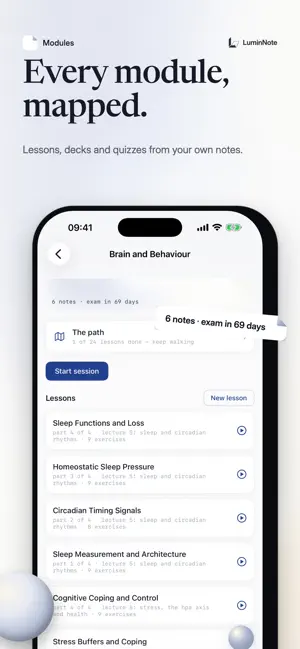
LuminNote is the study app that knows your course. Take notes, record lectures, and let an AI tutor grounded in YOUR material turn them into lessons, flashcards and a daily revision plan. CAPTURE EVERYTHING • Handwritten notes with Apple Pencil — lined, grid or plain paper in white, yellow and dark styles, A4 and A5 sizes • Typed notes with a clean, focused editor • Record lectures and get a transcript — transcription happens entirely on your device, and your audio never leaves it • Scan slides and documents with the camera AN AI TUTOR THAT KNOWS YOUR NOTES Ask anything, and Lumin answers from your own modules — your notes, your lectures, your readings. Answers draw on what you actually wrote, so revision stays grounded in your course, not generic internet answers. Handwritten diagrams and maths are read and folded into your notes too. TURN LECTURES INTO LESSONS The Path breaks each lecture into short, numbered lessons — learn step by step, track what you've mastered, and see exactly what to revise next. REVISE SMARTER • Flashcards generated from your notes, with spaced review • Quizzes that target your weakest concepts • A daily study plan built around your exam dates • Streaks to keep the habit going • Academic reference finder for essays and reports BUILT FOR STUDENTS Works beautifully on iPhone and iPad — full Apple Pencil support on iPad, your whole library in your pocket on iPhone. Everything syncs with LuminNote on the web, so your notes are wherever you are. FREE TO START The core of LuminNote is free. LuminNote Pro raises your monthly AI allowances as a monthly subscription. Payment is charged to your Apple Account; subscriptions renew automatically unless cancelled at least 24 hours before the end of the period, and can be managed in your Apple Account settings. Privacy Policy: https://www.luminnote.com/privacy Terms of Use: https://www.luminnote.com/terms
What’s new
Version 1.0.2 · Updated October 16, 2026
Get your essays marked • New Essays section on iPhone and iPad: add a draft from a Word file, PDF, a scan or pasted text • Lumin marks it against your own marking criteria — a score for each criterion and the fixes that move your grade • Mark your next draft and see what you've fixed since the last one • Try it free: Lumin reads your first paragraph each month • Lumin's marks are estimates, not official marks Also new • Continue with Apple or Google to sign in • iPad notebook: one smooth canvas, and a sidebar that folds to a slim rail • Your path progress now syncs between iPhone, iPad and the web
App privacy
The developer, AFZ Labs, reported these privacy practices to Apple.
Data Linked to You
The following data, which may be collected and linked to your identity, may be used for the following purposes:
- Usage Data: Product Interaction
- Purchases: Purchase History
- Contact Info: Email Address, Name
- User Content: Photos or Videos, Other User Content
- Identifiers: User ID
Used for: Product Personalization, App Functionality
Alternatives to LuminNote
Looking for apps like LuminNote? Here are 6 similar apps on the App Store. The highest rated is passNMC (2.5/5), and all 6 are free to download.


| App | Rating | Price | Last updated | Compare |
|---|---|---|---|---|
| LuminNote | – | Free | October 16, 2026 | |
| Class Timetable: Timetide | – | Free | Sep 21, 2026 | Compare |
| BWS Calendar | – | Free | Aug 19, 2025 | Compare |
| StudyStash | – | Free | Feb 12, 2025 | Compare |
| UniTracks | – | Free | Oct 20, 2026 | Compare |
| SMBP Portal | – | Free | Apr 1, 2026 | Compare |
| passNMC | 2.5 / 5 (2) | Free | Oct 30, 2025 | Compare |
Compare LuminNote with the top alternatives: ratings, updates, ASO score and keyword gaps →