

Timelog - Day Route
Hanbin Jeong Photo & Video iPhoneiPadiPod touch
Timelog - Day Route is a free Photo & Video app for iPhone and iPad by Hanbin Jeong. Requires iOS 17.0. Updated October 4, 2026.
- Price
- Free
- on the App Store
- Size
- 23 MB
- Age 4+
- Updated
- Oct 4
- 2026 · v1.3
Screenshots


About Timelog - Day Route
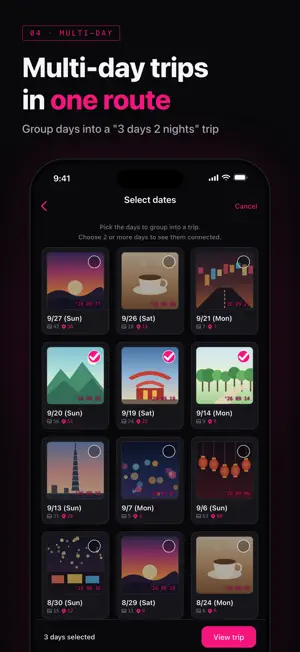
Where did I go today? How did I walk that trip last month? Timelog draws your day's route on a map from the location and time stored in your photos. No GPS tracking to leave on, nothing to write down. Just take photos. 【Routes drawn from your photos】 · Photos with location are connected in the order they were taken · Nearby photos are grouped into a numbered "stop" · See distance, number of stops, and time spent at a glance 【Pick a day, tap once】 · See photo counts and geotagged photo counts for each day · Pick the last 2 weeks, 1 month, 3 months, 6 months or 1 year in one tap · Choose the photos to show on the map and exclude any you like 【Multi-day trips as one route】 · Combine several days into one trip, like "3 days 2 nights" · Look back on trips, walks, even your commute 【Route videos in one go】 · Make a 10-second, 30-second or 1-minute video · A marker travels the route past each stop. Choose whether photos appear · A short ad plays before the video is made; watch it through and the video is created 【Share straight to Instagram Stories】 · Get a 1080 × 1920 share card in a dark, film-inspired design · Post the video to Instagram Stories or save it to Photos 【Evening reminder】 · A nudge every night at 10 PM to see today's map (you can turn it off in Settings) 【Privacy】 · Your photos and location are processed only on your device and never sent out · No sign-up or login needed 【Good to know】 · Only photos with location data appear on the map. Make sure Location Services is on for your camera · The route connects where photos were taken, so it may differ from the path you actually walked Your photos hold more than scenery. They hold the path you walked.
What’s new
Version 1.3 · Updated October 4, 2026
• Added Traditional Chinese (Taiwan). Dates and times follow your region. • No sign-in: the app now opens straight in. Sign-up and login screens are gone. • The photo-access intro button now says "Continue". • Polished singular/plural wording for trip days and remaining photos.
App privacy
The developer, Hanbin Jeong, reported these privacy practices to Apple.
Data Not Collected
The developer does not collect any data from this app.
Alternatives to Timelog - Day Route
Looking for apps like Timelog - Day Route? Here are 6 similar apps on the App Store. The highest rated is Videos to Photos / Images 2 (4.8/5), and all 6 are free to download.
-
 TripScene
-
 Chapter.1 챕터원 - 추억의 첫 장
-
 Videos to Photos / Images 2
4.8
Videos to Photos / Images 2
4.8
-
 Fisheye Camera Lens Filter
3.9
Fisheye Camera Lens Filter
3.9
-
 Nero Lens - AI Photo Enhancer
4.7
Nero Lens - AI Photo Enhancer
4.7
-
 GoPlus Cam
2.0
GoPlus Cam
2.0
| App | Rating | Price | Last updated | Compare |
|---|---|---|---|---|
| Timelog - Day Route | – | Free | October 4, 2026 | |
| TripScene | – | Free | Sep 11, 2026 | Compare |
| Chapter.1 챕터원 - 추억의 첫 장 | – | Free | Mar 12, 2025 | Compare |
| Videos to Photos / Images 2 | 4.8 / 5 (152) | Free | Sep 26, 2025 | Compare |
| Fisheye Camera Lens Filter | 3.9 / 5 (169) | Free | May 17, 2026 | Compare |
| Nero Lens - AI Photo Enhancer | 4.7 / 5 (383) | Free | Sep 1, 2026 | Compare |
| GoPlus Cam | 2.0 / 5 (362) | Free | Sep 2, 2025 | Compare |