

Numa: Money Manager
Ismael Martinez Finance iPhoneiPadiPod touch
Numa: Money Manager is a free Finance app for iPhone and iPad by Ismael Martinez. Requires iOS 18.0. Updated October 6, 2026.
- Price
- Free
- on the App Store
- Size
- 22 MB
- Age 4+
- Updated
- Oct 6
- 2026 · v1.1
Screenshots


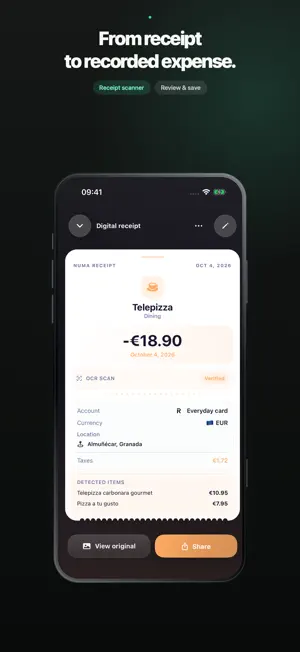
About Numa: Money Manager
Your money, clearly organised. Numa brings expenses, income, accounts and savings goals together in an app designed for iPhone and iPad. Log your morning coffee, plan the month or share household expenses. Keep track in a way that works for you. EVERYTHING IN ITS PLACE • Record expenses, income and transfers, with receipts to revisit. • Set category budgets and savings goals. • Share an account through iCloud with people you invite. • Scan receipts on your device, review the results and optionally keep the original. • Import compatible CSV files and export your data. • Organise recurring transactions and use multiple currencies. • Explore spending analysis and trends with Premium. MAKE IT YOURS Light and dark modes, categories, a personal profile and a discreet mode to hide amounts. Optional Zento integration brings subscriptions into view; those subscriptions are managed in Zento. START FREE One account, up to three active budgets, two savings goals and five receipt scans per month. CSV export is included. Premium expands limits and adds features including custom categories and iCloud backup and restore. Numa does not automatically connect to your bank or make payments. Published exchange rates may differ from your bank's rates. Investment valuations are entered manually, without live market prices. Always review imported or scanned information. NEW IN NUMA 1.1 • Search transactions by merchant, notes or account and review possible duplicates before saving. • Link refunds to the original expense and split shared expenses. • Schedule contributions to savings goals and see their history; these are earmarks inside Numa, not bank transfers. • Check your balance and jump into expense entry from widgets. Premium offers monthly and annual auto-renewing plans and, when available, a one-time Lifetime purchase. The current price, length of any free trial and eligibility terms appear before purchase. Manage subscriptions in your Apple account. Privacy: https://numa.krzapps.com/privacy/en/ Terms: https://www.apple.com/legal/internet-services/itunes/dev/stdeula/
What’s new
Version 1.1 · Updated October 6, 2026
Search transactions by merchant, notes or account. Review possible duplicates when importing CSV files or scanning receipts. Link refunds and split shared expenses. Schedule savings-goal contributions and view their history. New balance and quick-expense widgets. Scheduled contributions earmark savings in Numa; they do not move bank funds.
App privacy
The developer, Ismael Martinez, reported these privacy practices to Apple.
Data Not Linked to You
The following data, which may be collected but is not linked to your identity, may be used for the following purposes:
- Purchases: Purchase History
Used for: Analytics, App Functionality
Alternatives to Numa: Money Manager
Looking for apps like Numa: Money Manager? Here are 6 similar apps on the App Store. The highest rated is Uallet: Money Tracker (5.0/5), and all 6 are free to download.
-
 mibu: expense tracker
-
 Expense Tracker & Split: Tally
-
 Perezoso Subscriptions
-
 Uallet: Money Tracker
5.0
Uallet: Money Tracker
5.0
-
 many - track expenses & budget
5.0
many - track expenses & budget
5.0
-
 Neto: Money & Net Worth
5.0
Neto: Money & Net Worth
5.0
| App | Rating | Price | Last updated | Compare |
|---|---|---|---|---|
| Numa: Money Manager | – | Free | October 6, 2026 | |
| mibu: expense tracker | – | Free | Oct 14, 2026 | Compare |
| Expense Tracker & Split: Tally | – | Free | Oct 10, 2026 | Compare |
| Perezoso Subscriptions | – | Free | Sep 16, 2026 | Compare |
| Uallet: Money Tracker | 5.0 / 5 (5) | Free | Sep 28, 2026 | Compare |
| many - track expenses & budget | 5.0 / 5 (36) | Free | Apr 1, 2026 | Compare |
| Neto: Money & Net Worth | 5.0 / 5 (8) | Free | Oct 9, 2026 | Compare |