

Lockout: Exercise to Unlock
FitDawg Productivity iPhoneiPadiPod touch
Lockout: Exercise to Unlock is a free Productivity app for iPhone and iPad by FitDawg. Requires iOS 18.0. Updated September 15, 2026.
- Price
- Free
- on the App Store
- Size
- 25 MB
- Age 4+
- Updated
- Sep 15
- 2026 · v1.0.7
Screenshots


About Lockout: Exercise to Unlock
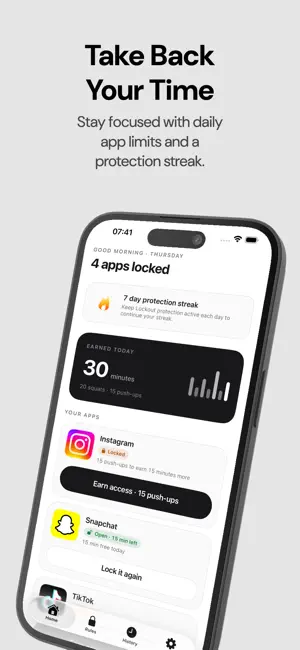
Stop scrolling. Earn your access. Lockout puts your most distracting apps behind a challenge you actually have to complete. Tap a blocked app and you don't get a lecture or a countdown — you get push-ups. Finish them, and the app opens. HOW IT WORKS Pick the apps that take the most of your time. Lockout shields them using Apple's Screen Time framework. Open one and Lockout asks for a challenge instead, then hands the app back when you've done it. Every protected app gets a daily allowance you set yourself, so a few minutes are there when you genuinely need them. Once those are gone, movement is the way back in. CAMERA-VERIFIED EXERCISE Prop up your iPhone and Lockout counts your reps as you do them: • Push-ups • Squats • Jumping jacks Counting runs entirely on your iPhone using Apple's on-device body-pose detection. No video is recorded, no frames are saved, and no image data is uploaded. The only thing kept is the count. WALKING CHALLENGES Prefer to move outdoors? Set a distance instead. Lockout measures how far you've walked and checks it against your step count, so the distance has to be walked rather than driven. RULES THAT FIT YOU Every app gets its own rule: which exercise, how many reps, how long the unlock lasts, and how much free time it starts each day with. Instagram might cost 15 push-ups. TikTok might cost 20 squats. YouTube might cost a kilometre on foot. PROTECTION STREAKS Keep your protection switched on and your streak grows. It counts the days you stayed protected rather than the days you exercised, so it rewards leaving the guard up. BUILT TO KNOW AS LITTLE AS POSSIBLE Lockout cannot see which apps you have locked. Apple's Screen Time framework hands over sealed references that Lockout cannot read, and they never leave your iPhone. Camera frames are measured and released. Your location is used to measure distance and no coordinate is ever uploaded. There is no advertising software in Lockout and nothing it does is used to track you. BEFORE YOU START Lockout needs Screen Time permission to shield apps, camera permission for camera-based challenges, and location permission for walking challenges. Each one can be withdrawn at any time in iOS Settings. Rep counting is a product feature, not a fitness or medical assessment. A rep can be missed or miscounted, and nothing Lockout produces should be treated as a measure of your health or ability. Lockout requires a subscription. Terms of Use: https://lockout.adai.systems/terms Privacy Policy: https://lockout.adai.systems/privacy
What’s new
Version 1.0.7 · Updated September 15, 2026
Bug fixes.
App privacy
The developer, FitDawg, reported these privacy practices to Apple.
Data Linked to You
The following data, which may be collected and linked to your identity, may be used for the following purposes:
- Health & Fitness: Fitness
- Identifiers: User ID, Device ID
- Usage Data: Product Interaction
- Purchases: Purchase History
- User Content: Other User Content
Used for: Analytics, App Functionality
Alternatives to Lockout: Exercise to Unlock
Looking for apps like Lockout: Exercise to Unlock? Here are 6 similar apps on the App Store. The highest rated is Stats: Track Your Life (5.0/5), and all 6 are free to download.
-
 Balance Buddy: Screen Time
-
 Stats: Track Your Life
5.0
Stats: Track Your Life
5.0
-
 Dropdesk
5.0
Dropdesk
5.0
-
 CallMeThen: Voice Reminders
-
 BRÆK – Screen Break
-
 Loopi - Family Reminders
5.0
Loopi - Family Reminders
5.0
| App | Rating | Price | Last updated | Compare |
|---|---|---|---|---|
| Lockout: Exercise to Unlock | – | Free | September 15, 2026 | |
| Balance Buddy: Screen Time | – | Free | Oct 2, 2026 | Compare |
| Stats: Track Your Life | 5.0 / 5 (1) | Free | Oct 24, 2026 | Compare |
| Dropdesk | 5.0 / 5 (1) | Free | Sep 13, 2026 | Compare |
| CallMeThen: Voice Reminders | – | Free | Sep 2, 2026 | Compare |
| BRÆK – Screen Break | – | Free | Jan 29, 2026 | Compare |
| Loopi - Family Reminders | 5.0 / 5 (3) | Free | Oct 17, 2026 | Compare |