

Omezy - Video Chat Scenes
Anika Desai Reference iPhoneiPadiPod touch
Omezy - Video Chat Scenes is a free Reference app for iPhone and iPad by Anika Desai. Rated 4.8/5 from 12 ratings. Requires iOS 15.0.
- Rating
- 4.8
- 12 ratings
- Price
- Free
- on the App Store
- Size
- 67 MB
- Age 4+
- Updated
- Oct 16
- 2026 · v4.0
Screenshots


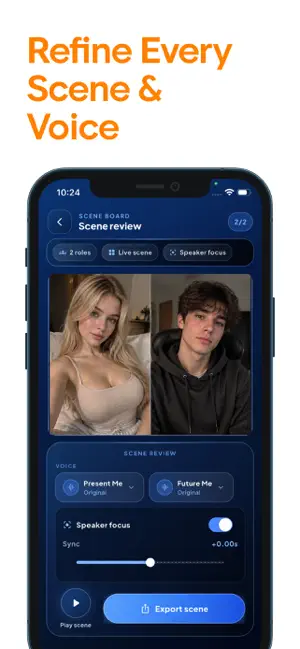
About Omezy - Video Chat Scenes
PERFORM EVERY ROLE IN ONE CALL-STYLE SCENE. this app is a solo cast video studio. Build a fictional cast of 2–4 characters, record each role one take at a time while your finished roles play back, and export one synchronized conversation — performed entirely by you. No editing app. No syncing. No other people. WHY NOTHING ELSE FEELS LIKE THIS - Your completed takes PLAY BACK in their tiles while you record the next role — hear your other characters and genuinely react to them - One master scene timeline keeps every take in sync automatically, so the final video feels like a real conversation - Flubbed a line? Retake that one role. Everything else stays untouched. BUILD YOUR CAST - Create a cast scene with two to four roles: Present Me, Future Me, The Interviewer, your Inner Critic — or anyone you invent - Name each character, place them on the stage, give each an accent color - Clear status for every role: Ready, Recording, Recorded, Needs Retake - Preview the whole cast together before you export PERFORM AGAINST YOURSELF - Countdown pre-roll, then your previous roles play while you record the reply - Playback volume control, plus a headphone tip to keep dialogue clean - Interruption-safe: backgrounding or audio changes never corrupt your project SCRIPT PROMPTER — ON SCREEN, NEVER IN THE VIDEO - Write or paste a script and assign each line to a character - Only the active role's lines appear while recording, with cues like Pause, React, Smile - Adjustable size and position — and it is never rendered into your exported scene RETAKE ONE CHARACTER - Re-record a single role against the latest takes of the others - Compare old and new, then Keep Previous or Use New Take - One mistake never restarts the whole scene SMART SPEAKER FOCUS - The speaking character is gently emphasized while quiet tiles dim — smooth, subtle, flicker-free - Off, Subtle, and Focused presets, rendered identically in preview and export CHARACTER VOICE STUDIO - Give each role its own voice style: Deeper, Brighter, Telephone, Robot, Soft Echo, Cartoon, Whisper-like, Dramatic - Processed on your device, non-destructive — preview first, reset to Original anytime - Clearly labeled as fun effects: styling, not imitation THE CALL-STYLE STAGE - Participant tiles, visible recording indicator, session timer, role labels — the atmosphere of a group scene, powered by one camera - Quick formats: two-role dialogue, self interview, solo podcast, four-role skit DRAFTS, LIBRARY, EXPORT - Every scene saves as a draft — leave anytime, resume exactly where you stopped - Your project library tracks drafts, scenes ready for review, and exported videos - Export presets: Standard, High Quality, and Vertical Short for short-form platforms PRIVATE BY DESIGN - Recorded by you, stored on your device — projects stay local unless you choose to share - Recording starts only with an explicit action, always with a visible indicator - Core creation works fully offline — no account, no sign-up - this is styled like a call screen, but nothing here is a real call: no video chat, no matching, no messaging. Every character on screen is a performance by you. One phone. Full cast. Perform every role. For an uninterrupted experience, consider subscribing to access all app features without ads through an auto-renewing subscription available on a weekly, monthly, or yearly basis. Manage your subscription settings and turn off auto-renewal within your iTunes Account Settings after purchase, ensuring flexibility and control over your subscription. Current subscription may not be canceled during the active subscription period; however, you can manage your subscription and/or turn off auto-renewal by visiting your iTunes Account Settings after purchase. Read our full Terms of Service and our Privacy Policy at: Link to Privacy Policy: https://anikadesai.netlify.app/privacy-policy.html Link to Terms of use: https://anikadesai.netlify.app/terms-conditions.html
Ratings & reviews
4.8
12 ratings
What’s new
Version 4.0 · Updated October 16, 2026
bug fix.
App privacy
The developer, Anika Desai, reported these privacy practices to Apple.
Data Used to Track You
The following data may be used to track you across apps and websites owned by other companies:
- Usage Data: Advertising Data
Data Linked to You
The following data, which may be collected and linked to your identity, may be used for the following purposes:
- Usage Data: Advertising Data
Used for: Third-Party Advertising, Analytics
Data Not Linked to You
The following data, which may be collected but is not linked to your identity, may be used for the following purposes:
- Diagnostics: Crash Data, Performance Data
Used for: Analytics, App Functionality
Alternatives to Omezy - Video Chat Scenes
Looking for apps like Omezy - Video Chat Scenes? Here are 6 similar apps on the App Store. The highest rated is Umingle - Video Chat Studio (4.4/5), and all 6 are free to download.
-
 Umingle - Video Chat Studio
4.4
-
 PRIMZ
-
 Talk AI - Chat & New Friends
4.4
-
 CBR Auto Theorie Examen B 2026
-
 FunnyTalk
3.4
-
 Flogix
| App | Rating | Price | Last updated | Compare |
|---|---|---|---|---|
| Omezy - Video Chat Scenes | 4.8 / 5 (12 ratings) | Free | October 16, 2026 | |
| Umingle - Video Chat Studio | 4.4 / 5 (731) | Free | Aug 3, 2026 | Compare |
| PRIMZ | – | Free | Jul 25, 2026 | Compare |
| Talk AI - Chat & New Friends | 4.4 / 5 (18) | Free | Nov 18, 2026 | Compare |
| CBR Auto Theorie Examen B 2026 | – | Free | Nov 17, 2026 | Compare |
| FunnyTalk | 3.4 / 5 (16) | Free | Apr 28, 2025 | Compare |
| Flogix | – | Free | Dec 3, 2025 | Compare |