

JamTake
Eduardo Quesada Sevillano Music iPhoneiPadiPod touch
JamTake is a free Music app for iPhone and iPad by Eduardo Quesada Sevillano. Requires iOS 18.0. Updated October 18, 2026.
- Price
- Free
- on the App Store
- Size
- 35 MB
- Age 17+
- Updated
- Oct 18
- 2026 · v1.0.6
Screenshots


About JamTake
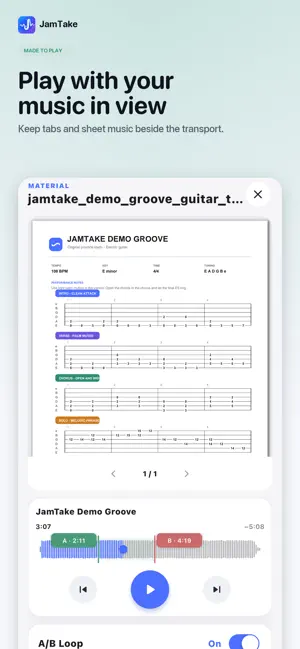
JamTake turns your iPhone or iPad into a complete workspace for music practice, recording and lessons. Connect your instrument setup through a compatible USB audio interface, effects pedal or amplifier. Listen to your instrument together with your backing tracks, adjust the mix and capture your performances. Organize everything around sessions. Add your backing tracks, keep reference material nearby and choose how you want to practise or record. PRACTICE WITH CONTROL • Play along with your own backing tracks. • Loop difficult passages with precise A/B markers. • Slow down or speed up a backing track. • Change pitch by semitones. • Use count-in and metronome tools. • Balance multiple backing tracks with the built-in mixer. • View sheet music and other reference material while you play. CONNECT AND RECORD Connect compatible USB audio gear to capture your instrument alongside the backing mix. JamTake supports compatible audio interfaces, effects pedals and amplifiers that provide USB audio. Record audio or video using connected audio gear or the device’s built-in microphone. Adjust the backing mix and keep the takes that matter. LESSON RECORDING Capture music lessons and divide the backing track into meaningful sections such as intro, verse, chorus, solo and outro. Replay individual parts later for more focused practice. STAY ORGANIZED • Keep backing tracks, materials and recordings together. • Review your practice time, active days and streaks. • Find your most-practised sessions. • Optionally synchronize supported session data through your private iCloud account. JamTake does not require a separate account. Your audio and video recordings remain stored on the device where they were created. Whether you practise guitar, piano, drums, bass, vocals or another instrument, JamTake helps turn every backing track into a structured practice session.
What’s new
Version 1.0.6 · Updated October 18, 2026
Practice Studio now has a built-in chromatic tuner — plug in, glance at the ring, and you're in tune before the backing track even starts. Activity now has achievements: five monthly goals (active days, practice hours, perfect week, longest streak, studio session) plus Full Year, a running tally across the whole year that joins them as a sixth ring once enough months qualify. Unlock one and a banner lets you know on the spot. Had a good year? Generate a Year in Review card — total hours, active days, sessions recorded, achievements unlocked and your top 3 most-played songs — and share it straight from the app. Also fixed: Record and Stop in Practice Studio are now rock solid, even if a take gets interrupted.
App privacy
The developer, Eduardo Quesada Sevillano, reported these privacy practices to Apple.
Data Not Collected
The developer does not collect any data from this app.
Alternatives to JamTake
Looking for apps like JamTake? Here are 6 similar apps on the App Store. The highest rated is The Advancing Guitarist (5.0/5), and 4 of the 6 are free to download.
-
 NoteHound
-
 The Advancing Guitarist
5.0
-
 Metric Flow
4.7
-
 Metronome M1 Pro
4.6
-
 Coryvo - Rhythm Trainer
4.8
-
 GP Tone Builder
5.0
| App | Rating | Price | Last updated | Compare |
|---|---|---|---|---|
| JamTake | – | Free | October 18, 2026 | |
| NoteHound | – | Free | Jul 13, 2026 | Compare |
| The Advancing Guitarist | 5.0 / 5 (1) | Free | Aug 17, 2026 | Compare |
| Metric Flow | 4.7 / 5 (7) | 9.99 USD | Jul 3, 2026 | Compare |
| Metronome M1 Pro | 4.6 / 5 (68) | 2.99 USD | Jan 17, 2024 | Compare |
| Coryvo - Rhythm Trainer | 4.8 / 5 (92) | Free | Oct 23, 2026 | Compare |
| GP Tone Builder | 5.0 / 5 (3) | Free | Aug 31, 2026 | Compare |
Compare JamTake with the top alternatives: ratings, updates, ASO score and keyword gaps →