

Radio DIY
Konrad Falkowski Music iPhoneiPadiPod touchApple Watch
Radio DIY is a free Music app for iPhone and iPad by Konrad Falkowski. Requires iOS 17.0. Updated October 28, 2026.
- Price
- Free
- on the App Store
- Size
- 17 MB
- Age 4+
- Updated
- Oct 28
- 2026 · v1.9
Screenshots



About Radio DIY
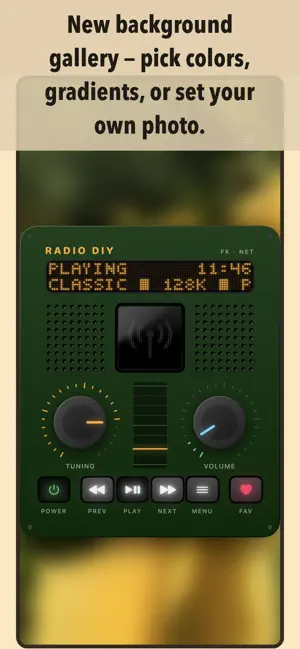
Forget the boring station lists of traditional radio apps. RADIO DIY is internet radio with real character - a retro enclosure, knobs, buttons, and a dot-matrix LED display with an interactive MENU, just like real hardware. Key features: - Completely free internet radio with tens of thousands of radio stations from around the world* - Build your own radio (DIY) - use the editor to arrange knobs, buttons, memory buttons, the display, and decorations on a grid and create your own radio from scratch, your way (Premium feature) - Ready-made radios in the Radio Gallery - 3 free, 4 Premium (including Radio Memory with preset buttons), with more on the way - Sonos® - play the radio directly on Sonos® speakers on your home network and control them like a remote, including volume from the knob and your iPhone's volume buttons - Lock Screen and Dynamic Island remote for Sonos - previous/next station, volume, and play/stop, with the station logo - Lucky Dip - shake your iPhone to discover a random station from anywhere in the world (unlimited with Premium) - Memory buttons 1-9 - hold a number to save a station, tap to switch instantly (Premium feature) - Quick Actions - touch and hold the app icon to start one of your favorite stations - Alarm - wake up to your radio with a daily alarm set right from the radio menu - Sleep timer - let the radio turn itself off after a chosen time - Fast station search - by name, country, or keywords, plus stations near you - Favorite stations - save them and come back with a single tap - Autostart - automatically resume the last station you were listening to when you launch the app - Custom audio stream - play any radio station from its URL (Premium feature) - Choose a background for each radio in the Background Gallery - colors, gradients, your own photo, or the logo of the station that's playing - Old-school dot-matrix LED display - customize its color, brightness, scroll speed, and glow effect - Tap the station logo to open the station's website - AirPlay - stream audio to speakers and audio equipment around your home - CarPlay - enjoy your favorite stations safely on the road - Apple Watch - play radio straight from your wrist or control playback on your iPhone - Apple TV - browse stations and play your favorites on the big screen - Lock Screen and Control Center controls - play/pause/next station without unlocking your phone, complete with station artwork - Cellular data control - decide whether the radio may play over cellular, set a data limit, and see how many MB you've used and your network type (LTE/5G) right on the display - Extensive settings menu - LED, favorites, autostart, clock, alarm, sleep timer, playback output, and more - Available in English, Polish, German, French, Spanish, and Dutch - Share your custom-built radios with friends - Cross-device sync and backup of your favorite stations and custom radio designs (Premium feature) - "Legal & Privacy" section - Privacy Policy, Terms of Use, sources and licenses, content reporting, and data deletion, all in one place --- *) The radio station list is provided by the free, community-driven radio station database (radio-browser.info) Terms of Use (EULA): https://www.apple.com/legal/internet-services/itunes/dev/stdeula/ Privacy Policy: https://falkowski.pm/radio-diy/en/privacy.html
What’s new
Version 1.9 · Updated October 28, 2026
• CarPlay - switch between favorite stations with the next/previous buttons, including those on your steering wheel, without opening the list. • Sonos - when opened, the app better recognizes the station playing from the speaker's queue and takes over control. • Dynamic Island - improved layout of the compact Sonos remote when holding your phone in landscape. • Playback - fixes to prevent the radio from starting on your phone by itself after disconnecting CarPlay, Bluetooth, headphones, or AirPlay, or when the app wakes in the background.
App privacy
The developer, Konrad Falkowski, reported these privacy practices to Apple.
Data Not Collected
The developer does not collect any data from this app.
Alternatives to Radio DIY
Looking for apps like Radio DIY? Here are 6 similar apps on the App Store. The highest rated is Lofyee - A Lo-Fi Music Player (5.0/5), and all 6 are free to download.
-
 TBK RADIO 974
1.0
TBK RADIO 974
1.0
-
 ROCK ATTACK
-
 JY Radio: Live FM AM Stations
-
 Platine — Multiroom
-
 Sonement for Sonos
-
 Lofyee - A Lo-Fi Music Player
5.0
Lofyee - A Lo-Fi Music Player
5.0
| App | Rating | Price | Last updated | Compare |
|---|---|---|---|---|
| Radio DIY | – | Free | October 28, 2026 | |
| TBK RADIO 974 | 1.0 / 5 (1) | Free | Aug 3, 2025 | Compare |
| ROCK ATTACK | – | Free | Sep 22, 2026 | Compare |
| JY Radio: Live FM AM Stations | – | Free | Sep 17, 2026 | Compare |
| Platine — Multiroom | – | Free | Oct 26, 2026 | Compare |
| Sonement for Sonos | – | Free | Oct 23, 2026 | Compare |
| Lofyee - A Lo-Fi Music Player | 5.0 / 5 (1) | Free | Feb 8, 2026 | Compare |
Compare Radio DIY with the top alternatives: ratings, updates, ASO score and keyword gaps →