

WinkU - Dual Phone Cam Remote
忆吟 陈 Photo & Video iPhoneiPadiPod touch
WinkU - Dual Phone Cam Remote is a free Photo & Video app for iPhone and iPad by 忆吟 陈. Requires iOS 17.0. Updated September 28, 2026.
- Price
- Free
- on the App Store
- Size
- 7 MB
- Age 4+
- Updated
- Sep 28
- 2026 · v1.2.0
Screenshots
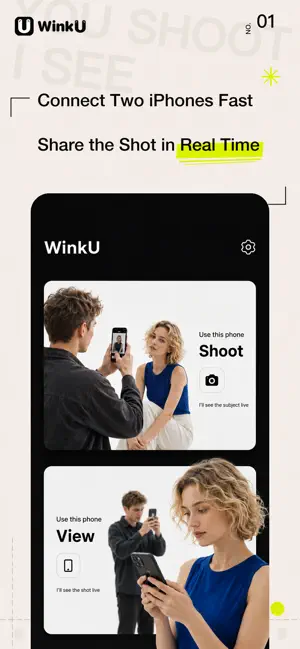
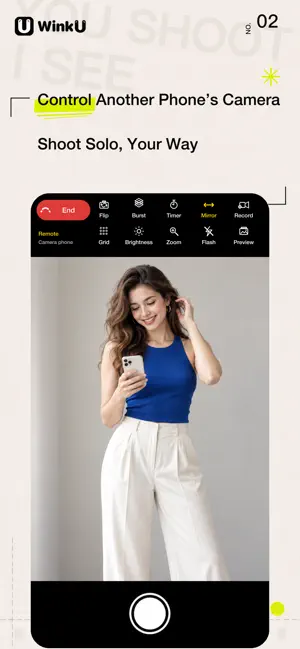
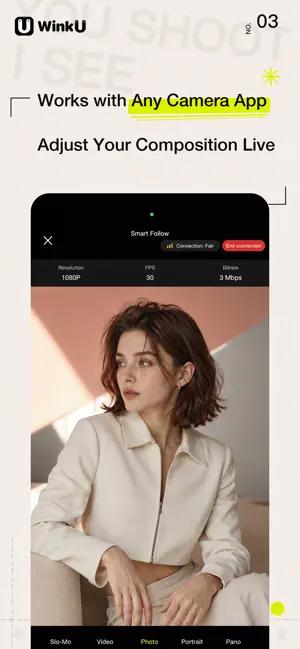

About WinkU - Dual Phone Cam Remote
Take photos on your own, or guide a friend without going back and forth. WinkU works with two iPhones: one captures the photo or video, while the other displays the live camera view. Whether you are shooting by yourself or asking someone for help, you can check the angle, pose, and composition before capturing. === Selfie Mode: See It and Shoot It Yourself === Place one iPhone in position and use the other as a remote. View your pose and composition in real time, then press the shutter when everything looks right. You can take photos or record vlogs on your own with ease. Features include: • Remote photo and video recording • Front and rear camera switching • Countdown timer with optional voice count • Custom interval burst shooting • Focus, brightness, and zoom controls • Flash and mirroring controls • Grid and tilt-angle guides • Quick preview after taking a photo • Swipe through burst photos • Pinch to zoom and inspect photo details Photos and videos are saved to the Photos library on the camera iPhone. They are not screenshots of the live preview. === Assisted Shooting Mode: They Shoot, You Watch === When your partner or friend takes your photo, the angle may be wrong, you may look too small in the frame, or you may not notice a problem until the photo has already been taken. In Assisted Shooting Mode, the photographer operates the camera while the person in front of it views the live image on another iPhone. Adjust your pose, position, and composition as you shoot, with less back-and-forth communication and fewer retakes. Features include: • Real-time camera view • Support for other camera apps • Composition grid • Roll and pitch angle guides • Zoom and drag to inspect the view • Landscape viewing and one-tap display reset Please note: Other camera apps are displayed through iOS screen sharing. Remote shutter, video recording, and camera controls are available only in Selfie Mode with WinkU’s built-in camera. === Easy to Connect, Private to Use === • Pair through nearby devices, a QR code, or a 4-digit connection code • No account registration or personal profile upload required • The image is sent only to the currently connected device • No public livestreaming service • You control when connections begin, are approved, and end Each device includes 3 free trials of up to 5 minutes each. After the trials are used, WinkU can be permanently unlocked with a one-time in-app purchase. It is not a subscription and does not renew automatically. Privacy Policy: https://mytishici.cn/static/winku/privacy/en/index.html Terms of Use: https://mytishici.cn/static/winku/terms/en/index.html Contact: [email protected]
What’s new
Version 1.2.0 · Updated September 28, 2026
Major update with an improved remote selfie experience: • Added remote Vlog recording. Start and stop recording from the monitor phone while preserving the original audio • Added photo and video mirroring, allowing you to control the final mirrored result remotely • Added interval burst shooting with adjustable photo count and shooting interval • Added quick post-capture preview, automatically sending photos to the monitor phone for viewing • Swipe through multiple photos captured in a burst • Pinch, zoom, and drag preview photos to inspect details • Turn post-capture preview on or off at any time • Added roll and pitch angle displays, visible on both the camera and monitor phones • Improved remote focus, brightness, and zoom controls for both front and rear cameras • Redesigned the camera and monitor interfaces to make common controls clearer • Improved response times for recording, photography, preview, and remote controls • Fixed known issues and improved connection and shooting stability
App privacy
The developer, 忆吟 陈, reported these privacy practices to Apple.
Data Not Collected
The developer does not collect any data from this app.
Alternatives to WinkU - Dual Phone Cam Remote
Looking for apps like WinkU - Dual Phone Cam Remote? Here are 6 similar apps on the App Store. The highest rated is Nitra - HDR Editor (5.0/5), and all 6 are free to download.
-
 Nitra - HDR Editor
5.0
Nitra - HDR Editor
5.0
-
 Memory Gacha
-
 PawCam: Pet Photo Camera
5.0
PawCam: Pet Photo Camera
5.0
-
 DuoFrame Dual Camera Recorder
5.0
DuoFrame Dual Camera Recorder
5.0
-
 ACamViewfinder
-
 CamTag: Timestamp & GPS Camera
5.0
CamTag: Timestamp & GPS Camera
5.0
| App | Rating | Price | Last updated | Compare |
|---|---|---|---|---|
| WinkU - Dual Phone Cam Remote | – | Free | September 28, 2026 | |
| Nitra - HDR Editor | 5.0 / 5 (1) | Free | Oct 6, 2026 | Compare |
| Memory Gacha | – | Free | Oct 1, 2026 | Compare |
| PawCam: Pet Photo Camera | 5.0 / 5 (2) | Free | Oct 5, 2026 | Compare |
| DuoFrame Dual Camera Recorder | 5.0 / 5 (1) | Free | Oct 5, 2026 | Compare |
| ACamViewfinder | – | Free | Oct 1, 2026 | Compare |
| CamTag: Timestamp & GPS Camera | 5.0 / 5 (1) | Free | Oct 5, 2026 | Compare |