

OpenManual
Gunnar Hostetler Utilities iPhoneiPadiPod touch
OpenManual is a free Utilities app for iPhone and iPad by Gunnar Hostetler. Rated 5.0/5 from 1 ratings. Requires iOS 26.0. Updated October 6, 2026.
- Rating
- 5.0
- 1 ratings
- Price
- Free
- on the App Store
- Size
- 8 MB
- Age 4+
- Updated
- Oct 6
- 2026 · v1.7
Screenshots



About OpenManual
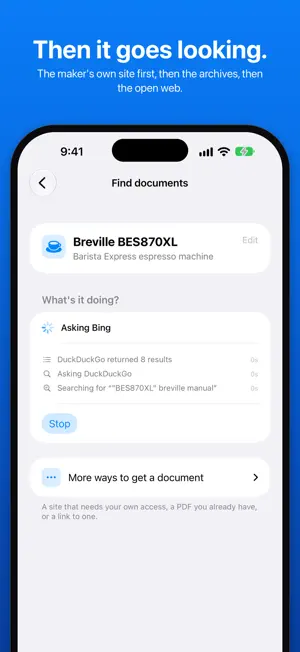
The manual is never around when you actually need it. It came in a box you recycled years ago, or it's in a drawer somewhere, or the company that made the thing doesn't even exist anymore. Meanwhile the thing is sitting right in front of you blinking and all you want to know is what the light means. So OpenManual starts where you already are, which is standing next to it. Point your camera at the label. Everything has one somewhere, whether it's a sticker on the back, a plate screwed to the side, or tiny type stamped into the plastic. OpenManual reads it and figures out which part is the brand and which part is the model, because those two are almost never labeled and the whole search depends on getting them right. If you can't get to the label, take a photo of it, scan the barcode on the box, or just type in what you know. Then it goes looking where manuals live. The maker's support site, the Internet Archive, which keeps documents long after a product is gone, and the open web get asked, so one engine having a bad day doesn't sink it. If the first pass comes up short, it reads what went wrong and searches again. The maker's own copy comes first. With Apple Intelligence, the phone's model reads the label, and Refine searches locally lets it sort results and plan a harder search. It finds documents but it never decides for you, and that's on purpose. Every result shows you the cover of the actual file, tells you what site it came from, and says in plain words how well it matches. If a document only half fits your device it says so instead of handing it over and hoping you don't notice. Nothing gets saved until you say yes. Sometimes the manual is real and sitting behind a login or a paywall. OpenManual won't sign in, pay, or sneak around a gate, so it just tells you where the document is and lets you go get it yourself. That felt more honest than pretending nothing turned up. Anything you keep stays on your phone (and in any backup of it) and works offline, which matters when you're in a basement and the signal gives up. Ask a question about a manual you saved and the answer comes straight from the document with the page shown, so you can check that it really says that. It works on the stuff that fills a house, a shop, or a building: • Washers, dryers, fridges, dishwashers, ovens • Furnaces, heat pumps, water heaters, thermostats • Drills, saws, mowers, pressure washers, generators • Printers, routers, TVs, cameras • The mystery unit in the garage that was already there when you moved in It also does medical and lab equipment, which is honestly why I built it. I spend my days supporting operating rooms, and I've spent a lot of that time hunting down IFUs for devices that went out of production a decade ago. So scan the UDI barcode on a device label and the whole device lands on one page: what it is, verified against the FDA's public registry, this unit's lot, serial and expiry, the instructions for use, recalls, adverse event reports split by what happened, and its class and regulation. It knows a REF from a serial from a lot number, and an IFU from a service manual from a cleaning guide. A few things worth knowing before you download it: • Three saved devices are free, no account, no sign up • One purchase lifts the limit forever and nothing renews • Saved manuals work offline • You confirm every document before it gets kept • It runs on iPhone and iPad One last thing, because it matters. OpenManual finds documentation and quotes it. It doesn't diagnose problems, it doesn't tell you whether something is safe to run, and it's not a substitute for someone who actually knows the machine. When it can't find your manual it says so, because being confidently wrong is worse than being honest.
What’s new
Version 1.7 · Updated October 6, 2026
1.7 is about finding the manual, and honestly it's because I caught the app missing ones I could find myself. I typed a camera's name into a search engine and had the page with its manual immediately, and my own app was showing me two catalogs and a copy in French. The whole point of this app is to find the manual on sites that don't need a login, without me doing the searching. So I went through why it didn't, and it was a handful of things that apply to any device, not just that one. FINDING THE MANUAL • A device has more than one name and the app was only searching one of them. If it had a catalog number that's all it asked for, and a manual is titled by the name. Now it searches under every name the device has, and the one people actually call it goes first. • Scanning a medical device's barcode pulls up its FDA record, and that record doesn't write things the way a manual does. The company is filed under its legal name, with LP or Incorporated on the end, so a pulse oximeter's own manual got downloaded five times and turned away every time for not naming the company that way. An ultrasound got searched by its two part numbers and never by its name. Both are fixed, and so are a few more like them. • When the manual is on a page the app can't pull a file from, it lists the page now, under Where the manual is. It used to just drop those. You tap one and it opens in Safari, and there's a Search the web yourself row after every search too. • A recall notice, an FDA clearance letter, a brochure and a sell sheet all name your device just like its manual does, and the search used to stop as soon as it had one. Now it keeps going until it has an actual manual, a card that isn't one says so, and the screen tells you when no manual was downloaded. • A manual that's only in another language doesn't end the search anymore, and its card says which languages it's in. • A manual for a different device that only mentions yours gets turned away. A camera's guide that explains how to plug it into a hub was being offered as the hub's manual. • It reads what a document is off its cover. A defibrillator's operating instructions were filed as an accessory guide and shown as not being a manual. • Once you have the manual, the search stops waiting on a slow copy from somewhere else. A coffee machine's manual was on screen in 1 second and the search kept going for 2 more minutes behind one download that never showed up. Now it gives it 15 seconds. • It asks three search engines now. It used to try seven addresses, and the other four never gave it a usable result in any check I have on record, so it made sense to remove them. • A car you scan by its VIN is searched by its year and model, because that's how an owner's manual is titled. ASKING A QUESTION • Ask answers from any manual you kept now, and that includes a PDF you added yourself. On a medical device it used to answer only if the FDA's registry confirmed the device and the manual came from one of 18 manufacturers' own sites or a regulator. I measured that on 16 older hospital devices and 1 of them qualified, which is the opposite of what this app is for. • So now the answer tells you where that copy came from, and it says when the device isn't confirmed with the FDA's registry so you check the model on the cover. • What didn't change is that it only quotes the manual with the page shown, every quote is checked against that page, and it still won't answer a question about a specific person or a clinical decision. THE LOOK • The app wasn't well laid out and I only just realized it. So there are four tabs now, Scan, Devices, Answers and Settings, and the first screen has the three ways in at the top: scan it, use a photo, or type it in. • It uses your iPhone's own colors now, with six accents to pick from in Settings. Everything you keep still stays on your phone, and in your backups. And the shared list of manuals others kept is gone.
App privacy
The developer, Gunnar Hostetler, reported these privacy practices to Apple.
Data Not Collected
The developer does not collect any data from this app.
Alternatives to OpenManual
Looking for apps like OpenManual? Here are 6 similar apps on the App Store. The highest rated is Elapsed - Days Since Counter (4.8/5), and 5 of the 6 are free to download.
-
 ManualBox: Appliance Manuals
-
 Allow: copy, select for Safari
1.0
Allow: copy, select for Safari
1.0
-
 Elapsed - Days Since Counter
4.8
Elapsed - Days Since Counter
4.8
-
 Simple BLE Scanner
3.0
Simple BLE Scanner
3.0
-
 NetDose
4.2
NetDose
4.2
-
 Homepage for Safari
4.2
Homepage for Safari
4.2
| App | Rating | Price | Last updated | Compare |
|---|---|---|---|---|
| OpenManual | 5.0 / 5 (1 rating) | Free | October 6, 2026 | |
| ManualBox: Appliance Manuals | – | Free | Sep 23, 2026 | Compare |
| Allow: copy, select for Safari | 1.0 / 5 (1) | 2.99 USD | Aug 24, 2026 | Compare |
| Elapsed - Days Since Counter | 4.8 / 5 (19) | Free | Oct 25, 2026 | Compare |
| Simple BLE Scanner | 3.0 / 5 (2) | Free | Dec 27, 2025 | Compare |
| NetDose | 4.2 / 5 (5) | Free | Oct 5, 2026 | Compare |
| Homepage for Safari | 4.2 / 5 (10) | Free | Oct 26, 2026 | Compare |
Compare OpenManual with the top alternatives: ratings, updates, ASO score and keyword gaps →