

Odie - Mileage Tracker
Taylor Brown Finance iPhoneiPadiPod touch
Odie - Mileage Tracker is a free Finance app for iPhone and iPad by Taylor Brown. Requires iOS 17.0. Updated October 22, 2026.
- Price
- Free
- on the App Store
- Size
- 6 MB
- Age 4+
- Updated
- Oct 22
- 2026 · v1.0.9
Screenshots



About Odie - Mileage Tracker
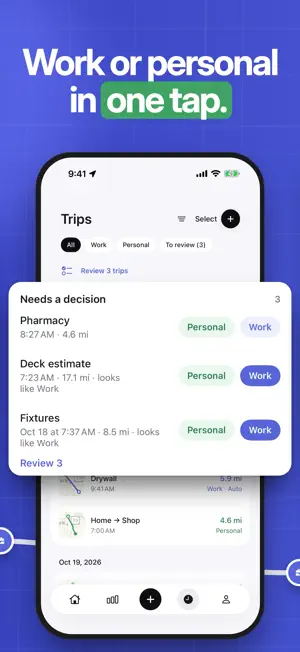
Business driving is deductible for the self-employed in the United States, but only with a log kept as you go. Odie keeps it for you: it starts when you drive your car and only your car, asks Work or Personal when the trip ends, and at tax time hands your accountant one PDF. Everything stays on your phone. TRIPS LOG THEMSELVES Most trackers guess from speed and motion, which is why they log bus rides and split a drive every time you stop for coffee. Odie waits for your car's own Bluetooth or CarPlay, and motion confirms you are driving before anything is recorded. No beacon to buy, no button to press. A short stop does not split your trip, and cars that do not pair are covered by a motion only mode where you confirm each trip. ONE TAP TO CLASSIFY When a trip ends, a notification asks which it was. Tap Work or Personal and you are done. In the list, swipe right for Work and left for Personal. After you have classified the same route twice, Odie suggests the answer. Once your last eight trips on a route agree, Odie classifies the next one by itself, marked Auto, and one tap changes it. Turn that off and it only suggests. You can also decide before you park: the live trip view shows the route so far, and takes a purpose, client, note and expenses at your next stop. ON THE LOCK SCREEN AND IN CARPLAY The trip card shows on the Lock Screen and the CarPlay dashboard with Work and Personal buttons. When the trip ends it stays and asks. Name your car once and Odie knows it over Bluetooth, CarPlay or the car's own Wi-Fi. A Shortcuts automation can start the trip the moment CarPlay connects. A REPORT YOUR ACCOUNTANT WILL RECOGNIZE One PDF for the year: summary, monthly totals, per client totals, business expenses, the trip log and your opening and closing odometer readings. A CSV for anyone who wants to rework the numbers. Rates come from dated IRS tables, each trip priced at the rate in force on its date. MILES AND THE IRS RATE Miles by default, the IRS standard mileage rate priced per trip across the mid year change, and a year PDF with the date, destination, purpose and miles Pub 463 asks for. Parking and tolls added on top of the standard rate, medical and charity trips at their own rates, and actual expenses for a Schedule C. EVERYTHING ELSE THE LOG NEEDS Log a trip by hand with address search and a driving distance from Apple Maps. Merge and split trips. Expenses cover gas, charging, parking, tolls and maintenance, in litres or gallons, or kilowatt hours, with a receipt photo. Saved places tag trips for you, clients and projects keep totals separate, and several cars are kept apart. FREE TO START, ODIE PRO WHEN YOU DRIVE MORE The free tier does not expire. Odie is free with trips logged by hand without limit, 40 automatic trips a month, one car, CSV export of every trip, backup, iCloud sync and every reminder. Odie Pro adds automatic trips without limit, the year report and more than one car, as a monthly or yearly subscription billed by Apple. The price is shown in the app before you buy, in your local currency. No ads, no account. PRIVATE BY DESIGN Your trips and routes stay on your phone, synced only through your private iCloud database, which you can turn off. No account to create. No tracking. No third party code. The privacy manifest says exactly that. Odie works in English and French, in miles or kilometres, with USD, CAD, EUR and GBP. iPhone, iOS 17 or later. Privacy policy: https://www.odielog.com/privacy-policy Terms of use: https://www.odielog.com/terms Licensed under Apple's standard EULA: https://www.apple.com/legal/internet-services/itunes/dev/stdeula/
What’s new
Version 1.0.9 · Updated October 22, 2026
Trips to review is easier to get through. Each trip has its own card with a map, where it started and ended, and two big buttons: Work or Personal. Trips on the same route are grouped, so one tap answers them all, and Undo puts things back. Logging a trip, an expense, a home charge or an odometer reading takes fewer taps. The main choice comes first and optional fields sit behind Add details. A home charge shows its cost and the part that counts as work right at the top. Odometer reading is now in the + menu. Plus many small fixes: “1 receipt” instead of “1 receipts”, French number formats in reports, the Lock Screen card clears as soon as a trip is classified, cleaner Home and trip screens, and a simpler Help page.
App privacy
The developer, Taylor Brown, reported these privacy practices to Apple.
Data Not Collected
The developer does not collect any data from this app.
Alternatives to Odie - Mileage Tracker
Looking for apps like Odie - Mileage Tracker? Here are 6 similar apps on the App Store. The highest rated is Mileage Tracker by Driversnote (4.8/5), and all 6 are free to download.
-
 Ours: Shared Budget
-
 Mileage Tracker by Driversnote
4.8
Mileage Tracker by Driversnote
4.8
-
 Omni by Desjardins
3.8
Omni by Desjardins
3.8
-
 Questrade: Invest & Trade
4.6
Questrade: Invest & Trade
4.6
-
 Intact Insurance: Mobile app
4.6
Intact Insurance: Mobile app
4.6
-
 MileIQ: Mileage Tracker & Log
4.8
MileIQ: Mileage Tracker & Log
4.8
| App | Rating | Price | Last updated | Compare |
|---|---|---|---|---|
| Odie - Mileage Tracker | – | Free | October 22, 2026 | |
| Ours: Shared Budget | – | Free | Oct 26, 2026 | Compare |
| Mileage Tracker by Driversnote | 4.8 / 5 (39,298) | Free | Oct 28, 2026 | Compare |
| Omni by Desjardins | 3.8 / 5 (11) | Free | Oct 7, 2026 | Compare |
| Questrade: Invest & Trade | 4.6 / 5 (304) | Free | Oct 30, 2026 | Compare |
| Intact Insurance: Mobile app | 4.6 / 5 (1,223) | Free | Oct 22, 2026 | Compare |
| MileIQ: Mileage Tracker & Log | 4.8 / 5 (115,379) | Free | Oct 28, 2026 | Compare |