

LabelDash
YIYUAN JIN Business iPhoneiPadiPod touchMac
LabelDash is a free Business app for iPhone and iPad by YIYUAN JIN. Requires iOS 17.0. Updated September 10, 2026.
- Price
- Free
- on the App Store
- Size
- 3 MB
- Age 4+
- Updated
- Sep 10
- 2026 · v1.0.2
Screenshots


About LabelDash
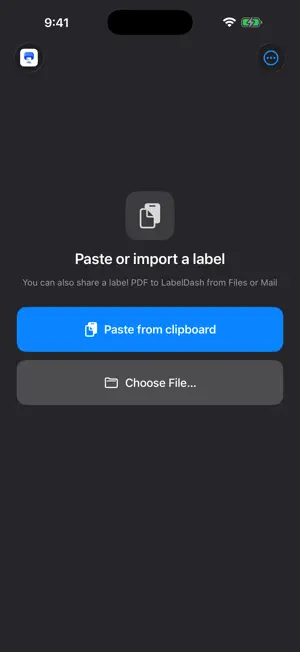
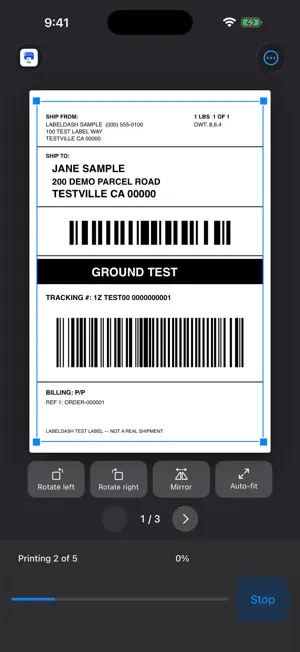
LabelDash prints 4×6 in shipping labels to a thermal label printer over Bluetooth LE or your local network. Paste a label, check it, print it — that is the whole app. REQUIRES A COMPATIBLE PRINTER TSPL/TSPL2 command set · 4×6 in gap stock · 203 dpi · Bluetooth LE or raw TCP port 9100. Not supported: Zebra/ZPL, ESC/POS, EPL, USB-only models, 300 dpi, continuous stock, black-mark stock. Check the compatibility page before you buy: https://labeldash.carljin.com/compatibility PASTE OR IMPORT Copy a label from your carrier portal, ERP, or email and paste it. Or drop in a PDF or image, open one from Files, or share it to LabelDash from another app. Multi-page PDFs load as a batch, one label per page. AUTO-CROP THAT FINDS THE LABEL Exported a full A4 or Letter page? LabelDash locates the 4×6 label inside it and frames it for print. You can always switch back to the full page. PRE-PRINT CHECK Before anything reaches the printer, LabelDash rasterizes the label and scans the result again. If a barcode on your source would come out unscannable at the current settings, it tells you — and can fix it — instead of wasting a label and getting the parcel returned. It also reminds you to calibrate the first time. CALIBRATION THAT STICKS Print a test page, drag the on-screen ruler to match what came out, done. Offsets are remembered per printer. BATCH PRINTING WITH A STOP BUTTON Print a whole PDF in one go. Stop mid-run and resume from the exact page you left off — no duplicates, no reprinting the pages that already came out. ADJUST WHAT MATTERS Margins, black-and-white threshold, print density, copies, rotate, mirror, auto-fit. Changes are saved automatically. RECENT PRINTS The last 7 days of prints stay on the device so you can reprint one without hunting for the original file. Clear them any time. IPHONE, IPAD AND MAC Buy once, use everywhere. On Mac paste with ⌘V and print with ⌘P. On iPhone everything sits in the thumb zone. PRIVACY No account, no ads, no analytics SDK, no tracking. Labels, addresses and tracking numbers are processed on your device and are never uploaded to the developer. Recent prints are stored locally and excluded from backups. Nine languages: English, 简体中文, 繁體中文, 日本語, 한국어, Español, Français, Deutsch, Português (BR). Support: https://labeldash.carljin.com/support
What’s new
Version 1.0.2 · Updated September 10, 2026
Fixed an issue where the first label could be skipped when printing after connecting to certain Bluetooth printers. Improved Bluetooth printer compatibility by avoiding unsupported status queries.
App privacy
The developer, YIYUAN JIN, reported these privacy practices to Apple.
Data Not Collected
The developer does not collect any data from this app.
Alternatives to LabelDash
Looking for apps like LabelDash? Here are 6 similar apps on the App Store.
-
 Label Magic
-
 TaskPrint | Thermal Printer
-
 Termal Studio
-
 Zhekar Shipping
-
 Printa
-
 Shiply: 4x6 Label Print
| App | Rating | Price | Last updated | Compare |
|---|---|---|---|---|
| LabelDash | – | Free | September 10, 2026 | |
| Label Magic | – | Free | Oct 14, 2026 | Compare |
| TaskPrint | Thermal Printer | – | Free | Oct 3, 2026 | Compare |
| Termal Studio | – | Free | Oct 15, 2026 | Compare |
| Zhekar Shipping | – | Free | Dec 16, 2025 | Compare |
| Printa | – | 0.99 USD | Oct 15, 2026 | Compare |
| Shiply: 4x6 Label Print | – | Free | Sep 24, 2026 | Compare |
Compare LabelDash with the top alternatives: ratings, updates, ASO score and keyword gaps →