

PhotoPaint — Paint by Numbers
healthspan GmbH Graphics & Design iPhoneiPadiPod touch
PhotoPaint — Paint by Numbers is a free Graphics & Design app for iPhone and iPad by healthspan GmbH. Requires iOS 17.0. Updated September 7, 2026.
- Price
- Free
- on the App Store
- Size
- 3 MB
- Age 4+
- Updated
- Sep 7
- 2026 · v1.1
Screenshots


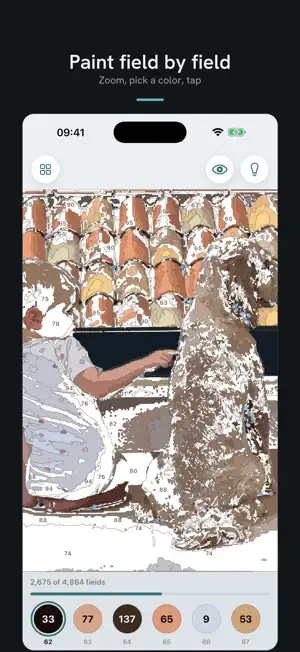
About PhotoPaint — Paint by Numbers
Your photo. Your canvas. Your painting. PhotoPaint turns your photo into a real paint-by-numbers template: numbered fields you fill in, color by color, on your iPhone or iPad. No filter gimmick — you watch your photo being broken down into fields and numbers, and you paint it back, piece by piece. HOW IT WORKS 1. Pick a photo — a portrait, your pet, that vacation moment. A crop suggestion helps you make the subject big; you can move it or keep the whole picture. 2. Watch the template appear: the conversion shows you in three steps what happens to your photo — from the picture to the color areas to the white template with numbers. Everything is computed right on your device, in about a second per level. 3. Choose your level: for each level you see the painted result and the template side by side, with the real number of fields for your photo. You know what you're getting into before you start. 4. Paint: zoom in, pick a color, tap. You don't have to hit the spot exactly — the app catches taps nearby. The light bulb shows you the next field, and finished colors disappear from the palette. There's no way to go wrong. THREE LEVELS, ONE PHOTO • Starter — around 600 fields, done in a long coffee break. Free, without limits. • Detail — around 2,500 fields, an hour or two of calm. • Artist — several thousand fields. A project for long evenings, closest to the original. How many fields it really becomes is up to your photo: fur and texture cost fields, large calm areas allow more. The exact number is on every card before you choose. Previewing all three levels is always free. You pay only when you really want to paint a finer level — and your first finer conversion is free, in the level you choose yourself. WHAT ELSE IS INSIDE • Gallery: your works in progress at the top to swipe through, the vernissage of finished ones below — several paintings at once, your progress is saved automatically • Time-lapse: watch your painting come to life again, tap by tap — and share the video if you like • Share: your finished work, without numbers and outlines • Light and dark — for the balcony as well as the couch in the evening • No ads, no account, no internet needed: converting and painting happen offline WHAT IT'S FOR To wind down after a full day. As a gift with time in it. And for that one photo that deserves more than sitting in your library. YOUR PHOTOS STAY YOURS Everything happens on your device. No upload to us, no account, no training of any models on your pictures. Your photo doesn't leave your iPhone — not even for the conversion. Your works are kept on your device and, if you use iCloud Drive, in your own iCloud. PRICING, NO HIDE-AND-SEEK Starter is free — for good, without ads. For Detail and Artist there are two ways: a subscription with unlimited conversions, monthly or yearly (a year costs about as much as five months), or credits without a subscription — three or ten conversions, paid once. What it costs in your country is shown in the app before you tap anything. The subscription renews automatically and can be canceled anytime in your iOS settings. Purchases can be restored on new devices. A painting you've started waits patiently for you. Bring your favorite photo to the canvas. Privacy Policy: https://photopaint.app/datenschutz Terms of Use: https://www.apple.com/legal/internet-services/itunes/dev/stdeula/
What’s new
Version 1.1 · Updated September 7, 2026
New in 1.1: • Your works now live in your iCloud: they survive deleting the app or switching devices, and they show up on your iPad too. • The app is now available in English — pick your language in the menu. • Privacy policy and terms of use in English as well.
App privacy
The developer, healthspan GmbH, reported these privacy practices to Apple.
Data Not Collected
The developer does not collect any data from this app.
Alternatives to PhotoPaint — Paint by Numbers
Looking for apps like PhotoPaint — Paint by Numbers? Here are 6 similar apps on the App Store. The highest rated is Hueprint - Paint by Numbers (5.0/5), and all 6 are free to download.
-
 Hueprint - Paint by Numbers
5.0
Hueprint - Paint by Numbers
5.0
-
 PaintLikePro
-
 ColorCrafter: Paint by Numbers
3.3
ColorCrafter: Paint by Numbers
3.3
-
 Pincela: Paint by Numbers
-
 Paint.co: Color by Number
-
 Malwerk
| App | Rating | Price | Last updated | Compare |
|---|---|---|---|---|
| PhotoPaint — Paint by Numbers | – | Free | September 7, 2026 | |
| Hueprint - Paint by Numbers | 5.0 / 5 (2) | Free | Oct 5, 2026 | Compare |
| PaintLikePro | – | Free | Dec 20, 2025 | Compare |
| ColorCrafter: Paint by Numbers | 3.3 / 5 (3) | Free | Sep 14, 2026 | Compare |
| Pincela: Paint by Numbers | – | Free | Jul 1, 2026 | Compare |
| Paint.co: Color by Number | – | Free | Oct 24, 2026 | Compare |
| Malwerk | – | Free | Oct 24, 2026 | Compare |