

Timeline Visualize: Travel Map
Mert Can Kasapoglu Travel iPhoneiPadiPod touch
Timeline Visualize: Travel Map is a free Travel app for iPhone and iPad by Mert Can Kasapoglu. Requires iOS 15.0. Updated October 28, 2026.
- Price
- Free
- on the App Store
- Size
- 179 MB
- Age 4+
- Updated
- Oct 28
- 2026 · v1.6.4
Screenshots


About Timeline Visualize: Travel Map
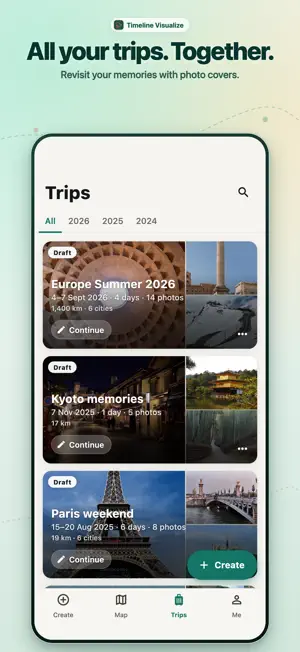
Even without a location history, your photos are enough: Timeline Visualize turns them into an animated 3D travel map video, a trip postcard and a map poster in a few taps. Add the places you've been by searching for them, colour in your map and see where you rank among travellers. Timeline Visualize finds trips automatically from the dates and locations in your photo library, maps the countries and cities you have visited on a 3D globe, and turns each trip into an animated route video, travel poster, postcard or printable PDF photo book. You can also pick photos and short clips yourself, tap the map to place photos without GPS, or import a location history export to map years of travel. AUTOMATIC TRIP DISCOVERY & 3D PHOTO GLOBE • Finds trips and special days in your photo library automatically • Spin your 3D photo globe and explore the countries, regions and cities you have visited • Browse all your trips by year in the Trips tab, with route distance and visited places • Create year and month travel recaps from your journeys MAP VIDEOS, POSTERS, POSTCARDS & PDF PHOTO BOOKS • Animated route video: photos and clips pop up on the map at the places they were taken • Travel posters, postcards and 4-photo strips ready to save and share • Printable PDF photo book generated from your trip moments and captions • Share a web link to a journey: friends open the route and photos in their browser without installing anything, and you can remove the link at any time HOW IT WORKS • Let the app find trips in your photos, pick trip photos and clips, or import a Timeline JSON export • Preview the journey and set exact dates and times • Pick a map style, camera movement, route colour and emoji pin • Export a portrait, square or landscape video, poster, postcard or PDF photo book MADE FOR SHARING • Long flights and drives speed up, so local moments stay easy to follow • Trim a clip and keep or mute its sound • Add music and sound effects to your video FREE AND FULL Free covers journeys from the latest 90 days, up to 3 photos or clips per journey (one of them can be a video clip), and 720p video with a Timeline Visualize watermark. Full unlocks every older date, unlimited photos and clips, 4K Ultra HD and 1080p video without the watermark, premium poster designs, the cinematic camera view, and re-creating saved journeys. Full is available as an auto-renewing subscription, a single-trip unlock, or a one-time lifetime purchase; the plans on offer are shown in the app. YOUR DATA Videos are created on your device. There is no sign-in and no live location tracking. Your journeys are kept on this device. With cloud saving on, your journeys, photos and locations are also backed up to cloud servers under a random ID the app creates, not an account; you can turn it on or off, restore journeys from it, or request deletion, in the app at any time. A web link is created only when you choose to share a journey; its route and photos are then visible to anyone who has the link, until you remove it. Product analytics are on by default and can be turned off in the app. Works with location history exported from Google Maps Timeline. Timeline Visualize is not affiliated with Google. Subscriptions renew automatically unless cancelled at least 24 hours before the end of the current period. Payment is charged to your Apple Account at confirmation of purchase. You can manage or cancel subscriptions in your account settings. Terms of Use: https://timeline.barbarda.com/terms Privacy Policy: https://timeline.barbarda.com/privacy Map data © CARTO, © OpenStreetMap contributors Apple Standard EULA: https://www.apple.com/legal/internet-services/itunes/dev/stdeula/ Traveller rankings come with the app: everyone who accepts the Terms of Use takes part, and you can leave them at any time in the app, which deletes your ranking data. Timeline Visualize runs on Google Firebase, Cloudflare, RevenueCat and OneSignal; details are in the Privacy Policy.
What’s new
Version 1.6.4 · Updated October 28, 2026
What's new in 1.6.4 • Tap back while your video is being made? The app now asks before stopping it, so you don't lose your video. • Memory reminders: choose morning or evening, and turn on notifications in one tap when you want them. • Small fixes and improvements. • Recently added: “Make this video” one tap away when your best trip is ready, and a first video from a few photos when no trips are found yet.
App privacy
The developer, Mert Can Kasapoglu, reported these privacy practices to Apple.
Data Linked to You
The following data, which may be collected and linked to your identity, may be used for the following purposes:
- Location: Precise Location, Coarse Location
- User Content: Other User Content
Used for: Analytics, App Functionality
Data Not Linked to You
The following data, which may be collected but is not linked to your identity, may be used for the following purposes:
- User Content: Photos or Videos
- Diagnostics: Crash Data, Other Diagnostic Data
Used for: Analytics, Product Personalization, App Functionality
Alternatives to Timeline Visualize: Travel Map
Looking for apps like Timeline Visualize: Travel Map? Here are 6 similar apps on the App Store. The highest rated is Scoria: Private Location Log (4.9/5), and all 6 are free to download.
-
 Timeline: Location History
-
 Scoria: Private Location Log
4.9
-
 RailNetwork: Real-Time Train
-
 J플래너 - JPlanner 여행 플래너
-
 떠나가챠 - 국내 여행지 랜덤 뽑기
-
 My Korea Map
| App | Rating | Price | Last updated | Compare |
|---|---|---|---|---|
| Timeline Visualize: Travel Map | – | Free | October 28, 2026 | |
| Timeline: Location History | – | Free | Oct 28, 2026 | Compare |
| Scoria: Private Location Log | 4.9 / 5 (12) | Free | Sep 5, 2026 | Compare |
| RailNetwork: Real-Time Train | – | Free | Oct 9, 2026 | Compare |
| J플래너 - JPlanner 여행 플래너 | – | Free | Oct 29, 2026 | Compare |
| 떠나가챠 - 국내 여행지 랜덤 뽑기 | – | Free | Oct 5, 2026 | Compare |
| My Korea Map | – | Free | Oct 20, 2026 | Compare |