

Tap the Total: Receipt Ledger
Kwok Chun Wong Finance iPhoneiPadiPod touch
Tap the Total: Receipt Ledger is a free Finance app for iPhone and iPad by Kwok Chun Wong. Requires iOS 16.4. Updated September 9, 2026.
- Price
- Free
- on the App Store
- Size
- 47 MB
- Age 4+
- Updated
- Sep 9
- 2026 · v1.0.1
Screenshots

About Tap the Total: Receipt Ledger
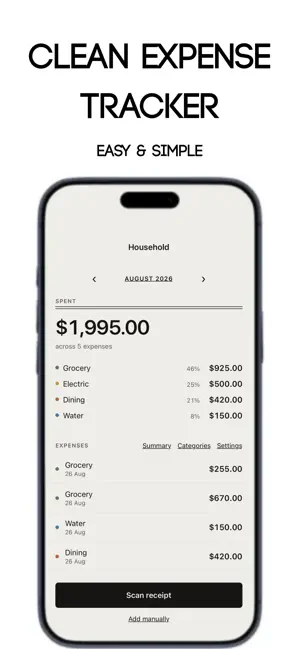
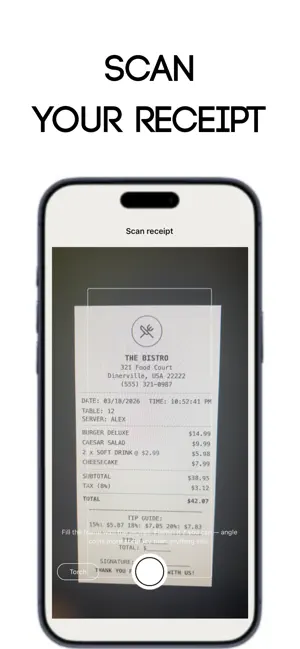
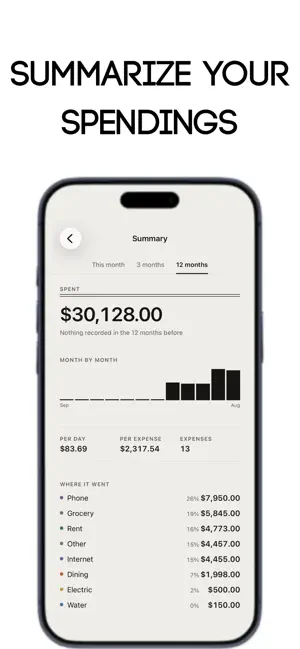
A household ledger you fill in by photographing receipts. Point the camera at a receipt and take one picture. Tap the Total reads every amount printed on it and turns each one into a button laid over the photo. The amount it believes is the total is already chosen and marked with a dot — if it guessed wrong, tap the right one instead. Pick a category, save, and the expense lands in this month's ledger. That's the whole interaction. No typing, no forms, no fifteen-field entry screen. WHAT IT DOES • One photo per receipt. It finds the paper's edges and flattens the perspective before reading it. • Reads English and Chinese receipts, in the same scan, without switching modes. • Split the bill. Say how many ways and it files your share, not the whole total. • Your own categories. Start from a sensible list, add what your household actually spends on, archive what it doesn't — archived ones stay on old expenses instead of vanishing from your history. • The month at a glance. Tap the month to jump to any other; tap a category to see every expense filed under it, searchable by shop or note. • Summaries over one, three, or twelve months: where it went, month by month, per day, biggest single expense, and how it compares to the period before. • No receipt to hand? Type the amount instead. • English and 繁體中文 throughout. WHERE YOUR DATA LIVES On your phone. That is the entire answer. There is no account to make and no server to sign in to. Receipts are read by Apple's on-device text recognition — the photograph never leaves the device. Your expenses sit in a database on the phone itself. Nothing is uploaded, nothing is sold, there are no ads, and there is no analytics SDK watching what you spend.
What’s new
Version 1.0.1 · Updated September 9, 2026
Improved Scanning accuracy and better identification logic.
App privacy
The developer, Kwok Chun Wong, reported these privacy practices to Apple.
Data Not Collected
The developer does not collect any data from this app.
Alternatives to Tap the Total: Receipt Ledger
Looking for apps like Tap the Total: Receipt Ledger? Here are 6 similar apps on the App Store. The highest rated is Pocket Clear: Expense Tracker (4.9/5), and all 6 are free to download.
-
 TallyTap: Expense Tracker
-
 SnapBudget: One-Tap Spending
-
 SpendByMe
-
 Pocket Clear: Expense Tracker
4.9
Pocket Clear: Expense Tracker
4.9
-
 Slog: Budget&Portfolio Tracker
4.4
Slog: Budget&Portfolio Tracker
4.4
-
 Tappy - Daily Expense Tracker
4.7
Tappy - Daily Expense Tracker
4.7
| App | Rating | Price | Last updated | Compare |
|---|---|---|---|---|
| Tap the Total: Receipt Ledger | – | Free | September 9, 2026 | |
| TallyTap: Expense Tracker | – | Free | May 25, 2026 | Compare |
| SnapBudget: One-Tap Spending | – | Free | Mar 25, 2026 | Compare |
| SpendByMe | – | Free | Oct 11, 2026 | Compare |
| Pocket Clear: Expense Tracker | 4.9 / 5 (149) | Free | Oct 7, 2026 | Compare |
| Slog: Budget&Portfolio Tracker | 4.4 / 5 (29) | Free | Oct 10, 2026 | Compare |
| Tappy - Daily Expense Tracker | 4.7 / 5 (14) | Free | Oct 7, 2026 | Compare |