

SpinCut DJ
株式会社LALAMO Music iPhoneiPadiPod touch
SpinCut DJ is a free Music app for iPhone and iPad by 株式会社LALAMO. Requires iOS 17.0. Updated November 7, 2026.
- Price
- Free
- on the App Store
- Size
- 67 MB
- Age 4+
- Updated
- Nov 7
- 2026 · v4.0
Screenshots



About SpinCut DJ
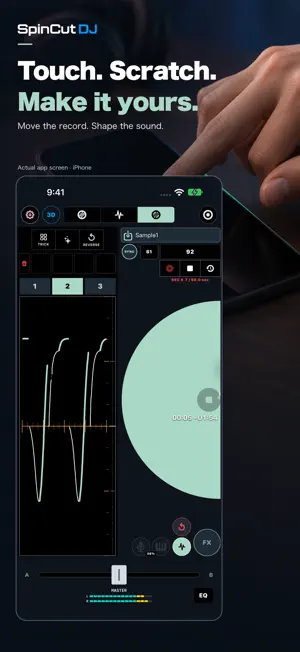
SpinCut DJ 4.0 A redesigned portrait interface, one-finger Easy Mode, per-deck ECHO and 50 deck colours let you DJ your way. Layer scratches and performances with the eight-channel Audio Looper, switch individual recorded channels on or off, and save the finished mix to your library. YOUR TRACKS. YOUR MIX. SpinCut DJ brings two-deck mixing, expressive scratching and creative performance tools to iPhone and iPad. Load your own audio files and build your mix with touch controls or a DDJ-FLX4 controller. YOUR MAC LIBRARY, AWAY FROM HOME Sign in with the same SpinCut account to browse tracks and folders from your Mac. Select LOAD to fetch a track over the internet. Once its opening audio is ready, playback can begin while the rest continues downloading. Separate tabs keep your device tracks and Mac library organized. GO LIVE IN SPINCUT WORLD Stream your DJ performance to your Personal Room in SpinCut World and share music in a virtual space. Show or hide the live broadcast area in Settings. MIX WITH CONFIDENCE Blend two tracks with channel and crossfader controls. Shape your sound with EQ, filters and FX, and add variety with performance pads. Organize device tracks in folders, move tracks and change their order. EXPLORE VOCALS AND INSTRUMENTALS Use vocal and instrumental controls to explore new combinations. Stem processing is required before separated audio is available. SCRATCH YOUR WAY Scratch directly on the screen, or use the jog wheels of a connected DDJ-FLX4 for hands-on performance. SEE MORE OF YOUR MUSIC Switch to the large waveform view to see track structure and playback position clearly as you mix. DDJ-FLX4 CONTROLLER SUPPORT Connect a DDJ-FLX4 via USB to control playback, cues, jog wheels, mixer controls and more. DDJ-FLX4 is sold separately. A compatible USB connection and appropriate power supply are required. Remote library access requires a compatible Mac version of SpinCut DJ, the same account on both devices, your Mac running and awake with sharing enabled, and an internet connection on both devices. Playback start time depends on the connection. Fetched audio uses temporary storage on your device. This feature does not provide a subscription music catalog. Feature availability may depend on your account and plan. Use supported audio files you have the necessary rights to use. Ensure you also have the necessary rights for live broadcasting.
What’s new
Version 4.0 · Updated November 7, 2026
SpinCut DJ 4.0 • Redesigned iPhone and iPad portrait interface with two platters and waveforms matched to your deck colours. • Easy Mode for one-finger scratching and mixing, with an independent ECHO button for each deck. • An eight-channel Audio Looper for layering scratches and performances, switching recorded channels on or off, deleting individual takes and saving your mix to the library. • Open the Looper from standard or Scratch mode, with all eight channels visible while recording. • Tap anywhere on an FX card to select it. Help buttons explain the settings. • Choose from 50 deck colours, with clearer cue pads, playback controls, time displays and track-loading buttons. • Improved portrait/landscape layouts, Scratch controls and crossfader touch handling.
App privacy
The developer, 株式会社LALAMO, reported these privacy practices to Apple.
Data Linked to You
The following data, which may be collected and linked to your identity, may be used for the following purposes:
- Contact Info: Email Address, Name
- Purchases: Purchase History
- User Content: Customer Support, Other User Content
- Identifiers: User ID
Used for: Developer’s Advertising or Marketing, App Functionality
Data Not Linked to You
The following data, which may be collected but is not linked to your identity, may be used for the following purposes:
- Identifiers: Device ID
- Usage Data: Product Interaction
Used for: Analytics, App Functionality
Alternatives to SpinCut DJ
Looking for apps like SpinCut DJ? Here are 6 similar apps on the App Store. The highest rated is DJ Dual Wave (5.0/5), and all 6 are free to download.
-
 Guanche's DJ Booth
-
 KeepDJ - DJ Mixer Console
-
 DJ Dual Wave
5.0
-
 DJ Scratcher Neo
3.0
-
 AlyDeejay: Dj App & AI Automix
-
 Serato DJ
3.9
| App | Rating | Price | Last updated | Compare |
|---|---|---|---|---|
| SpinCut DJ | – | Free | November 7, 2026 | |
| Guanche's DJ Booth | – | Free | Sep 9, 2026 | Compare |
| KeepDJ - DJ Mixer Console | – | Free | Nov 2, 2026 | Compare |
| DJ Dual Wave | 5.0 / 5 (8) | Free | Aug 27, 2026 | Compare |
| DJ Scratcher Neo | 3.0 / 5 (2) | Free | Oct 29, 2026 | Compare |
| AlyDeejay: Dj App & AI Automix | – | Free | Oct 28, 2026 | Compare |
| Serato DJ | 3.9 / 5 (84) | Free | Oct 19, 2026 | Compare |
Compare SpinCut DJ with the top alternatives: ratings, updates, ASO score and keyword gaps →