

Mony Planet
Kaiyu Tsai Finance iPhoneiPadiPod touchApple Watch
Mony Planet is a free Finance app for iPhone and iPad by Kaiyu Tsai. Requires iOS 17.0. Updated October 27, 2026.
- Price
- Free
- on the App Store
- Size
- 47 MB
- Age 4+
- Updated
- Oct 27
- 2026 · v1.1.18
Screenshots


About Mony Planet
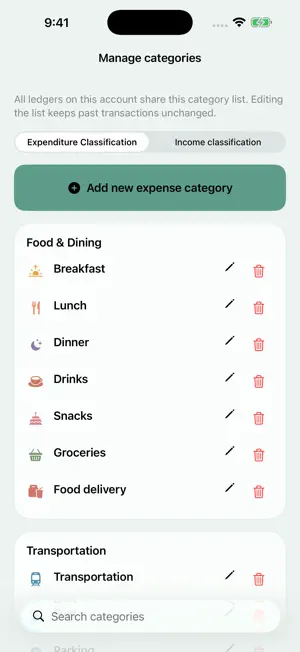
Mony Planet helps you organize daily expenses, travel and shared spending. TEXT, PHOTO AND VOICE ENTRIES Switch between photo, text and voice in the entry window, keeping your draft. Type “lunch 120” or photograph receipts, then review the editable draft before saving. Use multiple photos, item edits, saved receipt images, original/translated foreign receipt text and multiple currencies. Read Taiwan e-invoice QR codes and available items. ONE LEDGER, MANY TRIPS Create custom tags in each ledger for a trip, renovation or other project. Set a default, tag entire receipts or individual items, and update older records in bulk. Each item can have one tag or none. Tags remain separate from spending categories and do not change split settlements. Archive completed tags while keeping their history. TRAVEL ITEM INSPECTION Border item checks are off by default. Enable them when creating a ledger or later in Ledger Settings, then set your destination and outbound/return dates. Free local analysis organizes suspected, pending and all purchase items. Illustrated examples explain common items; open Details for country guidance, penalties and official links, or replay the luggage guide. Mark items carried, consumed or excluded. Optional front/back product photos are sent to Google Cloud Vertex AI after consent to extract labels and research arrival rules. Detailed AI queries require internet and available credits; sharing scope and cost appear before you start. This non-government travel aid may miss or misclassify items. Results are reference only, never an entry permit; check current official notices. SHARED LEDGERS AND SETTLEMENTS Track expenses with friends. Choose who paid and who shares each item, review amounts owed, and keep settlement notes and evidence photos. The Unsettled list brings pending obligations together; select records and confirm payment details before settling. ANALYSIS AND REPORTS Review income, expenses and balances by category or tag. Choose a month, year, custom period or All Dates to see projects spanning several months. Export PDF reports, CSV entries and personal JSON backups. EVERYDAY ORGANIZATION Manage recurring entries, import older records and check duplicates. Track asset balances and transfers, or ask the bookkeeping assistant questions. Customize categories and daily reminders, and archive or restore ledgers. THEMES, LARGE TEXT AND HELP Choose caramel, cocoa or other themes, or customize your colors. Layouts adapt to iPhone text size, with longer explanations behind “?” buttons. Explore 12 guide topics, jump directly to a feature, skip or replay anytime. LINE AND SYNC Connect our official LINE account for quick entries, receipt recognition and queries. LINE commands use Traditional Chinese. LINE category syntax is separate from ledger tags, which you manage in the app. Entries save on your phone first. Tap Sync or pull to refresh to upload pending changes and load cloud updates. Unsynced changes remain on your phone until you sync. Some text and Taiwan Chinese receipts are recognized on your device first. If the device cannot handle the request or the result is incomplete, Google Cloud Vertex AI processes the request after you consent to data sharing. You can withdraw consent in Settings > AI Data Sharing. Review text and photo recognition results before saving. AI Recognition in ledger tools categorizes individual imported expenses. Select items, review and edit AI category suggestions in a preview, then tap Done to save. Cancelling leaves your records unchanged. Unresolved items can be categorized manually. Cloud AI recognition and assistant questions require internet and available credits. Manual entries remain available when credits run out or membership is inactive. Plan details and prices appear in the app and on the App Store purchase sheet. Support: [email protected] Terms of Use (EULA): https://www.apple.com/legal/internet-services/itunes/dev/stdeula/
What’s new
Version 1.1.18 · Updated October 27, 2026
• Filter transactions by tag and apply one tag to a batch of recognized items. • Take multiple photos in one camera session, with improvements to keyboard handling, selection controls and layout. • Choose yearly, quarterly or custom-month analysis ranges. Select ledgers for the AI assistant, see its record limit, and benefit from clearer sync status and carrier-number copying.
App privacy
The developer, Kaiyu Tsai, reported these privacy practices to Apple.
Data Linked to You
The following data, which may be collected and linked to your identity, may be used for the following purposes:
- Purchases: Purchase History
- Financial Info: Other Financial Info
- Contact Info: Email Address
- User Content: Photos or Videos, Other User Content
- Identifiers: User ID
Used for: App Functionality
Data Not Linked to You
The following data, which may be collected but is not linked to your identity, may be used for the following purposes:
- Diagnostics: Other Diagnostic Data
Used for: Analytics
Alternatives to Mony Planet
Looking for apps like Mony Planet? Here are 6 similar apps on the App Store. The highest rated is Splitea: Split the Bill (5.0/5), and all 6 are free to download.
-
 Split Cat
-
 MyFinance: Expense Tracker
-
 Splitea: Split the Bill
5.0
-
 Owely - IOU & Loan Ledger
-
 FiftyFifty: Shared Expenses
-
 Splitly - Group Expenses
| App | Rating | Price | Last updated | Compare |
|---|---|---|---|---|
| Mony Planet | – | Free | October 27, 2026 | |
| Split Cat | – | Free | Oct 24, 2026 | Compare |
| MyFinance: Expense Tracker | – | Free | Oct 12, 2026 | Compare |
| Splitea: Split the Bill | 5.0 / 5 (8) | Free | Oct 19, 2026 | Compare |
| Owely - IOU & Loan Ledger | – | Free | Oct 10, 2026 | Compare |
| FiftyFifty: Shared Expenses | – | Free | Sep 18, 2026 | Compare |
| Splitly - Group Expenses | – | Free | Feb 11, 2026 | Compare |
Compare Mony Planet with the top alternatives: ratings, updates, ASO score and keyword gaps →