

Luter - Color Grading
XEL TECHNOLOGIES LTD Photo & Video iPhoneiPadiPod touch
Luter - Color Grading is a free Photo & Video app for iPhone and iPad by XEL TECHNOLOGIES LTD. Requires iOS 17.0. Updated September 3, 2026.
- Price
- Free
- on the App Store
- Size
- 19 MB
- Age 4+
- Updated
- Sep 3
- 2026 · v1.3.0
Screenshots



About Luter - Color Grading
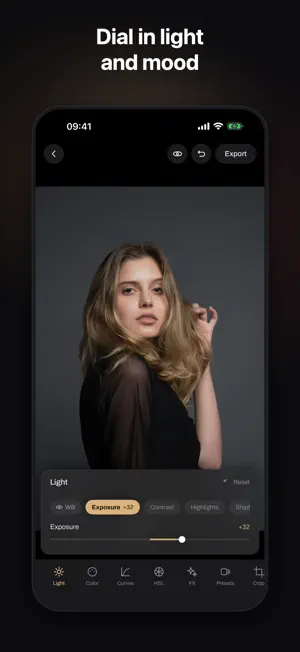
Luter is a color grading studio for your pocket. Pick a photo or a video, tap a look, and watch it turn cinematic. When you want to go deeper, the pro tools are right there, and they stay out of your way until you need them. MAKE IT CINEMATIC IN SECONDS Start with a curated library of film inspired looks: warm golden tones, deep teals, soft faded palettes, and clean modern styles. Adjust the intensity with one slider until it feels right. REAL LUT SUPPORT Import any .cube LUT and use it like a native look. Built a grade you love? Export it as a .cube file and use it in your other editing apps. Your color, everywhere. GO DEEPER WHEN YOU WANT - Light: exposure, contrast, highlights, shadows, white balance - Color: vibrance, saturation, temperature and tint - Curves: luminance and RGB channels with smooth control points - HSL: fine tune every color range separately - Masks: grade just the part of the image you choose - FX: grain, vignette and finishing touches PHOTOS AND VIDEOS Grade both. Your edits are non destructive, so the original stays safe and you can change your mind anytime. EXPORT YOUR WAY JPEG, HEIF or PNG. Standard to maximum quality. Half or full size. You see the estimated file size before you save. LUTER PRO Unlock the complete look library, new looks as they arrive, full quality export for photos and videos, and the complete finishing toolkit with masks and curves. Subscriptions renew automatically until cancelled. Manage or cancel anytime in Settings. Privacy policy: https://boom-gerbera-364.notion.site/Luter-Privacy-Policy-3c54fea2140080e19d09e15cab87f0e0 Terms of use: https://www.apple.com/legal/internet-services/itunes/dev/stdeula/
What’s new
Version 1.3.0 · Updated September 3, 2026
Faster, clearer, and easier to get around. Importing a photo or video that lives in iCloud now shows you the download as it happens, with a progress ring and a way to cancel, instead of leaving you looking at a still screen. Luter now opens with a short introduction so you can see what it does before you decide anything. You can also rate Luter from inside the app now, which genuinely helps a new app like this one.
App privacy
The developer, XEL TECHNOLOGIES LTD, reported these privacy practices to Apple.
Data Not Linked to You
The following data, which may be collected but is not linked to your identity, may be used for the following purposes:
- Purchases: Purchase History
- Identifiers: Device ID
Used for: App Functionality
Alternatives to Luter - Color Grading
Looking for apps like Luter - Color Grading? Here are 6 similar apps on the App Store. The highest rated is Maple: Raw Photo Editor (5.0/5), and all 6 are free to download.
-
 Maple: Raw Photo Editor
5.0
Maple: Raw Photo Editor
5.0
-
 HUEO
HUEO
-
 Retro Lab Photo Editor
-
 Color Grading - Färg
-
 Cubedit: LUT Color Grading
-
 REGRADE - AI Film Camera
| App | Rating | Price | Last updated | Compare |
|---|---|---|---|---|
| Luter - Color Grading | – | Free | September 3, 2026 | |
| Maple: Raw Photo Editor | 5.0 / 5 (2) | Free | Oct 21, 2026 | Compare |
| HUEO | – | Free | Oct 14, 2026 | Compare |
| Retro Lab Photo Editor | – | Free | Jul 28, 2026 | Compare |
| Color Grading - Färg | – | Free | Aug 31, 2026 | Compare |
| Cubedit: LUT Color Grading | – | Free | Oct 18, 2026 | Compare |
| REGRADE - AI Film Camera | – | Free | Apr 8, 2026 | Compare |