

SimpleNet Tools
Todd Dresser Utilities iPhoneiPadiPod touch
SimpleNet Tools is a free Utilities app for iPhone and iPad by Todd Dresser. Requires iOS 16.4. Updated September 16, 2026.
- Price
- Free
- on the App Store
- Size
- 38 MB
- Age 12+
- Updated
- Sep 16
- 2026 · v1.0.4
Screenshots

About SimpleNet Tools
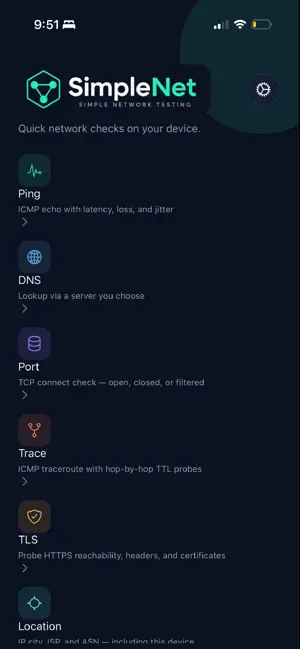
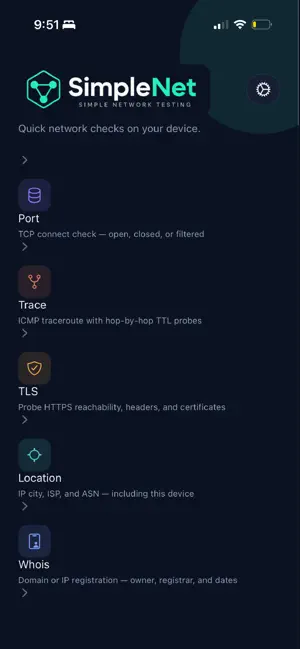
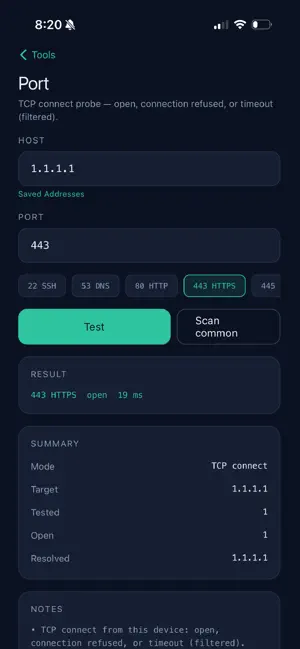
SimpleNet Tools is a focused network toolkit for IT folks who need basic checks from a phone — without ads getting in the way. Run common diagnostics on the go: ping a host, look up DNS records, check a TCP port, follow a traceroute, probe TLS and certificates, look up whois/RDAP registration, and estimate IP city/ISP/ASN. Native ICMP and TCP run on iOS production builds so results reflect real network behavior from your device. TOOLS • Ping — ICMP echo with latency, loss, and jitter • DNS — A, AAAA, CNAME, MX, TXT, and NS via the resolver you choose (device DNS where available, or Cloudflare) • Port — TCP connect check: open, closed, or filtered • Trace — ICMP traceroute with hop-by-hop TTL probes • TLS — HTTPS reachability, security headers, and certificate transparency lookup • Location — IP city, ISP, and ASN (including this device’s public IP) • Whois — RDAP registration for a domain or IP: owner, registrar, dates, nameservers EXTRA • Saved addresses — keep frequent hosts on-device for quick re-use • About — version, release notes, Terms, and Privacy No account. No ads. No in-app purchases. You choose the host or address to test; checks run from your device. Made by anollopa for people who just need simple network commands on mobile.
What’s new
Version 1.0.4 · Updated September 16, 2026
• Ping: choose count, interval between probes, or run indefinitely until you stop • Host fields: clear button and Save to add the current host to Saved Addresses • Saved Addresses: Save is hidden when that host is already stored; Save from a tool pre-fills companion IP or DNS from the latest result • Results: tap to copy hosts, IPs, DNS answers, and other key values; share/export from tool screens • DNS: choose a custom resolver on Ping, Port, Traceroute, TLS, and DNS; pick a Saved Address as the server • DNS: Lock a custom DNS server across those tools; Unlock to restore each tool’s default • Options: show, hide, and reorder tools on the home screen • Options: host field on open — sample defaults, last used per tool, or always blank • Clearer network errors, including when a feature needs the native iOS/Android client Thanks for using SimpleNet Tools.
App privacy
The developer, Todd Dresser, reported these privacy practices to Apple.
Data Not Collected
The developer does not collect any data from this app.
Alternatives to SimpleNet Tools
Looking for apps like SimpleNet Tools? Here are 6 similar apps on the App Store. The highest rated is PiParent (5.0/5), and 5 of the 6 are free to download.
-
 Packetly Network Toolkit
-
 PiParent
5.0
-
 Stacked Deck
3.0
-
 NetProbe: LAN Scanner
5.0
-
 Subnet Calculator 192
-
 Ruview Wifi Sensing Tools Hub
| App | Rating | Price | Last updated | Compare |
|---|---|---|---|---|
| SimpleNet Tools | – | Free | September 16, 2026 | |
| Packetly Network Toolkit | – | Free | Sep 7, 2026 | Compare |
| PiParent | 5.0 / 5 (2) | Free | Sep 29, 2026 | Compare |
| Stacked Deck | 3.0 / 5 (2) | 4.99 USD | Jan 19, 2026 | Compare |
| NetProbe: LAN Scanner | 5.0 / 5 (1) | Free | Sep 28, 2026 | Compare |
| Subnet Calculator 192 | – | Free | Jul 6, 2025 | Compare |
| Ruview Wifi Sensing Tools Hub | – | Free | Oct 25, 2026 | Compare |
Compare SimpleNet Tools with the top alternatives: ratings, updates, ASO score and keyword gaps →