

Save to Photos
Frozen Duck Technologies LLC Utilities iPhoneiPadiPod touch
Save to Photos is a free Utilities app for iPhone and iPad by Frozen Duck Technologies LLC. Requires iOS 16.0. Updated October 27, 2026.
- Price
- Free
- on the App Store
- Size
- 8 MB
- Age 4+
- Updated
- Oct 27
- 2026 · v26.10
Screenshots


About Save to Photos
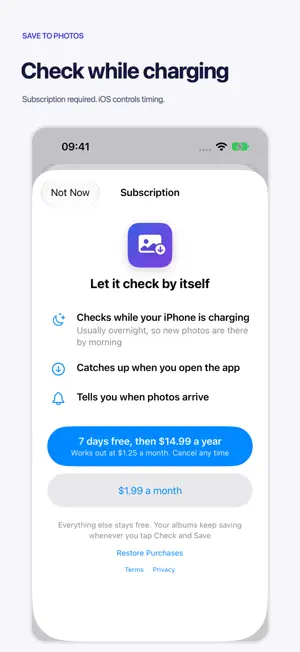
Bring photos and videos from weddings, school days and trips with friends into your own collection. Keep them in your camera roll or collect them in an album you choose. KEEP YOUR OWN COPY The album owner can turn off sharing or remove photos at any time. Save your own copies to iPhone while you have access. Once saved in Apple Photos, your copies stay even if the shared link stops working or the originals are removed from the Google Photos album. With iCloud Photos enabled and enough iCloud storage, your saved photos and videos also sync to your own iCloud library. HOW TO SAVE AN ALBUM 1. Open the shared album in Google Photos. 2. Tap Share and choose Save to Photos, or paste the shared link into the app. 3. Choose what to save and where it goes in Apple Photos. Save everything, or start from a date or photo. The app skips items already saved to the same destination, even when they appear in several shared albums. Photos and videos save at the largest size available through the shared link. FREE SAVING, OPTIONAL SUBSCRIPTION Manual saving is free and unlimited. A monthly or yearly subscription adds checks while your iPhone is charging and when you open the app. iOS controls background timing. Subscriptions renew automatically unless cancelled in Apple Account settings. YOUR PHOTOS AND LINKS Photos download directly from Google to your iPhone. Shared links stay in Keychain and sync through your own iCloud Keychain; they are never sent to us. Anonymous technical reports use Apple's iCloud to help us find errors. Apple's advertising tools provide privacy-protected campaign and conversion reports. No Google sign-in is needed. Works with Google Photos shared-album links. Requires iOS 16 or later. Terms of Use: https://www.apple.com/legal/internet-services/itunes/dev/stdeula/ Privacy Policy: https://savetophotos.frozenducktech.com/privacy/
What’s new
Version 26.10 · Updated October 27, 2026
Clearer step-by-step guidance shows how to add a shared album and save its photos. Album removals now carry across your iCloud devices. This update also improves subscription checks and explains partial save failures more clearly.
App privacy
The developer, Frozen Duck Technologies LLC, reported these privacy practices to Apple.
Data Not Linked to You
The following data, which may be collected but is not linked to your identity, may be used for the following purposes:
- Purchases: Purchase History
- Usage Data: Product Interaction
- Diagnostics: Crash Data, Performance Data, Other Diagnostic Data
- Other Data: Other Data Types
Used for: Analytics, App Functionality
Alternatives to Save to Photos
Looking for apps like Save to Photos? Here are 6 similar apps on the App Store. The highest rated is My IP ∞ Country & IP Lookup (4.9/5), and all 6 are free to download.
-
 My IP ∞ Country & IP Lookup
4.9
-
 AI Noise Reducer-Enhance Audio
4.3
-
 My IP - Address
3.5
-
 GNSS Analyzer
1.0
-
 MoneyCircle: Expense & Budget
4.6
-
 CPU-X
4.7
| App | Rating | Price | Last updated | Compare |
|---|---|---|---|---|
| Save to Photos | – | Free | October 27, 2026 | |
| My IP ∞ Country & IP Lookup | 4.9 / 5 (13) | Free | Sep 13, 2026 | Compare |
| AI Noise Reducer-Enhance Audio | 4.3 / 5 (19) | Free | Jun 8, 2025 | Compare |
| My IP - Address | 3.5 / 5 (2) | Free | Nov 24, 2024 | Compare |
| GNSS Analyzer | 1.0 / 5 (1) | Free | Mar 18, 2026 | Compare |
| MoneyCircle: Expense & Budget | 4.6 / 5 (21) | Free | Oct 11, 2026 | Compare |
| CPU-X | 4.7 / 5 (114) | Free | Oct 8, 2026 | Compare |
Compare Save to Photos with the top alternatives: ratings, updates, ASO score and keyword gaps →