

KDraw Kids: Draw & Color
HYM Education iPhoneiPadiPod touch
KDraw Kids: Draw & Color is a free Education app for iPhone and iPad by HYM. Requires iOS 16.0. Updated September 14, 2026.
- Price
- Free
- on the App Store
- Size
- 12 MB
- Age 4+
- Updated
- Sep 14
- 2026 · v1.5
Screenshots



About KDraw Kids: Draw & Color
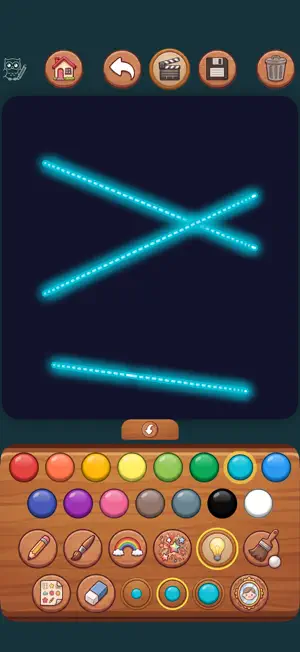
KDraw Kids is a complete little art studio for the youngest children: four ways to create, everything unlocked from the very first launch, and nothing to set up. FOUR WAYS TO CREATE • Free Drawing: marker, crayon, rainbow, glitter, spray and neon brushes, three thicknesses, fifteen colours, an eraser, and forty stamps to press into the picture. • Magic Glow: the same brushes on a dark canvas, where every line shines. Switch on the mirror and a scribble becomes a two-way or four-way kaleidoscope pattern. • Coloring Book: 33 hand-drawn pages across six sets: animals, vehicles, nature, sweets, magic and all of them together. Tap an area to fill it, or paint inside it with a brush, and the colour never crosses the lines. • Color by Number: each area to fill shows the number of the colour it wants, every colour bead carries that same number, and there is no way to get it wrong. FINISH A PAGE AND IT COMES ALIVE Finish a picture and confetti bursts across the screen with a little fanfare, and many of the pages fly, drive or swim away as well. Save a masterpiece to the gallery with one tap. BUILT FOR PARENTS TO TRUST • No accounts, no sign-in, nothing to remember. The app opens straight into the drawing. • No in-app purchases and no subscriptions. Everything is there from the first launch. • Drawing, coloring and the gallery all work without a connection. • Drawings are kept on the device, in the app's own gallery. One is shared only when a grown-up chooses to send it through the system share sheet. • Sharing artwork, deleting saved pictures and the grown-ups' settings are behind a parental gate. MADE FOR SMALL HANDS Big buttons and no reading required. Two children can draw on the same iPad at the same time: the canvas follows every finger separately. An unfinished drawing is still waiting after the app is closed. Works on iPhone and iPad, in portrait and landscape, in 15 languages. A tip for parents: to keep a small child inside the app, turn on Guided Access in Settings > Accessibility, then triple-click the side button once KDraw is open.
What’s new
Version 1.5 · Updated September 14, 2026
Stability improvements and general maintenance.
App privacy
The developer, HYM, reported these privacy practices to Apple.
Data Not Linked to You
The following data, which may be collected but is not linked to your identity, may be used for the following purposes:
- Location: Coarse Location
- Usage Data: Product Interaction, Advertising Data
- Diagnostics: Other Diagnostic Data
Used for: Third-Party Advertising, Developer’s Advertising or Marketing, Analytics, App Functionality
Alternatives to KDraw Kids: Draw & Color
Looking for apps like KDraw Kids: Draw & Color? Here are 6 similar apps on the App Store. The highest rated is Zora Learning - Storytelling (5.0/5), and all 6 are free to download.
-
 SFSJ School
-
 LearnMelody: Nursery Rhymes
-
 Kirketegn
-
 Budou Coloring
-
 ChessCoach - Learn Chess
-
 Zora Learning - Storytelling
5.0
Zora Learning - Storytelling
5.0
| App | Rating | Price | Last updated | Compare |
|---|---|---|---|---|
| KDraw Kids: Draw & Color | – | Free | September 14, 2026 | |
| SFSJ School | – | Free | Apr 24, 2026 | Compare |
| LearnMelody: Nursery Rhymes | – | Free | Oct 19, 2026 | Compare |
| Kirketegn | – | Free | Apr 23, 2024 | Compare |
| Budou Coloring | – | Free | Sep 16, 2026 | Compare |
| ChessCoach - Learn Chess | – | Free | Oct 1, 2026 | Compare |
| Zora Learning - Storytelling | 5.0 / 5 (2) | Free | Mar 17, 2024 | Compare |