

Kiriwake: Split Photos for X
MASATO MORITA Photo & Video iPhoneiPadiPod touch
Kiriwake: Split Photos for X is a free Photo & Video app for iPhone and iPad by MASATO MORITA. Requires iOS 16.4. Updated November 14, 2026.
- Price
- Free
- on the App Store
- Size
- 37 MB
- Age 4+
- Updated
- Nov 14
- 2026 · v1.6.0
Screenshots
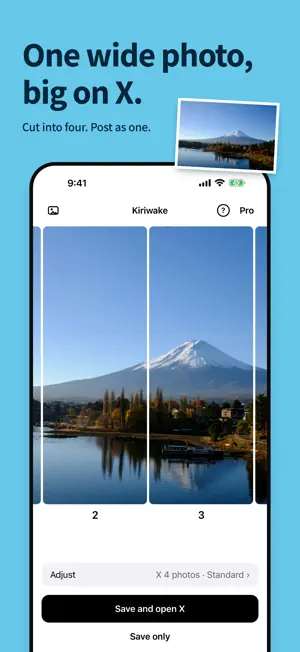

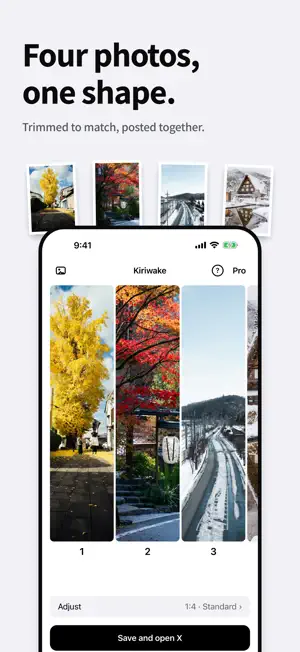

About Kiriwake: Split Photos for X
Kiriwake makes a wide photo show up big on X. Posted as it is, a wide photo looks small in the timeline. Cut it into slender tiles with Kiriwake, attach them to one post, and X lines them up side by side as one large image you can swipe across. Choose anywhere from 2 to 20 tiles. ■ How it works 1. Pick one photo 2. Check the result at the size it will appear on X 3. Tap "Save and open X". Attach the tiles in number order and the picture joins up ■ Line up separate photos too A full-length outfit shot, four cuts from an event, four favorites. Kiriwake trims 2 to 4 separate photos to the same slender shape so they sit together in one post. ■ Included - Split one photo into 2 to 20 tiles (X allows up to 20 images in one post) - Align separate photos to the same shape (1:4) - Rotate, remove and add photos - Save at standard quality (2048 px on the long edge) and share - Layouts for Instagram (grid, carousel) ■ Pro (one-time purchase) - Adjust position: pinch to zoom and decide where the cuts fall - Replace photos and change their order - Change how slender each photo is (1:2 to 1:8) - Save in 4K / full size No monthly payments. ■ Private by design - No ads, no watermark - Photos are processed on your phone and never uploaded - No account - Location and other capture data are removed from saved images How four-image posts look on X was checked on the iOS app and the web in November 2026; posts with five or more images were checked on the web. It may change with updates to X or with the viewer's device.
What’s new
Version 1.6.0 · Updated November 14, 2026
X now allows up to 20 images in one post, so Kiriwake can now cut one photo into 2 to 20 tiles. - Change the number of tiles one at a time with "Photos" in Adjust. Smaller photos allow fewer tiles - Saving and sharing handle all the tiles at once - With 5 or more tiles, Adjust position (Pro) shows one frame with the cut lines - Tile numbers stay readable on slender tiles
App privacy
The developer, MASATO MORITA, reported these privacy practices to Apple.
Data Not Linked to You
The following data, which may be collected but is not linked to your identity, may be used for the following purposes:
- Identifiers: User ID
- Usage Data: Product Interaction
Used for: Analytics
Alternatives to Kiriwake: Split Photos for X
Looking for apps like Kiriwake: Split Photos for X? Here are 6 similar apps on the App Store. The highest rated is LAMUNE - Film Photo Editor (1.0/5), and all 6 are free to download.
-
 PictOrb Movable Lens Camera
-
 しゃしんシュレッダー
-
 Swapscape: Photo Exchange
-
 SNS Video Fixer - FPSuke -
-
 LAMUNE - Film Photo Editor
1.0
-
 Slicer: Photo Grid & Carousel
| App | Rating | Price | Last updated | Compare |
|---|---|---|---|---|
| Kiriwake: Split Photos for X | – | Free | November 14, 2026 | |
| PictOrb Movable Lens Camera | – | Free | Nov 11, 2026 | Compare |
| しゃしんシュレッダー | – | Free | Oct 11, 2026 | Compare |
| Swapscape: Photo Exchange | – | Free | Nov 5, 2026 | Compare |
| SNS Video Fixer - FPSuke - | – | Free | Oct 14, 2026 | Compare |
| LAMUNE - Film Photo Editor | 1.0 / 5 (1) | Free | Sep 28, 2026 | Compare |
| Slicer: Photo Grid & Carousel | – | Free | Oct 20, 2026 | Compare |