

Unichrono
Abhilash Emmanuel Utilities iPhoneiPadiPod touchMacApple Watch
Unichrono is a free Utilities app for iPhone and iPad by Abhilash Emmanuel. Requires iOS 17.0. Updated October 5, 2026.
- Price
- Free
- on the App Store
- Size
- 34 MB
- Age 4+
- Updated
- Oct 5
- 2026 · v1.5
Screenshots


About Unichrono
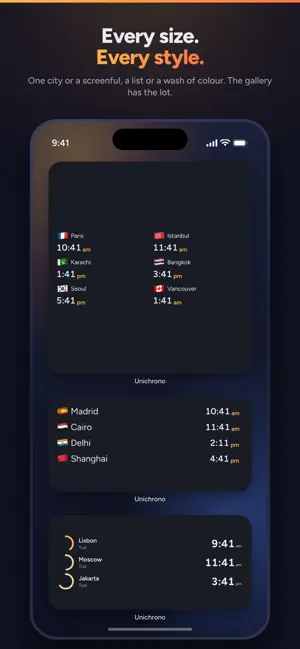
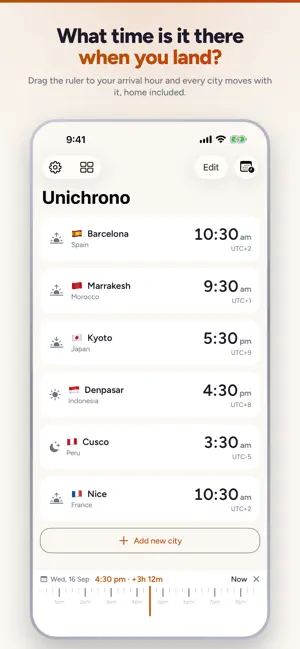
It's 9 in the morning where you are. Is it too early to call your mother? Is your team in Berlin still at their desks? Will anyone in Tokyo read this tonight? And what time will it be in Lisbon when you land? Unichrono answers all three from your Home Screen, without you opening anything. PUT THEIR TIME WHERE YOU ALREADY LOOK Add the cities your people are in, then place a widget. One city, big enough to read across a room. Four cities in a row. Eight in a grid. A clock face. Your Lock Screen too, in every shape Apple allows. Every widget is yours to set up: which cities it holds, 12 or 24 hour, which theme, and what the second line says. KNOW BEFORE YOU SEND IT Each city carries the shape of its own day, so you can see it instead of working it out. A wash of colour for morning, afternoon, evening and night. Yesterday or Tomorrow when the date has already turned over there. Sunrise and sunset. And a dot for each city — green while they are inside their own working hours, amber at the edges, red when you would be waking them up. WORK OUT THE TIME BEFORE YOU GO Add the city you are flying to and it sits beside home, with the offset spelled out, so the gap is a fact rather than arithmetic you do at the gate. Drag the ruler to your landing hour and see what everyone back home will be doing when you touch down, and whether that is a reasonable time to text. Sunrise and sunset tell you what daylight you are arriving into. Once you are there, your own row moves with you and the people you left behind stay where they are. PLAN WITHOUT THE ARITHMETIC Drag the ruler along the bottom of the screen and every clock moves together, so you can find the hour that works for all of you before you propose it. Jump to a date months out and see what it looks like there. Once you have found it, set an alarm for their morning, drop the meeting into your calendar, or copy an invite that reads correctly in every zone. Unichrono can also say a city's time out loud, at an hour you pick. 6,312 cities are built in, from capitals down to small towns. Search happens on your phone; nothing is fetched. IT NEVER ASKS YOU FOR ANYTHING No account. No sign-in. No ads. No analytics. No tracking. Switch on Airplane mode and every clock in this app keeps telling the truth, because not one of them was ever asking a server. Unichrono has no backend to send your data to, because it does not need one — the time zone rules ship inside the app. WHAT IT COSTS Free, and staying free: 3 cities, the World Clock widget in every size, Hero City, Lock Screen widgets, time travel, the plan board, themes, and the full city search. Unichrono Pro is one payment of USD 2.99. It is not a subscription and never becomes one. Pro adds unlimited cities; every other widget — Two Cities, Three Cities in a day-wash or rings style, Analog, Sun Clock and Availability; the denser grid layout; extra widget detail lines, such as how long until they close; spoken city alerts; the hourly or daily time announcer; and the plan board's alarm, calendar and invite actions. Launch gift: until 31 December, all of that is free. Open the app, tap Claim, and it stays unlocked on your iPhone. No account, no subscription, nothing to renew.
What’s new
Version 1.5 · Updated October 5, 2026
Unichrono is now on Apple Watch, and it understands the times you type. • Apple Watch: your cities on your wrist, synced with your iPhone. Turn the Digital Crown to time travel, add and reorder cities on the watch, and put City Time or World Clock on your watch face or Smart Stack (Pro adds "OK to call?", Two Cities, Analog and Sun). • Type a time: "8am Tokyo", "3pm PST", "LHR" or "UTC+5:30" in the time-travel box jumps every city to that moment. Search now finds airport codes, time zone abbreviations and UTC offsets too. • Clock change warnings: a heads-up three days before the time difference to one of your cities changes, on the city card and as a notification. • City groups (Pro): sort cities into groups like Team or Family, filter the list with one tap, point a widget at a group, and share a group with anyone as a file. Don't need them? Settings → Show groups hides them. • Dynamic Island (Pro, iOS 18): pin up to two cities to the Dynamic Island and Lock Screen. • Siri, Spotlight and Control Center: "What time is it in Tokyo with Unichrono?", city search in Spotlight, and Control Center buttons. • Share a time: send the moment on the ruler, with every city's time, from the time-travel panel.
App privacy
The developer, Abhilash Emmanuel, reported these privacy practices to Apple.
Data Not Collected
The developer does not collect any data from this app.
Alternatives to Unichrono
Looking for apps like Unichrono? Here are 6 similar apps on the App Store. The highest rated is World Clock Widget Time Zone (4.6/5), and all 6 are free to download.
-
 World Clock & Time Widgets
-
 Earth Time - Clock and Weather
-
 NewOaks
-
 Timezone: World Clock Widget
-
 Hello Doorbell
2.8
Hello Doorbell
2.8
-
 World Clock Widget Time Zone
4.6
World Clock Widget Time Zone
4.6
| App | Rating | Price | Last updated | Compare |
|---|---|---|---|---|
| Unichrono | – | Free | October 5, 2026 | |
| World Clock & Time Widgets | – | Free | Sep 27, 2026 | Compare |
| Earth Time - Clock and Weather | – | Free | Oct 7, 2026 | Compare |
| NewOaks | – | Free | Feb 9, 2025 | Compare |
| Timezone: World Clock Widget | – | Free | Oct 7, 2026 | Compare |
| Hello Doorbell | 2.8 / 5 (13) | Free | Aug 26, 2026 | Compare |
| World Clock Widget Time Zone | 4.6 / 5 (19) | Free | Jul 13, 2026 | Compare |
Compare Unichrono with the top alternatives: ratings, updates, ASO score and keyword gaps →