

Kedge: Screen Time & Focus
Shubham Meena Productivity iPhoneiPadiPod touch
Kedge: Screen Time & Focus is a free Productivity app for iPhone and iPad by Shubham Meena. Requires iOS 16.0. Updated October 7, 2026.
- Price
- Free
- on the App Store
- Size
- 43 MB
- Age 4+
- Updated
- Oct 7
- 2026 · v1.1.0
Screenshots


About Kedge: Screen Time & Focus
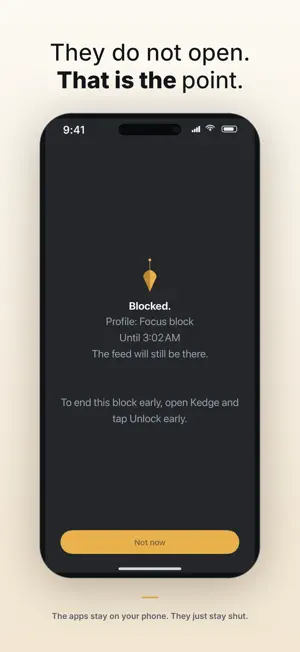
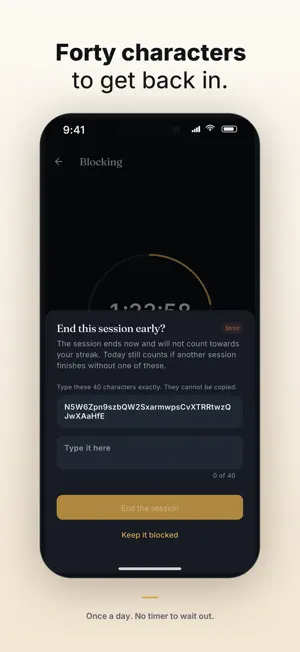
Kedge makes your phone boring for a while. That is the whole trick. Pick the apps that get you. Choose when they are shut. When you reach for one anyway, Kedge is already in the way. WHAT IT DOES Block on demand. Start a block for fifteen minutes, two hours, or until you end it yourself. Block on a schedule. Mornings until ten. Evenings after nine. It arms itself and runs with Kedge closed. Block after a daily limit. Give yourself an hour of something. When the hour is gone, so is the app, until tomorrow. THREE LEVELS OF FRICTION The point of Kedge is not that blocking is impossible. It is that leaving early costs something. Gentle — unlock one app for five minutes from the block screen, as often as you like. For when you actually did need the thing. Firm — a sixty-second wait, then the block ends. Three times a day. Strict — type forty random characters, exactly. Once a day. Strict can also stop the app being deleted while a block is running. WHAT IT DOES NOT DO No account. No sign-up. No email address. Nothing leaves your phone. Kedge cannot see which apps you chose — iOS never tells it. It knows how many, and nothing else. No streak guilt, no notifications nagging you, no leaderboard, no coach. No invented numbers. Kedge only shows you what it can actually measure. Time held is time a block was genuinely up. A day counts towards your streak when a block ran to the end and nothing was unlocked early. If it cannot be counted honestly, it is not on the screen. FREE AND PRO The free plan is a working app, not a trial. One profile, started by hand, at Gentle, with the last seven days of history. It does not expire. Pro adds as many profiles as you want, blocks that arm themselves on a schedule or a daily limit, the Firm and Strict friction levels, and your full history by week. REQUIREMENTS Kedge uses Apple's Screen Time permission to block apps. It asks once, and you can withdraw it any time in iOS Settings. iOS 16 or later. SUBSCRIPTION TERMS Kedge Pro is offered as a monthly or an annual subscription. Payment is charged to your Apple Account at confirmation of purchase. A subscription renews automatically unless it is cancelled at least 24 hours before the end of the current period, and your account is charged for renewal within 24 hours of the end of that period. You can manage or cancel a subscription in your Apple Account settings after purchase. Terms of Use (EULA): https://kedgefocus.com/terms/ Privacy Policy: https://kedgefocus.com/privacy/
What’s new
Version 1.1.0 · Updated October 7, 2026
Groundwork for measuring our own advertising so we can stop paying for ads that do not work. Nothing about how Kedge blocks apps has changed.
App privacy
The developer, Shubham Meena, reported these privacy practices to Apple.
Data Used to Track You
The following data may be used to track you across apps and websites owned by other companies:
- Purchases: Purchase History
- Identifiers: Device ID
- Usage Data: Product Interaction
Data Linked to You
The following data, which may be collected and linked to your identity, may be used for the following purposes:
- Purchases: Purchase History
- Identifiers: Device ID
Used for: Third-Party Advertising, Analytics, App Functionality
Data Not Linked to You
The following data, which may be collected but is not linked to your identity, may be used for the following purposes:
- Usage Data: Product Interaction
Used for: Third-Party Advertising, Analytics