

Melvra: MKV Video Player
Code and DESIGN inc. Entertainment iPhoneiPadiPod touch
Melvra: MKV Video Player is a free Entertainment app for iPhone and iPad by Code and DESIGN inc. Requires iOS 17.0. Updated August 26, 2026.
- Price
- Free
- on the App Store
- Size
- 19 MB
- Age 4+
- Updated
- Aug 26
- 2026 · v1.0
Screenshots



About Melvra: MKV Video Player
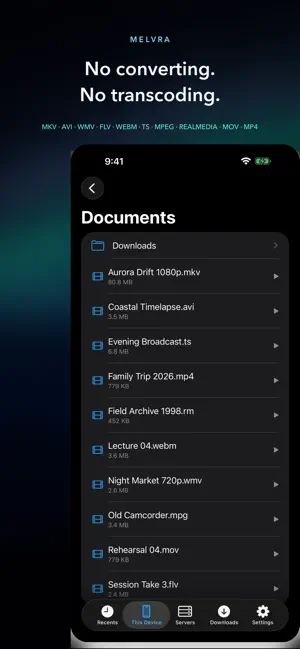
No converting. No waiting. No stalling. Melvra is a media player built only for iPhone and iPad. It opens the video sitting on your Mac, your PC, or your NAS without converting the file first. Instead of competing on the length of a format list, it is designed around two numbers you feel every single time: **how long it takes for the first frame to appear**, and **how long it takes to resume after you seek**. PLAY IT AS IT IS · MKV, AVI, WMV, FLV, WebM, TS, MPEG, MOV, MP4, RealMedia, and more · A built-in FFmpeg-based engine (496 decoders, 354 demuxers) · H.264, HEVC, and AV1 are handed to VideoToolbox still compressed, for hardware decoding. Only the codecs it cannot take are decoded in software · Files are identified by what is inside them, not by the extension, so a mislabelled file still opens SPEED YOU CAN SEE · The Performance HUD shows codec, resolution, frame rate, whether hardware decoding is active, dropped frames, **measured open and seek times in milliseconds**, bitrate, buffer, and thermal state · Keyframe positions are saved on first play, so opening and seeking the same file again is quicker YOUR NAS, WITHOUT COPYING · SMB (SMB2/3), WebDAV, and direct HTTP URLs · Credentials are stored in the Keychain, and you can test a connection before you save it · Read-ahead adapts to the throughput actually measured, and a seek cancels the read in flight so playback resumes from the new position SUBTITLES AND AUDIO TRACKS · ASS/SSA subtitles embedded in MKV are rendered by libass, with styles, positioning, and inline tags intact · External subtitle files (SRT, WebVTT, ASS, SSA), with ±0.5 s timing adjustment and adjustable size · Switch between multiple audio tracks without stopping playback — language, title, and codec are shown RELIABLE OFFLINE · Long-press a file on a server and choose Save Offline. If the transfer is interrupted, it resumes where it stopped · Saved files are size-checked, and a downloaded copy is always played in preference to the network one FILES ON YOUR DEVICE · In-app Documents, shared with the Files app · Add a USB-C SSD or another app's folder as an external folder and play from it in place, with no copying · Open a video in Melvra straight from another app STAYS COOL, SAVES BATTERY · Battery Guardian watches the device's thermal state and eases bitrate and resolution when it heats up · Choose Quality first, Auto, or Power saver WHILE YOU WATCH · Drag horizontally to seek, with a thumbnail preview; drag vertically on the left or right for brightness and volume · Double-tap either side for ±10 seconds, press and hold for 2× speed · 0.5× to 3.0× playback with pitch preserved, and A-B repeat · Picture in Picture, background audio, and AirPlay · Keyboard control on iPad (Space, arrow keys, J/K/L, Esc) PICK UP WHERE YOU LEFT OFF · Playback position is saved automatically, and one tap in Recents resumes it
App privacy
The developer, Code and DESIGN inc., reported these privacy practices to Apple.
Data Not Collected
The developer does not collect any data from this app.
Alternatives to Melvra: MKV Video Player
Looking for apps like Melvra: MKV Video Player? Here are 6 similar apps on the App Store. The highest rated is ZeoPlayer (2.0/5), and all 6 are free to download.
-
 俺の話はリズムから面白くない
-
 Apricot゜
-
 ZeoPlayer
2.0
ZeoPlayer
2.0
-
 Find Difference Games - Hard
-
 Livedio - M3U & Video Player
-
 MKV Video Player: All In One
1.0
MKV Video Player: All In One
1.0
| App | Rating | Price | Last updated | Compare |
|---|---|---|---|---|
| Melvra: MKV Video Player | – | Free | August 26, 2026 | |
| 俺の話はリズムから面白くない | – | Free | Oct 16, 2026 | Compare |
| Apricot゜ | – | Free | Sep 19, 2026 | Compare |
| ZeoPlayer | 2.0 / 5 (1) | Free | Oct 10, 2026 | Compare |
| Find Difference Games - Hard | – | Free | Dec 17, 2024 | Compare |
| Livedio - M3U & Video Player | – | Free | Oct 21, 2026 | Compare |
| MKV Video Player: All In One | 1.0 / 5 (1) | Free | Aug 8, 2026 | Compare |