

F50 Monitor
Kold Limited Liability Company Utilities iPhoneiPadiPod touch
F50 Monitor is a free Utilities app for iPhone and iPad by Kold Limited Liability Company. Rated 5.0/5 from 1 ratings. Requires iOS 16.0.
- Rating
- 5.0
- 1 ratings
- Price
- Free
- on the App Store
- Size
- 16 MB
- Age 4+
- Updated
- Oct 21
- 2026 · v1.3
Screenshots


About F50 Monitor
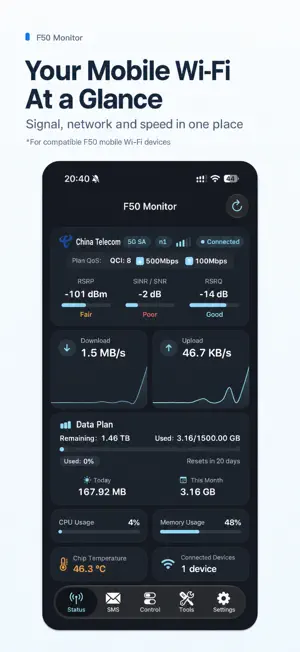
F50 Monitor helps you monitor and manage compatible mobile WiFi devices. Connect your iPhone to your device's WiFi, enter its management address and admin password, and view its status. Free Basic Features • Connect to your device and view signal, data usage, and connection status. • Automatically display available native system traffic statistics on compatible OpenWrt devices. Full Version Features • Access management and control features supported by your device. • View, manage, and send device SMS messages. • Use Network Doctor and placement assessment tools. • View CPU usage, memory usage, chip temperature, and other advanced information on devices that support ADB. • Use SMB file sharing where supported by your device. • View device status with Home Screen widgets. Purchase Information The full version offers a free trial lasting 7 consecutive days, with no automatic charge when it ends. The full version is a one-time purchase with no subscription. Use Restore Purchases to restore your purchase. Basic connectivity and status monitoring remain available after the trial ends. Requirements Device features require a compatible mobile WiFi device that you own. Availability varies by model, firmware, and ADB support. Please use the free trial to check compatibility before purchasing. OpenWrt features are available only on supported devices and firmware, and do not imply compatibility with all OpenWrt routers. This app does not replace a mobile data plan or guarantee faster internet speeds. Background refresh and widget updates are scheduled by iOS and are not guaranteed to update continuously in real time. Privacy Device status, SMS messages, and placement photos are processed on your device. Routine device communication does not pass through the developer's servers. When you actively run network diagnostics, the app contacts public connectivity test endpoints provided by Apple and Cloudflare. Purchases are handled by Apple StoreKit. See the privacy policy in the app for details. Support: [email protected] Privacy Policy: https://koldllc.com/privacy?lang=en Terms of Use (Apple Standard EULA): https://www.apple.com/legal/internet-services/itunes/dev/stdeula/
What’s new
Version 1.3 · Updated October 21, 2026
• Added network, speed, data usage, and hardware details, accessible from status cards on the main screen. • Added a connected-device list with client names and addresses on compatible devices. • Added a calibration shortcut to data usage details for adjusting local usage totals. • Improved F50 Pro stock firmware compatibility for data plans, real-time speeds, SMS read status, and band settings. • Added temperature, WAN addresses, QCI, and contracted bandwidth information from compatible stock firmware. Availability depends on the device and firmware. • Added manual band extensions for international models and improved band readback and default settings restoration. • Improved OpenWrt client details and WAN IPv4/IPv6 address display.
App privacy
The developer, Kold Limited Liability Company, reported these privacy practices to Apple.
Data Not Collected
The developer does not collect any data from this app.
Alternatives to F50 Monitor
Looking for apps like F50 Monitor? Here are 6 similar apps on the App Store. The highest rated is Bref Player (5.0/5), and all 6 are free to download.


| App | Rating | Price | Last updated | Compare |
|---|---|---|---|---|
| F50 Monitor | 5.0 / 5 (1 rating) | Free | October 21, 2026 | |
| Bref Player | 5.0 / 5 (8) | Free | Oct 15, 2026 | Compare |
| NetBot - 悬浮时钟 | – | Free | Jan 17, 2026 | Compare |
| Media joiner | – | Free | Apr 30, 2026 | Compare |
| APP应用收藏夹-跨平台应用管家 | – | Free | Jun 9, 2026 | Compare |
| Aurora Remote | 5.0 / 5 (1) | Free | Oct 17, 2026 | Compare |
| 度量衡-多单位转换一键换算工具 | – | Free | Dec 13, 2025 | Compare |
Compare F50 Monitor with the top alternatives: ratings, updates, ASO score and keyword gaps →