

TallyVally: Expense Tracker
Alisher Serikbayev Finance iPhoneiPadiPod touch
TallyVally: Expense Tracker is a free Finance app for iPhone and iPad by Alisher Serikbayev. Rated 5.0/5 from 2 ratings. Requires iOS 26.0.
- Rating
- 5.0
- 2 ratings
- Price
- Free
- on the App Store
- Size
- 15 MB
- Age 4+
- Updated
- Oct 18
- 2026 · v2.2.0
Screenshots


About TallyVally: Expense Tracker
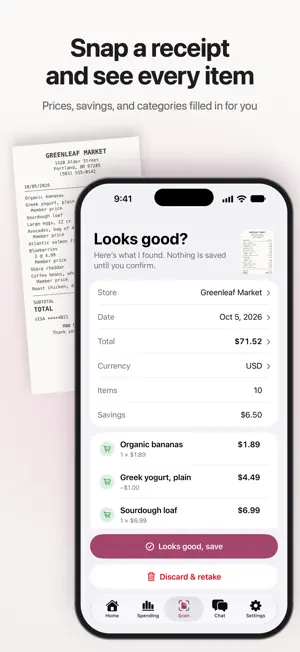
TallyVally turns the paper in your pocket into a spending record with every line in it. Snap a receipt or add a PDF, and you get the store, the date, each item, each discount and the total. No typing. No bank login. No account to create. TallyVally 2.0 is rebuilt from the ground up for iPhone. Your receipts, photos and subscription come with you. One photo, every line item Hold a receipt under the new receipt camera and it takes the photo by itself, straightened and trimmed. Or pick a photo from your library, or add a PDF from Files. TallyVally reads the store, the date, every item with its price and quantity, the discounts and the total, and sorts each item into a category. Nothing is saved until you check it and tap Save, and you can fix anything by hand. If a receipt looks like one you already saved, TallyVally asks first. See what you saved, not just what you spent Coupons, loyalty discounts and member prices come straight off the receipt and are added up for you, store by store. Your bank sees what left your account. It can't see the coupon printed on the paper. Find anything you bought Search every receipt by store or by item. Type "avocado" and see every receipt it's on. Your year, already added up Spending shows your year month by month, your categories and your stores, compared with the same point last year. Touch and hold the chart and slide to see any month, and tap a category or a store to see the receipts behind it. Ask a question, get a real answer "Where did my money go this year?" "What did I spend on groceries last month?" "When did I last shop there?" Ask in your own words. The figures come from the receipts on your iPhone. On iPhones that support Apple Intelligence, chat uses Apple's most advanced AI. It's free, it doesn't count against your questions, and its answers can include a chart. If it can't answer, Google's AI answers instead. Prefer to keep chat entirely on your iPhone? Turn that setting off, and a simpler Apple AI answers on the device. Traveling? TallyVally reads the currency from each receipt and keeps it with that purchase, then converts it at the published rate for the day you paid, so last March's total doesn't move tomorrow. Backed up in your own iCloud TallyVally keeps a copy of your receipts in your own iCloud, so they come back on a new iPhone. It goes to your Apple account, never to us, and you can turn it off in Settings. You can also keep a copy of each receipt's photo or PDF, and export everything to a spreadsheet whenever you like. Your money stays yours Your receipts live on your iPhone. No account, and no copy of your spending on our servers. Reading a receipt sends that photo or PDF to Google's Gemini AI, so whatever is printed on it gets read, including the payment method and a card's last four digits. TallyVally never asks for or stores a full card number, PIN or CVV. Chat never sends card details, and a stricter setting sends totals alone. No tracking, no ads, nothing sold. Free, and genuinely generous Start with 10 scans that never expire and 10 questions for Google's AI, then 3 more scans and 5 more questions at the start of every month. A scan that fails never counts. Your full history, every breakdown, search, the iCloud copy and export stay free. Premium removes both limits: scan as many receipts as you like, and ask as many questions as you like. Monthly or yearly, priced in your own currency by the App Store, renewing until you cancel. Terms of Use: https://www.apple.com/legal/internet-services/itunes/dev/stdeula/ Requires iOS 26 or later.
What’s new
Version 2.2.0 · Updated October 18, 2026
• Subscriptions and bills: list what you pay every month or year, see the total, and get a reminder before each charge. Tally also spots payments that repeat in your receipts. • What Tally noticed: price rises, what you buy most, and spending that's out of the ordinary, all from your own receipts. • Share your spending as a PDF report, free. • A "This month" widget and a Scan control for the Lock Screen and Control Center. • Home compares this month with last month, and "Ask Tally" puts a question about it in Chat.
App privacy
The developer, Alisher Serikbayev, reported these privacy practices to Apple.
Data Not Linked to You
The following data, which may be collected but is not linked to your identity, may be used for the following purposes:
- Purchases: Purchase History
- Financial Info: Payment Info
- User Content: Photos or Videos, Other User Content
- Diagnostics: Crash Data, Other Diagnostic Data
Used for: App Functionality
Alternatives to TallyVally: Expense Tracker
Looking for apps like TallyVally: Expense Tracker? Here are 6 similar apps on the App Store. The highest rated is SpendSnap - Expense Tracker (5.0/5), and all 6 are free to download.
-
 SpendSnap - Expense Tracker
5.0
-
 Pocket: Spending Tracker
5.0
-
 SnapSpend: Receipt Tracker
-
 Spendful - Mindful Spending
5.0
-
 Debt Guide - Payoff Planner
4.8
-
 Expense Tracker: Spendo
5.0
| App | Rating | Price | Last updated | Compare |
|---|---|---|---|---|
| TallyVally: Expense Tracker | 5.0 / 5 (2 ratings) | Free | October 18, 2026 | |
| SpendSnap - Expense Tracker | 5.0 / 5 (5) | Free | Jul 26, 2026 | Compare |
| Pocket: Spending Tracker | 5.0 / 5 (1) | Free | Mar 5, 2026 | Compare |
| SnapSpend: Receipt Tracker | – | Free | Aug 23, 2026 | Compare |
| Spendful - Mindful Spending | 5.0 / 5 (3) | Free | May 26, 2026 | Compare |
| Debt Guide - Payoff Planner | 4.8 / 5 (49) | Free | Jul 18, 2026 | Compare |
| Expense Tracker: Spendo | 5.0 / 5 (6) | Free | Aug 5, 2026 | Compare |