

Universal TV Remote: Power On
gen shinozaki Utilities iPhoneiPadiPod touch
Universal TV Remote: Power On is a free Utilities app for iPhone and iPad by gen shinozaki. Requires iOS 15.0. Updated October 13, 2026.
- Price
- Free
- on the App Store
- Size
- 24 MB
- Age 4+
- Updated
- Oct 13
- 2026 · v1.1.2
Screenshots


About Universal TV Remote: Power On
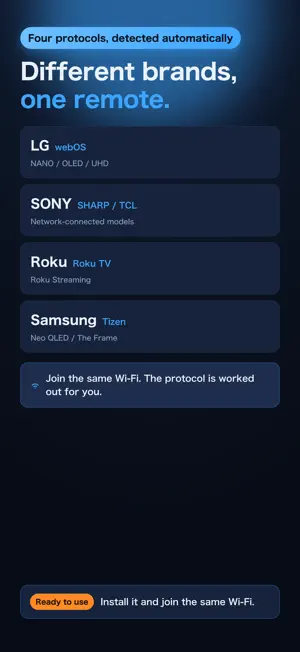
No subscription. No in-app purchases. No paid upgrade. The remote is missing. The batteries are dead. Someone left it in another room. When that happens, your iPhone becomes the remote, and unlike most remote apps, it turns the TV back on, not just off. It was built by someone who had tried a lot of remote apps and kept hitting the same problems: slow to respond, the useful buttons buried, no way to type a channel number. All of that is fixed. ■ It turns the TV on, not just off This app uses Wake on LAN to wake a TV from standby, so turning the TV on from bed in the morning actually works. * Your TV must have "turn on over network" enabled. See the notes below. ■ No in-app purchases Actions use "points": you start with 100 and each action spends one (press-and-hold and rapid presses count as one). Watching a rewarded video adds 30. "Turn the TV on" never costs a point, so running out can never leave you unable to switch the TV on. Points cannot be bought. ■ The buttons you use, where your thumb already is - A large circular D-pad with OK in the centre, sized for one-handed use - Volume and channel on rockers either side of the D-pad. Hold to repeat - Home, input, back and exit in a single row under the D-pad - The four coloured buttons (red, green, yellow, blue) ■ Captions, replay and search Turn subtitles on and off from the app, on LG and Samsung sets and other network-connected TVs. On Roku you also get instant replay and the options button (*), as on the physical remote. ■ Pick an input from a list, not by cycling The app asks your TV which inputs it has and shows them by name, including the names you gave your devices. TVs that do not report a list get HDMI 1-4. ■ A keypad for typing channel numbers Enter the number and go straight to it, including sub-channels like 12.1. Save the channels you watch most and reach them in a tap. ■ Launch streaming apps on the TV Open YouTube, Netflix, Prime Video, Hulu, Disney+, Apple TV, Spotify and others, whichever are installed on your TV. ■ Type with your iPhone keyboard Type on your iPhone and send it to the TV, instead of spelling a search out one letter at a time. ■ Supported TVs (detected automatically) - LG webOS (NANO, OLED, UHD and others) - Roku TV and Roku streaming devices - Samsung Tizen (Neo QLED, The Frame and others) - Network-connected TVs from Sony, Sharp, TCL and other brands Join the same Wi-Fi and the app finds the TV and works out its protocol. You do not need a separate app for each brand. ■ Getting started 1. Connect your iPhone to the same Wi-Fi network as the TV 2. Open the app. It looks for TVs on your network (iOS asks for Local Network access the first time) 3. Pick your TV and approve the connection on the TV screen (first time only) ■ Before you buy in - Your iPhone and TV must share a router. A TV on Ethernet is fine - Everything goes over Wi-Fi. Infrared (IR) is not supported - The first connection needs approval on the TV screen - Turning the TV on requires a setting on the TV. On LG sets, enable "Settings > General > External Devices > Mobile TV On". Some power-saving options prevent it - The app controls the television, not a cable or satellite set-top box. If you watch through a box, the app covers power, volume and input, but the channels are handled by the box's own remote - The app controls the television, not a cable or satellite set-top box. If you watch through a Sky, Virgin or similar box, it covers power, volume and input, but the channels are handled by the box's own remote - Some buttons are unavailable depending on your TV model and firmware. Buttons that cannot be used are dimmed - The app shows ads - Available in English, Spanish and Japanese, following your device language * Product and service names are trademarks of their respective owners. This app is not affiliated with or endorsed by any of them; they are listed as apps that can be opened on your TV.
What’s new
Version 1.1.2 · Updated October 13, 2026
Updated the App Store listing. No changes to how the app works.
App privacy
The developer, gen shinozaki, reported these privacy practices to Apple.
Data Not Collected
The developer does not collect any data from this app.
Alternatives to Universal TV Remote: Power On
Looking for apps like Universal TV Remote: Power On? Here are 6 similar apps on the App Store. The highest rated is Universal TV Remote Controls * (5.0/5), and all 6 are free to download.
-
 TV Remote・Universal
-
 Universal TV Remote Controls *
5.0
Universal TV Remote Controls *
5.0
-
 Zapp Remote for Android TV
-
 Universal Remote - TV & AC
1.0
Universal Remote - TV & AC
1.0
-
 SmartRemote: TV Controller
3.0
SmartRemote: TV Controller
3.0
-
 TV Remote Universal Control ·
4.5
TV Remote Universal Control ·
4.5
| App | Rating | Price | Last updated | Compare |
|---|---|---|---|---|
| Universal TV Remote: Power On | – | Free | October 13, 2026 | |
| TV Remote・Universal | – | Free | Aug 12, 2026 | Compare |
| Universal TV Remote Controls * | 5.0 / 5 (3) | Free | Oct 20, 2026 | Compare |
| Zapp Remote for Android TV | – | Free | Aug 16, 2026 | Compare |
| Universal Remote - TV & AC | 1.0 / 5 (1) | Free | Aug 15, 2026 | Compare |
| SmartRemote: TV Controller | 3.0 / 5 (2) | Free | Aug 12, 2026 | Compare |
| TV Remote Universal Control · | 4.5 / 5 (222) | Free | Mar 19, 2026 | Compare |