

Genoria — Family Tree
JESUS CARLOS HERNANDO GOMEZ Lifestyle iPhoneiPadiPod touch
Genoria — Family Tree is a free Lifestyle app for iPhone and iPad by JESUS CARLOS HERNANDO GOMEZ. Requires iOS 15.0. Updated October 15, 2026.
- Price
- Free
- on the App Store
- Size
- 25 MB
- Age 4+
- Updated
- Oct 15
- 2026 · v1.8
Screenshots
About Genoria — Family Tree
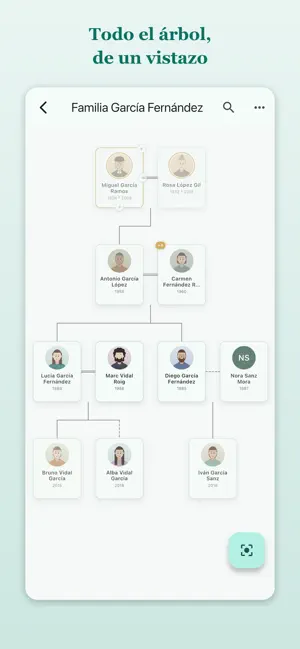
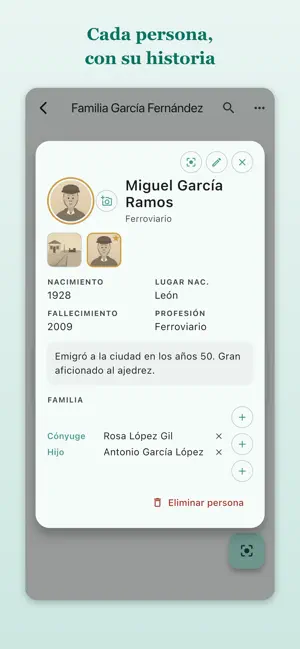
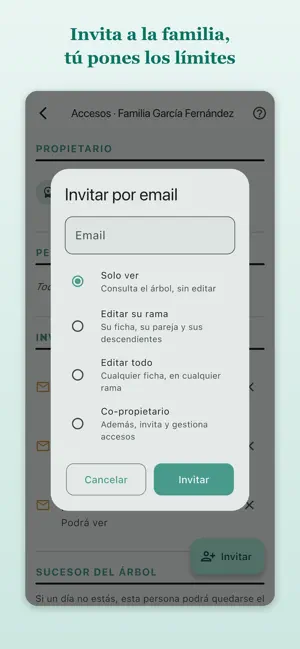
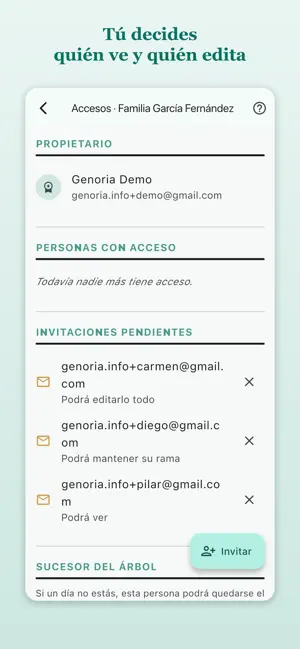
A family's surnames, dates and stories are usually scattered across a few memories and an old notebook. Genoria brings them together into one tree you can build as a family. HOW IT WORKS Start with yourself and add parents, children, partners and siblings. The tree draws itself and you pan around it with your finger. Every person gets a profile: photos, dates and places of birth and death, education, occupation, nickname, and as many notes as you want to write. YOU DON'T DO IT ALONE Invite whoever you like and decide what each of them can do: • View — browse the tree, change nothing. • Edit their branch — complete their own profile and add their partner and descendants. • Edit everything — add people anywhere in the tree. • Co-owner — also manages invitations and permissions. So you can open it up to the whole family without worrying that someone will undo another person's work. And anyone whose own profile is linked to their account can always correct their details, because they are theirs. TREES THAT FIND EACH OTHER When another family has recorded the same person, Genoria spots the match and lets you both know. If you agree, the two trees are linked through that person and each of you can look into the other's. Branches lost for generations show up at once. YOUR FAMILY IS NOT PUBLIC DATA We don't sell your data and there are no ads. A tree is seen only by the people you invite. And something almost no app handles: when you add a living relative, that person has a right to know. Genoria reminds you, sends them a notice showing exactly what is recorded about them, and lets them correct it or ask for it to be removed. Until they have been notified, their sensitive details are shown to nobody but you. ALSO • Import what you already have: coming from another genealogy program, upload its GEDCOM file and the whole tree is created at once. • Export to PDF to print your tree or keep it. • Create a new tree from a branch of an existing one. • Hand a tree over to someone else, or name a successor so the family keeps access if you are no longer around. • Works on phone, tablet and browser, with the same data. • In English, Spanish, Catalan, French and German. Your family tree, free. Terms of Use: https://www.genoria.app/condiciones?lang=en Privacy Policy: https://www.genoria.app/privacidad?lang=en
What’s new
Version 1.8 · Updated October 15, 2026
• The tree places father and mother together even if they were added separately. • With large text on your phone, buttons are now readable in full. • In ⋮ → Share, “Give access to the tree” now comes first. • When you add a father to someone who already has a mother (or vice versa), it asks whether they are a couple and links them. • “Edit their branch” now makes clear that person sees the whole tree. • “Stepdaughter” and “stepson” named correctly.
App privacy
The developer, JESUS CARLOS HERNANDO GOMEZ, reported these privacy practices to Apple.
Data Linked to You
The following data, which may be collected and linked to your identity, may be used for the following purposes:
- Contact Info: Email Address, Name
- User Content: Photos or Videos, Other User Content
- Identifiers: User ID
Used for: App Functionality
Alternatives to Genoria — Family Tree
Looking for apps like Genoria — Family Tree? Here are 6 similar apps on the App Store. The highest rated is Flinker (5.0/5), and all 6 are free to download.
-
 Yages Mobile
-
 Flinker
5.0
Flinker
5.0
-
 Arbol Familiar
-
 Family Tree: Private Archive
-
 Zuying · Family Tree
-
 Racines – Family Memories
| App | Rating | Price | Last updated | Compare |
|---|---|---|---|---|
| Genoria — Family Tree | – | Free | October 15, 2026 | |
| Yages Mobile | – | Free | May 18, 2026 | Compare |
| Flinker | 5.0 / 5 (2) | Free | Oct 15, 2026 | Compare |
| Arbol Familiar | – | Free | Oct 13, 2026 | Compare |
| Family Tree: Private Archive | – | Free | Sep 9, 2026 | Compare |
| Zuying · Family Tree | – | Free | Sep 9, 2026 | Compare |
| Racines – Family Memories | – | Free | Sep 25, 2026 | Compare |