

Dresser: AI Closet & Wardrobe
Maksim Bulat Lifestyle iPhoneiPadiPod touch
Dresser: AI Closet & Wardrobe is a free Lifestyle app for iPhone and iPad by Maksim Bulat. Rated 5.0/5 from 1 ratings. Requires iOS 18.0.
- Rating
- 5.0
- 1 ratings
- Price
- Free
- on the App Store
- Size
- 36 MB
- Age 4+
- Updated
- Sep 29
- 2026 · v1.1.0
Screenshots
About Dresser: AI Closet & Wardrobe
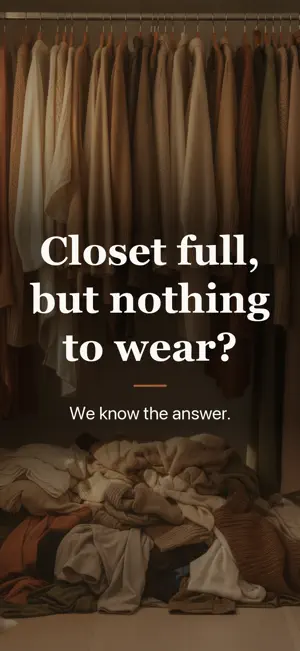
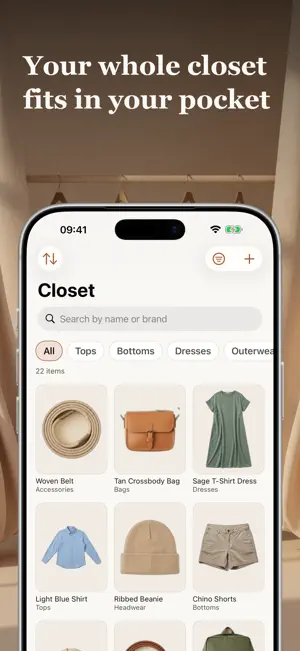
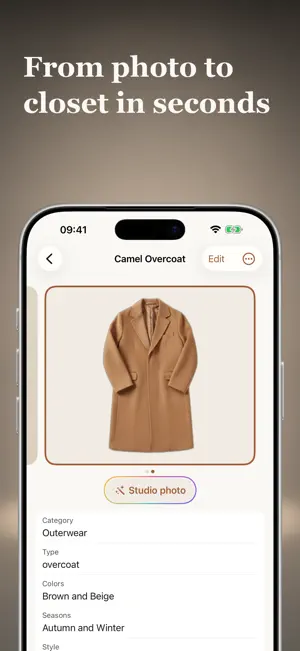
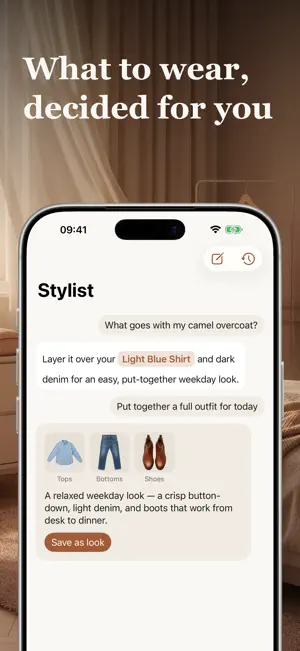
Closet full. Nothing to wear. You know the feeling: the rail is packed, the drawers won't close, and you're still standing there every morning with nothing to put on. A full closet doesn't answer the one question that actually matters — what do I wear today? Dresser is a stylist that lives in your phone and actually knows what you own. WAKE UP TO AN OUTFIT, NOT A DECISION Every morning, Dresser hands you a weather-ready outfit built entirely from clothes you already own — one tap to accept, shuffle, or tweak. No generic style-board ideas, no outfits you can't actually put on. Turn on a morning reminder after you log your first outfit — it stays quiet on days you've already decided. GET YOUR CLOSET INTO YOUR PHONE, WITHOUT THE DREAD Point your camera at each piece. Dresser cuts it out on the spot, and AI fills in category, color, and season while you keep shooting — you just confirm. Typing is never required, and the app is useful from your very first ten items, not only after two hundred. SEE YOUR OWN CLOTHES, CATALOG-CLEAN Turn an ordinary phone photo of any item into a clean, studio-quality shot — the same piece you own, shown the way it deserves to be seen. It's an optional extra image, never a replacement for your real photo. ADD A WHOLE OUTFIT FROM ONE PHOTO Snap an outfit — on you, on a chair, on the floor. Dresser finds every piece, cuts it out, tags it, and gives it its own studio photo. TURN A LOOK INTO A STUDIO PHOTO Turn a saved look into one studio photo: laid out, or on a figure — masculine, feminine, or built from your photo so it looks like you. GIVE YOUR STYLIST A MEMORY Tell it what you love and what you'd never wear in My style. It also learns from your chats, and everything it knows is visible and removable. ASK — GET OUTFITS FROM CLOTHES YOU ACTUALLY OWN Chat with a stylist grounded in your real closet, not a stock catalog. Ask what goes with that new jacket, what to wear to a rainy dinner, or how to bring back pieces that have been hanging unworn — every answer is something you can actually put on. COMPOSE LOOKS, NOT FORMS Arrange your own cutout items on a simple canvas. Save the combinations you love, and come back to them whenever you need one ready-made. FIND OUT WHAT YOU ACTUALLY WEAR See cost-per-wear, your most (and least) worn pieces, and the items quietly gathering dust — no guessing, just your own real habits. YOUR CLOSET STAYS FREE. FOREVER. Unlimited items, AI tagging, manual outfit building, wear tracking, basic stats, and full export — free, permanently, no catch. Free members also get 3 AI outfit suggestions a week and 10 stylist chat messages a month, both of which refill automatically. No ads, ever. DRESSER PREMIUM Go Premium for unlimited AI outfit suggestions and stylist chat (fair use applies) and deeper insights. Premium is offered as an auto-renewing subscription: • Dresser Premium Monthly — $9.99/month • Dresser Premium Annual — $39.99/year, with a 7-day free trial Studio photos for an item or a look share one credit balance. Premium includes monthly credits, a free starter allowance for everyone, and packs if you want more. Payment will be charged to your Apple ID account at confirmation of purchase. Subscriptions renew automatically unless auto-renew is turned off at least 24 hours before the end of the current period. Your account will be charged for renewal within 24 hours prior to the end of the current period, at the price shown above. Manage or cancel your subscription anytime in your Apple ID account settings. If you purchase a subscription before a free trial ends, the unused portion of the trial does not carry over. Privacy Policy: https://dresser-wardrobe.web.app/privacy Terms of Use: https://dresser-wardrobe.web.app/terms Dresser is built local-first: your closet lives on your device first, and exporting everything is always free. A digitized wardrobe is years of your own effort — it should always stay yours.
What’s new
Version 1.1.0 · Updated September 29, 2026
This one's big. Here's what your stylist can do now. • Snap a photo of a whole outfit — on you, on a chair, on the floor — and Dresser finds every piece, cuts each one out, and adds them to your closet, each with its own studio photo. The outfit is saved as a look right away too, with your original photo as one of its covers. Dresser won't jump you to a results screen on its own anymore — a notification, or a one-time "Your look is ready" bar in the closet, opens it when you're ready. And there's no more face-check: whatever photo you pick works. • Save a look, then get a studio photo of it: the garments laid out together, or worn by a figure. Choose a masculine or feminine figure, or add your own photo and the figure looks like you. • Every studio photo you generate sticks around. Item and look pages show them as a strip you can swipe through, you pick which one is the cover, and "Create another" makes one more without losing the last. Looks also switch between Canvas (your own arrangement, with an "Arrange" button right there) and Photo. • Studio photos read your clothes better now: a garment shot from the side or back comes back facing forward, one shoe becomes a pair, belts keep a single buckle, and cropping one piece out of an outfit photo no longer drags its neighbors along. Studio photos of single items are also about three times faster. • Premium now includes 50 studio photos a month, up from 10. Credits are simpler too: one balance, shared between item and look studio photos. If you've ever bought credits or a subscription, you'll see how many are left right on the button. • The stylist now remembers. Tell it what you love and what you'd never wear in More → My style, and it also learns quietly from your chats. You can see everything it knows and remove any of it. • Notifications, only when they make sense: a morning "what will you wear today?" once you've logged a first outfit, a note when the stylist's answer is ready, one when a studio photo is done. Each is your choice, in the moment. • Wear log now lets you pick a whole look from a gallery, the same way you pick items. And today's look won't offer to save an outfit you've already saved — it just opens it. • Garment photos are no longer cropped in the closet grid or the daily card. You see the whole piece. • Looks editor: the frame follows your finger as you move and rotate a piece, and you can bring a piece to the front or send it back. Your arrangement sticks now too, front piece included, even if all you did was rename the look. • Account now lives in one row under More — tap it for your Apple ID, sync, sign-out and delete. • A few small fixes: the camera's guide and toggles sit where they should, chat hides the keyboard as soon as you send, and Dresser says "give me a second" instead of a cold "typing…". If something feels off, write to us from More → Support. We read everything.
App privacy
The developer, Maksim Bulat, reported these privacy practices to Apple.
Data Not Linked to You
The following data, which may be collected but is not linked to your identity, may be used for the following purposes:
- Contact Info: Email Address
Used for: App Functionality
Alternatives to Dresser: AI Closet & Wardrobe
Looking for apps like Dresser: AI Closet & Wardrobe? Here are 6 similar apps on the App Store. The highest rated is Heart Soil: Spiritual Toolkit (5.0/5), and all 6 are free to download.
-
 Closetry: AI Closet & Try-On
-
 Modiste: AI Closet & Outfits
-
 Omriya: Gift Wishlist
-
 Heart Soil: Spiritual Toolkit
5.0
Heart Soil: Spiritual Toolkit
5.0
-
 Virtual Closet: Outfit Plan
-
 Closet AI: Smart Wardrobe
| App | Rating | Price | Last updated | Compare |
|---|---|---|---|---|
| Dresser: AI Closet & Wardrobe | 5.0 / 5 (1 rating) | Free | September 29, 2026 | |
| Closetry: AI Closet & Try-On | – | Free | Sep 21, 2026 | Compare |
| Modiste: AI Closet & Outfits | – | Free | Sep 20, 2026 | Compare |
| Omriya: Gift Wishlist | – | Free | Oct 5, 2026 | Compare |
| Heart Soil: Spiritual Toolkit | 5.0 / 5 (4) | Free | Sep 29, 2026 | Compare |
| Virtual Closet: Outfit Plan | – | Free | Oct 4, 2026 | Compare |
| Closet AI: Smart Wardrobe | – | Free | Jun 22, 2026 | Compare |