

As Told
Krishna Sathvik Mantripragada Productivity iPhoneiPadiPod touch
As Told is a free Productivity app for iPhone and iPad by Krishna Sathvik Mantripragada. Requires iOS 26.0. Updated September 2, 2026.
- Price
- Free
- on the App Store
- Size
- 3 MB
- Age 4+
- Updated
- Sep 2
- 2026 · v1.2.0
Screenshots


About As Told
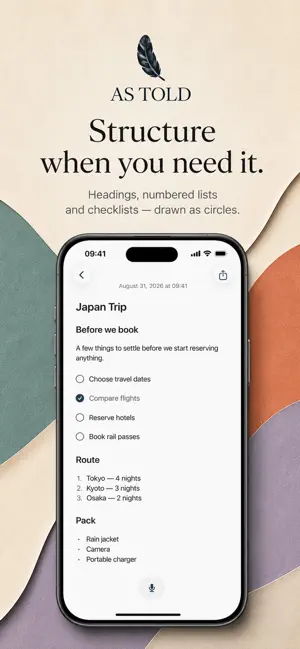
Write it. Say it. Keep it. As Told is a quiet, private writing space for anything you want to put into words. Capture a passing thought. Write a note. Work through an idea. Draft something longer. Make a plan. Build a list. Or tap the microphone and simply say what's on your mind. Typing and speaking belong on the same page, so you never have to decide what kind of note you're creating first. WRITE NATURALLY A clean page, a title if you want one, and a small writing toolbar just above the keyboard. No block picker, no formatting ribbon, no setup. Give a thought as much structure as it needs and no more. SAY IT INSTEAD The microphone sits beside the new-note button on Home. Tap it and As Told is already listening — there is no note to create first. Pause when you need a moment and pick the same recording back up. When your words come back, they become an ordinary note like any other: no separate voice inbox, no transcript screen to visit. Speaking inside a note works the same way, and the words land at your cursor. MAKE IT WHATEVER YOU NEED Headings and subheadings. Bulleted and numbered lists. Checklists you tick in place — a circle beside each line. Paste a plan, a table or a block of code and it arrives with its shape intact: tables stay tables, links stay tappable, code stays code, monospaced and syntax-coloured with Copy Code one tap away. FIND IT AGAIN Home keeps the recent days in view — Today, then the previous seven — with a short preview under every note. Search when you remember a word. Open the calendar when you remember the day: dots show how much you wrote on each one, and tapping a day lists its notes right under the month. SPEAK THE WAY YOU ACTUALLY SPEAK As Told doesn't ask you to choose a language before you talk. Speak in one, or move between two in the same sentence — the transcript comes back in the languages you used, in the scripts you used, rather than translated into one. Voice transcription is tested most closely with English, Telugu, Hindi, and speech that moves between them. Your words are transcribed as you said them. Punctuation, capitalisation and paragraph breaks are added so a spoken thought reads like written language — and that is all. Nothing is summarised, rewritten, polished or translated. YOUR WORDS SHOULDN'T DISAPPEAR If a recording can't be transcribed — no signal, a connection that dropped — it is kept on your iPhone so you can try again. Nothing you said is thrown away because the network wasn't there. SHARE WHEN YOU NEED TO Tap Share and iOS takes over. A note goes to whichever apps and services are already on your iPhone, with its formatting where the destination can take it and plain text everywhere else. As Told creates no link and keeps no record of what you sent. PRIVATE BY DESIGN No account, ever. Your notes live on your iPhone. A recording leaves the device only when you choose to transcribe it, only after you agree the first time, and nothing else from the note goes with it. No ads, no analytics, no third-party SDKs. Lock the app with Face ID if you like — it is off unless you turn it on. Whatever you want to put into words — write it, say it, keep it.
What’s new
Version 1.2.0 · Updated September 2, 2026
Home is easier to scan, and the calendar shows you your month. A clearer Home Notes are grouped into Today and the previous seven days, with a two-line preview under each title — titled and untitled notes side by side. Show all opens a busy group; Browse older notes takes you to the complete timeline. A calendar that shows where you wrote Dots under each day show how much you wrote that day. Tap a day and its notes appear right under the month — go back by when, not just by what. Checklists, drawn as circles A checklist item now has a circle beside it. Tap it to tick it off; it stays where you put it. Steadier voice A recording that is interrupted is finished properly before anything is sent, and when transcription can't start, the message says what actually happened. Quieter in Light and Dark A neutral palette across the app, so the only colour on the page is the one that means something.
App privacy
The developer, Krishna Sathvik Mantripragada, reported these privacy practices to Apple.
Data Linked to You
The following data, which may be collected and linked to your identity, may be used for the following purposes:
- Identifiers: Device ID
- Usage Data: Other Usage Data
Used for: App Functionality
Alternatives to As Told
Looking for apps like As Told? Here are 6 similar apps on the App Store. The highest rated is Papeza: Private PDF Scanner (5.0/5), and all 6 are free to download.
-
 MinDrop: Notes & Reminders
-
 Papeza: Private PDF Scanner
5.0
-
 DropMate: File Manager
5.0
-
 Outline - Tasks & Notes
-
 Samurai ‣ Get Insights Faster
5.0
-
 Idevo - Personal AI Archive
| App | Rating | Price | Last updated | Compare |
|---|---|---|---|---|
| As Told | – | Free | September 2, 2026 | |
| MinDrop: Notes & Reminders | – | Free | Oct 14, 2026 | Compare |
| Papeza: Private PDF Scanner | 5.0 / 5 (3) | Free | Oct 15, 2026 | Compare |
| DropMate: File Manager | 5.0 / 5 (1) | Free | Oct 13, 2026 | Compare |
| Outline - Tasks & Notes | – | Free | May 13, 2026 | Compare |
| Samurai ‣ Get Insights Faster | 5.0 / 5 (2) | Free | Sep 24, 2024 | Compare |
| Idevo - Personal AI Archive | – | Free | May 21, 2026 | Compare |
Compare As Told with the top alternatives: ratings, updates, ASO score and keyword gaps →