

Expense Tracker - MoneyDot
PHYU THIN KYI Finance iPhoneiPadiPod touch
Expense Tracker - MoneyDot is a free Finance app for iPhone and iPad by PHYU THIN KYI. Requires iOS 16.4. Updated October 4, 2026.
- Price
- Free
- on the App Store
- Size
- 44 MB
- Age 4+
- Updated
- Oct 4
- 2026 · v1.0.6
Screenshots



About Expense Tracker - MoneyDot
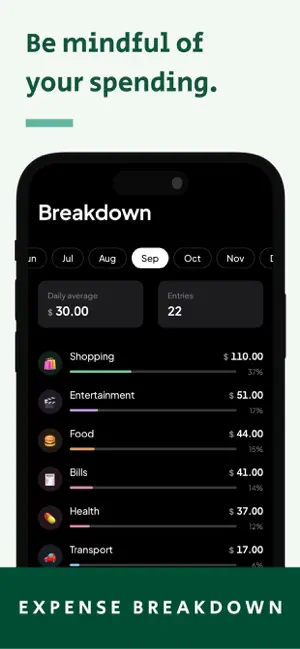
Most budgeting apps want your bank login, a subscription, and twenty minutes of setup before they tell you anything useful. Then they hand you a pie chart, when the only thing you wanted to know was whether you can afford dinner tonight. MoneyDot answers that one question, every time you open it: how much can I spend? You tell it your budget for the month. That's the whole setup. From then on, the first thing you see is how much of it is left — in big numbers, at the top, before you scroll or tap anything. 100 DOTS FOR YOUR MONTH Under the number sits a grid of 100 dots. They empty out as you spend. You can tell how the month is going from across the room, without reading a single figure. ADDING AN EXPENSE TAKES ABOUT FIVE SECONDS Tap the button next to the tab bar. Type the amount on the keypad that's already there. Tap a category — food, transport, whatever you made. Done. No forms, no receipt photos, no "which account was this from". Got the amount wrong? Tap Undo. You have five seconds on anything you add, change or delete. THE STUFF THAT REPEATS, REPEATS BY ITSELF Rent, Netflix, the gym, your phone bill. Set them up once — start, middle or end of the month — and MoneyDot enters them on the right day, on its own, dated correctly. Nothing to confirm, no list of things waiting for you. Pause one for a month, skip one, or change it like any normal expense. SEE WHERE THE MONEY WENT - Today: what you've spent, and what's left of today's share - A square for every day of the month — the darker it is, the more you spent that day - A calendar showing each day's total - Your recent expenses, and every past month you can scroll back through Tap any day to see exactly what you bought. A WIDGET ON YOUR HOME SCREEN Small or medium. Shows what's left this month, so most days you don't need to open the app at all. IT SPEAKS YOUR MONEY 154 currencies, from dollars to ringgit to yen. Six ways to write numbers — 1,234.56 or 1.234,56 or 1 234,56, with or without the cents. It picks the right one from your phone's region on the first launch, and you can change it whenever. A REMINDER ONLY IF YOU WANT ONE Off unless you turn it on. If you do, it's one gentle nudge a day, roughly when you normally log things — and it stays quiet on days you've already logged. No streaks to lose, no red warnings, no "you've overspent again". YOUR MONEY STAYS ON YOUR PHONE No account to create. No bank to connect. No cloud, no sync, no ads. Everything you type lives on your device and only there. When you want it elsewhere, export a month to a spreadsheet file through the share sheet. When you want it gone, erase everything from Settings. Three looks to choose from — Paper, Dusk and Void — or let it follow your phone. MoneyDot is a budgeting app, not an accounting program. It tells you where you stand; it doesn't lecture you. If what you want is to know whether lunch is affordable before payday, that's the entire app.
What’s new
Version 1.0.6 · Updated October 4, 2026
What's new - The summary now shows more detail, and currency amounts display more clearly. - History shortcuts added on home screen.
App privacy
The developer, PHYU THIN KYI, reported these privacy practices to Apple.
Data Not Linked to You
The following data, which may be collected but is not linked to your identity, may be used for the following purposes:
- Usage Data: Product Interaction
Used for: Analytics
Alternatives to Expense Tracker - MoneyDot
Looking for apps like Expense Tracker - MoneyDot? Here are 6 similar apps on the App Store.
-
 PiggyStash
-
 Expensed: AI Expense Tracker
-
 PocketLeft AI Expense Tracker
-
 Kids' Expense Tracker
-
 Spenday - Daily Budget
-
 What's Left - Money Tracker
| App | Rating | Price | Last updated | Compare |
|---|---|---|---|---|
| Expense Tracker - MoneyDot | – | Free | October 4, 2026 | |
| PiggyStash | – | Free | May 4, 2026 | Compare |
| Expensed: AI Expense Tracker | – | Free | Oct 7, 2026 | Compare |
| PocketLeft AI Expense Tracker | – | Free | Oct 23, 2026 | Compare |
| Kids' Expense Tracker | – | Free | May 16, 2025 | Compare |
| Spenday - Daily Budget | – | Free | Apr 1, 2026 | Compare |
| What's Left - Money Tracker | – | Free | Apr 22, 2025 | Compare |