

MP3 Converter + Ringtone Maker
Turbo Ventura FZCO Utilities iPhoneiPadiPod touch
MP3 Converter + Ringtone Maker is a free Utilities app for iPhone and iPad by Turbo Ventura FZCO. Rated 4.0/5 from 3 ratings. Requires iOS 17.0.
- Rating
- 4.0
- 3 ratings
- Price
- Free
- on the App Store
- Size
- 105 MB
- Age 4+
- Updated
- Oct 22
- 2026 · v1.1.0
Screenshots


About MP3 Converter + Ringtone Maker
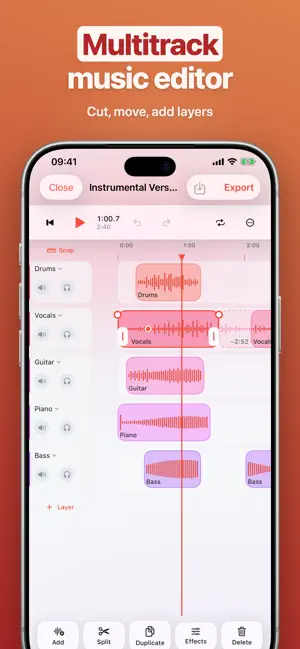
Pull the music out of any video, convert audio to the format you need, make your own ringtones and split a song into its instruments with AI. Conversion happens on your phone; your files are never uploaded to a server. VIDEO TO MUSIC • Extract the audio from MP4, MOV, MKV, AVI and more in seconds • 38 formats: MP3, M4A, AAC, WAV, FLAC, ALAC, OGG, Opus and beyond; MP4, MOV, MKV, WebM and GIF for video • When the source allows it, the audio is taken without re-encoding, so the quality stays exactly as it was • Batch conversion: queue a whole folder at once • Choose bitrate, sample rate and channels, and save them as a preset • Compare with the original in a preview before you convert ENHANCE THE SOUND • Even out the loudness, reduce noise, trim silence from the start and end • Karaoke, reverb, pitch and stereo width effects • Split long recordings by chapters, by CUE sheet or by silence • Speed, rotate and crop for video SEPARATE INSTRUMENTS WITH AI • Remove the vocals and get the instrumental version of a song • Isolate the vocals on their own • Split vocals, drums, bass, guitar, piano and everything else into separate tracks • Separation runs on your phone; your song is never sent anywhere 25 AUDIO TOOLS • Make a ringtone: pick the part you love and let your phone play it • Voice changer: robot, monster, alien, chipmunk, radio, telephone, cave, underwater and more — or set the pitch and the room yourself • Speech to text: turn conversations, lectures and voice notes into text • Text to speech: have what you write read aloud in a natural voice and save it as a file • Trim and merge: keep just the part you want, join tracks one after another • Add audio to video: put music on your video and balance the levels • Record: start recording with a single tap • Boost volume, normalize, compress; change speed and pitch; reverse STUDIO • Multitrack audio editor • Split, trim and move clips; add fades and effects • Record straight onto a layer, export the mix in the format you want PLAYER • Offline player for audio and video — MKV and AVI included • Background playback, lock screen controls, Picture in Picture • Up Next, playlists and favorites • Equalizer and presets, sleep timer, visualizer YOUR LIBRARY, YOUR WAY • A library organized in folders, with a tag and cover art editor • Add files from Files, Photos, the share sheet and Wi-Fi Transfer • Connect Google Drive, Dropbox, Yandex Disk, WebDAV, Nextcloud and SMB • App Lock: passcode, Face ID or Touch ID • Convert, make a ringtone or start recording with Shortcuts and Siri • Home Screen and Lock Screen widgets PREMIUM • Premium is offered as a weekly or yearly auto-renewing subscription, or as a one-time lifetime purchase. • Payment is charged to your Apple Account when you confirm the purchase. • A subscription renews automatically unless it is cancelled at least 24 hours before the end of the current period; the renewal is charged within the last 24 hours of the period. • You can manage and cancel your subscriptions at any time in your account settings on the App Store. Terms of Use: https://turboventura.com/terms Privacy Policy: https://turboventura.com/apps/mp3-converter/privacy
What’s new
Version 1.1.0 · Updated October 22, 2026
• iPhone Duo support • Performance improvements
App privacy
The developer, Turbo Ventura FZCO, reported these privacy practices to Apple.
Data Used to Track You
The following data may be used to track you across apps and websites owned by other companies:
- Identifiers: Device ID
Data Linked to You
The following data, which may be collected and linked to your identity, may be used for the following purposes:
- Identifiers: Device ID
Used for: Third-Party Advertising
Data Not Linked to You
The following data, which may be collected but is not linked to your identity, may be used for the following purposes:
- Usage Data: Advertising Data
- Diagnostics: Crash Data, Performance Data
- Purchases: Purchase History
- Location: Coarse Location
Used for: Analytics, App Functionality
Alternatives to MP3 Converter + Ringtone Maker
Looking for apps like MP3 Converter + Ringtone Maker? Here are 6 similar apps on the App Store. The highest rated is Audio Converter・MP3 Converter (4.6/5), and all 6 are free to download.
-
 Audio Converter・MP3 Converter
4.6
-
 Audio File Converter: My Media
-
 Converting Videos To MP3
4.1
-
 Combine Audio -Music,Mp3 Mixer
4.6
-
 All Video Downloader : Player
4.0
-
 FoxFM Offline Music MP3 Player
4.4
| App | Rating | Price | Last updated | Compare |
|---|---|---|---|---|
| MP3 Converter + Ringtone Maker | 4.0 / 5 (3 ratings) | Free | October 22, 2026 | |
| Audio Converter・MP3 Converter | 4.6 / 5 (10) | Free | Oct 6, 2026 | Compare |
| Audio File Converter: My Media | – | Free | Aug 22, 2025 | Compare |
| Converting Videos To MP3 | 4.1 / 5 (198) | Free | Feb 4, 2024 | Compare |
| Combine Audio -Music,Mp3 Mixer | 4.6 / 5 (126) | Free | May 18, 2026 | Compare |
| All Video Downloader : Player | 4.0 / 5 (216) | Free | Jul 7, 2026 | Compare |
| FoxFM Offline Music MP3 Player | 4.4 / 5 (29,769) | Free | Oct 1, 2026 | Compare |