

Authik - 2FA Authenticator
GEMIRY COMPANY LIMITED Utilities iPhoneiPadiPod touchMac
Authik - 2FA Authenticator is a free Utilities app for iPhone and iPad by GEMIRY COMPANY LIMITED. Requires iOS 17.0. Updated September 13, 2026.
- Price
- Free
- on the App Store
- Size
- 17 MB
- Age 4+
- Updated
- Sep 13
- 2026 · v1.1.0
Screenshots
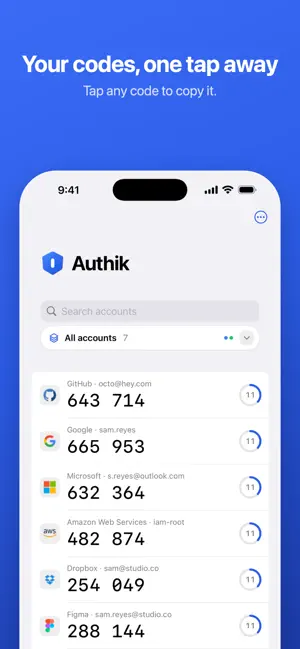


About Authik - 2FA Authenticator
Authik keeps your two-factor codes on your iPhone, behind a passcode and Face ID, and nowhere else. Every app that offers two-step sign-in gives you a QR code. Point Authik at it and the code appears in your list, counting down alongside the rest. No account to create, no sign-in, no sync service. Your secrets stay in the iPhone's Keychain and the app works entirely offline. ADDING AN ACCOUNT 1. Tap Scan QR Code and point the camera at the code. 2. Or pick a screenshot from Photos, or type the setup key by hand. 3. The account appears in your list with its six-digit code and timer. Codes are time-based (TOTP) or counter-based (HOTP), with SHA-1, SHA-256 and SHA-512. Google Authenticator export codes (otpauth-migration) import all accounts at once. LOCKED BY DEFAULT Authik is protected by a passcode you choose, with Face ID or Touch ID to unlock. Choose when it locks: immediately when you switch apps, after a delay, or never. Optionally hide codes in the list until tapped. When you set a passcode, Authik gives you a recovery key. It is the only way back in if you forget the passcode — Authik does not keep a copy. WIDGETS Pin an account and its code shows on your Home Screen and Lock Screen, refreshing on its own. A Lock Screen widget opens the scanner directly. Pinned secrets are stored in the shared Keychain, protected by your device passcode rather than the Authik passcode — Authik tells you this when you pin. ORGANISE Group accounts into folders, search by name, and long-press an account to move it. BACKUP AND RESTORE Export all accounts to a single encrypted file, protected by a password you choose. Restore it on a new phone, either merging with or replacing what is there. The backup is the recovery path that survives a lost passcode and a lost phone — keep one. FREE AND PRO Free includes everything above for up to 8 accounts and 3 folders. Authik Pro is a single one-time purchase — no subscription — and adds: • Unlimited accounts and folders • Hide in App Switcher: blurs the app preview so codes never show in the switcher • Advanced mode: per-account digits, period and algorithm, plus QR export of any account Restore Purchases is on the upgrade screen. PRIVACY Authik makes no network connections. There are no analytics, no crash reporting and no accounts. The camera is used only while you scan; Photos only for the image you pick; Face ID only to unlock.
What’s new
Version 1.1.0 · Updated September 13, 2026
- Add auto backup - Add nearby syncing
App privacy
The developer, GEMIRY COMPANY LIMITED, reported these privacy practices to Apple.
Data Not Linked to You
The following data, which may be collected but is not linked to your identity, may be used for the following purposes:
- Location: Coarse Location
- Identifiers: Device ID
- Usage Data: Product Interaction
Used for: Analytics
Alternatives to Authik - 2FA Authenticator
Looking for apps like Authik - 2FA Authenticator? Here are 6 similar apps on the App Store. The highest rated is Authenticator App " (5.0/5), and all 6 are free to download.
-
 Verity Authenticator: 2FA
-
 Duplicate Photo Cleaner.
4.8
-
 Authenticator App "
5.0
-
 Authenticator App : SafeAuth
-
 Two factor authenticator
-
 True Authenticator TOTP 2FA
5.0
| App | Rating | Price | Last updated | Compare |
|---|---|---|---|---|
| Authik - 2FA Authenticator | – | Free | September 13, 2026 | |
| Verity Authenticator: 2FA | – | Free | Sep 29, 2026 | Compare |
| Duplicate Photo Cleaner. | 4.8 / 5 (5) | Free | Nov 20, 2025 | Compare |
| Authenticator App " | 5.0 / 5 (1) | Free | May 21, 2026 | Compare |
| Authenticator App : SafeAuth | – | Free | Jul 29, 2026 | Compare |
| Two factor authenticator | – | Free | Oct 15, 2026 | Compare |
| True Authenticator TOTP 2FA | 5.0 / 5 (1) | Free | Jun 12, 2026 | Compare |