

PageNote
Tiancheng Gao Education iPhoneiPadiPod touch
PageNote is a free Education app for iPhone and iPad by Tiancheng Gao. Requires iOS 17.0. Updated October 12, 2026.
- Price
- Free
- on the App Store
- Size
- 37 MB
- Age 4+
- Updated
- Oct 12
- 2026 · v1.4.1
Screenshots
About PageNote
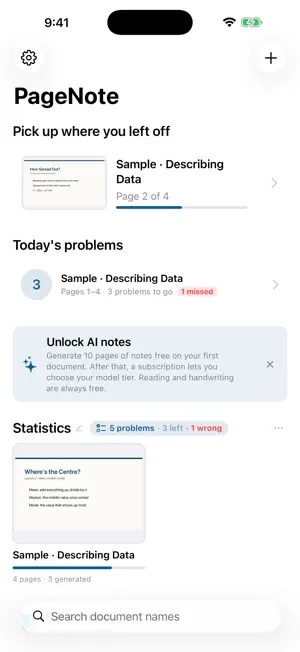
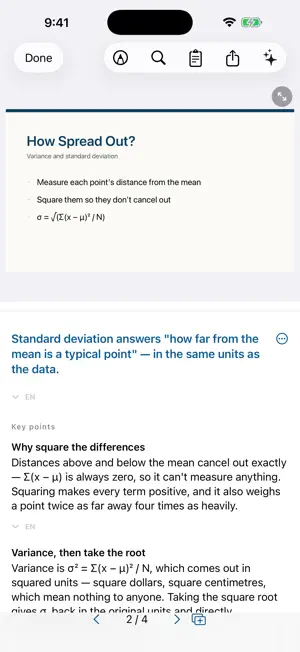
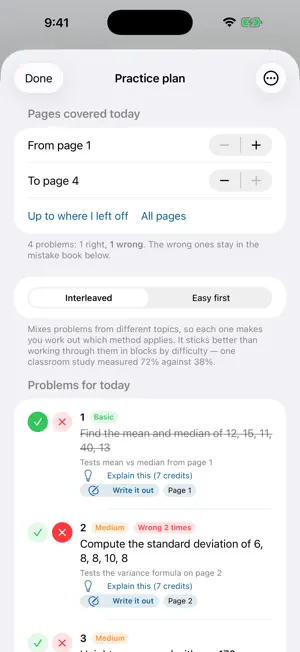
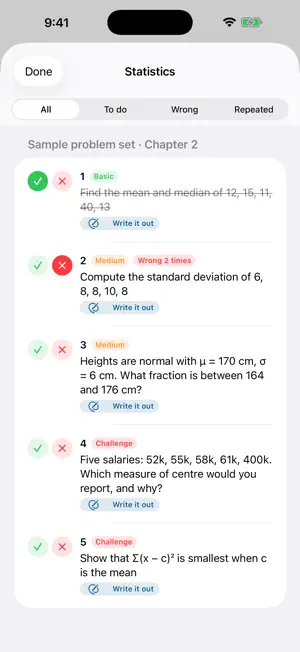
PageNote turns the lecture PDFs you already have into per-page study notes, and lines your problem sets up with how far your course has actually got. WHAT IT DOES • Per-page notes — open a lecture PDF and get a one-line summary, the key points, the terms that matter, and "how it's tested" for the page you're on. Not a summary of the whole deck: page by page, following your reading. • Problem sets that follow your progress — import a problem set and PageNote maps each question to the pages that teach it. Tell it how far today's lecture got — just the page number — and it pulls out the problems you can actually do now. • Write it out, then get it marked — do one problem per sheet with Apple Pencil, then ask for marking. It reads your working, says which step went wrong, and keeps what you missed in a mistake book. • Every problem, by subject — all of them in one place, filtered by To do, Wrong or Repeated. • Handwriting on the slides — annotate with Apple Pencil and export a PDF that combines the original slides with your handwriting. • Review — wrong answers and terms you keep forgetting go into one queue, spaced 1 / 3 / 7 / 14 / 30 days. One card at a time: think first, then flip. • Mock exam — before a test, pull a set of questions from a page range, with an optional timer. Mark yourself at the end; anything wrong goes into the mistake book. • Exam reminders and a Home Screen widget — set an exam date and get one reminder 7 days before and one the day before; the widget keeps the countdown and today's workload in front of you. FREE, AND WHAT COSTS MONEY Reading, Apple Pencil annotation and PDF export are free forever. Generate 10 pages of AI notes free on your first document — no key, no signup. After that a subscription covers the AI, you pick which model runs, and you can cancel any time in Settings. SUBSCRIPTION DETAILS • PageNote Standard — monthly, or one semester (6 months), auto-renewing • PageNote Advanced — monthly, or one semester (6 months), auto-renewing • PageNote Pro — monthly, or one semester (6 months), auto-renewing In mainland China, Hong Kong and Macau there are two tiers only (Standard and Advanced): fewer AI providers are reachable there, so both tiers run the same set of models and differ in monthly credits, and they are priced lower than elsewhere. Everywhere else there are three tiers, each unlocking a further class of model. Standard comes with a 7-day free trial, once per Apple ID within the subscription group; Advanced and Pro have no trial. When the trial ends it converts automatically into a paid Standard subscription, charged at the Standard price for your region. To avoid being charged, cancel in your Apple ID account settings at least 24 hours before the trial ends. Prices differ by region and may change over time. The exact price and period for your region are shown in the In-App Purchases list on this App Store page, and on the subscription screen inside the app, before you confirm. Payment is charged to your Apple ID at confirmation of purchase. The subscription renews automatically unless it is cancelled at least 24 hours before the end of the current period; your account is charged for renewal within 24 hours before the period ends. You can manage or cancel a subscription in your Apple ID account settings after purchase. Any unused part of a free trial, if offered, is forfeited when you buy a subscription. Terms of Use (EULA): https://terryg907.github.io/pagenote-legal/terms.html Privacy Policy: https://terryg907.github.io/pagenote-legal/privacy.html ANCHORED TO YOUR PAGE, NOT A CHAT You can tap a suggested question or type your own, but every answer is about the page you are on — nothing else. No conversation thread, no history between questions, and off-topic questions are declined. Each answer is saved as an annotation on that page, not as a chat log. AI can be wrong. Check anything that matters against your lecturer's material.
What’s new
Version 1.4.1 · Updated October 12, 2026
What's new in 1.4.1 - iCloud sync: turn it on in Settings to keep your documents, AI notes, handwriting, sticky notes and problem sets in your own iCloud, so they are there on your iPhone, iPad and Mac. It is off by default, and turning it off never deletes anything on your device. - Bug fixes and stability improvements.
App privacy
The developer, Tiancheng Gao, reported these privacy practices to Apple.
Data Linked to You
The following data, which may be collected and linked to your identity, may be used for the following purposes:
- Identifiers: Device ID, User ID
- Usage Data: Product Interaction
- Purchases: Purchase History
- User Content: Other User Content
- Diagnostics: Other Diagnostic Data
Used for: Analytics, App Functionality
Alternatives to PageNote
Looking for apps like PageNote? Here are 6 similar apps on the App Store. The highest rated is BearTranslate-Intelligent (5.0/5), and 5 of the 6 are free to download.
-
 BearTranslate-Intelligent
5.0
BearTranslate-Intelligent
5.0
-
 TypeWords: Vocab Typing
-
 PTE WFD: Write From Dictation
5.0
PTE WFD: Write From Dictation
5.0
-
 法寻
法寻
-
 ZhiGe
ZhiGe
-
 路觅教育
路觅教育
| App | Rating | Price | Last updated | Compare |
|---|---|---|---|---|
| PageNote | – | Free | October 12, 2026 | |
| BearTranslate-Intelligent | 5.0 / 5 (1) | 5.99 USD | Dec 11, 2024 | Compare |
| TypeWords: Vocab Typing | – | Free | Oct 18, 2026 | Compare |
| PTE WFD: Write From Dictation | 5.0 / 5 (2) | Free | Oct 16, 2026 | Compare |
| 法寻 | – | Free | Apr 8, 2025 | Compare |
| ZhiGe | – | Free | Oct 19, 2026 | Compare |
| 路觅教育 | – | Free | Oct 15, 2026 | Compare |
Compare PageNote with the top alternatives: ratings, updates, ASO score and keyword gaps →