

Speedometer: GPS Speedometer
Muhammad Aqib Navigation iPhoneiPadiPod touch
Speedometer: GPS Speedometer is a free Navigation app for iPhone and iPad by Muhammad Aqib. Requires iOS 17.6. Updated September 17, 2026.
- Price
- Free
- on the App Store
- Size
- 7 MB
- Age 4+
- Updated
- Sep 17
- 2026 · v1.0
Screenshots

About Speedometer: GPS Speedometer
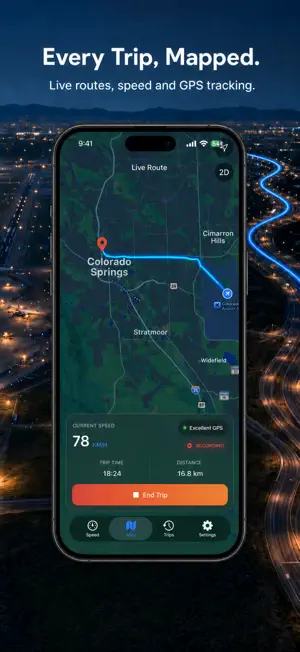
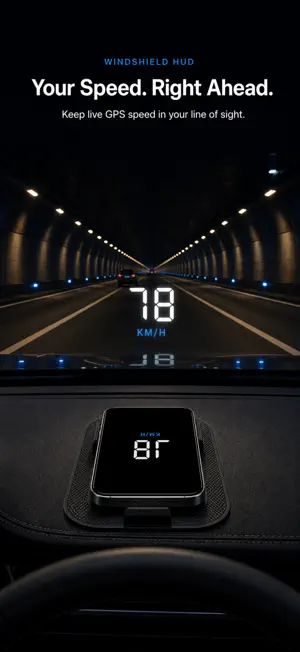
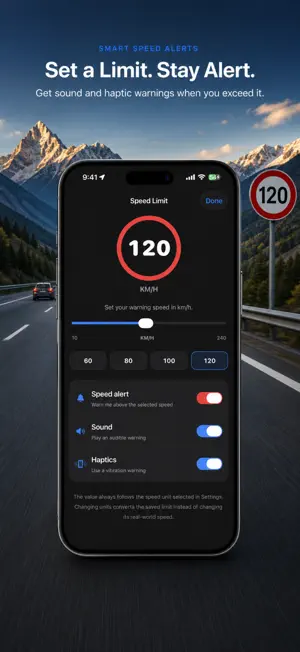
Turn your iPhone or iPad into a modern GPS speedometer for car journeys, daily commutes, bike rides, motorcycle trips, boating, and more. See real-time speed in MPH, KM/H, or knots, follow your route on a live map, and save every trip with detailed driving statistics. Whether you need a speedometer for car travel, a GPS speed tracker for a road trip, a digital MPH speedometer, or a trip odometer and mileage tracker, Speedometer delivers the essential information in a clean, driver-focused design. REAL-TIME GPS SPEEDOMETER: • View your current GPS speed on a large, easy-to-read display • Choose a modern analog gauge or digital speedometer • Switch between MPH, KM/H, and knots • Check GPS signal quality before you travel • Use portrait or landscape mode • Open Focus mode for a distraction-free speed display • Choose System, Light, or Dark appearance TRIP TRACKER AND GPS ODOMETER Start a trip to record your journey from beginning to end. The GPS odometer and mileage tracker capture: • Total distance • Trip duration • Moving and stopped time • Average and maximum speed • Start and finish locations • Your recorded route • Speed and altitude telemetry Save completed journeys to your trip history and review their map, statistics, and interactive charts whenever you want. LIVE MAP AND ROUTE RECORDER: Follow your position and recorded path on a live map. The map dashboard keeps current speed, trip time, distance, recording status, and GPS quality close at hand. Open a completed trip to see its route, start and finish points, and speed or altitude graph. HEAD-UP DISPLAY: Turn your device into a windshield HUD speedometer, heads-up display reflects digital speed. Secure your phone in a suitable holder or stable dashboard position, make any adjustments before the vehicle starts moving, and keep your eyes focused on the road. HUD is designed as a driving aid only and should never distract you from safe driving. CUSTOM SPEED LIMIT ALERTS: Set a warning speed and receive an alert when you go above it. • Adjustable speed limit • Quick limit presets • Optional sound warning • Optional haptic feedback • Automatic limit conversion when changing units The speed alert helps you stay aware but does not replace road signs or responsible driving. LIVE ACTIVITIES, LOCK SCREEN, AND DYNAMIC ISLAND: On supported devices, Live Activities keep ongoing speed and trip progress visible on the Lock Screen and Dynamic Island while recording, so useful information remains available without repeatedly opening the app. SMART TRIP EXPERIENCE: • Optional automatic trip detection while the app is running • Just start driving and trip will be detected automatically (must be enabled from settings) • Screen-awake option for continuous visibility • Clear location and GPS-accuracy guidance • Adaptive layouts for iPhone and iPad • Matching trip controls on the Speed and Map screens • Light and dark themes for day or night Use Speedometer 78 App as: • A GPS speedometer for car driving • An MPH speed tracker for American roads • A KM/H speedometer for travel and cycling • A bike speedometer and bicycle trip tracker • A motorcycle or scooter speedometer • A GPS odometer and mileage tracker • A speed limit monitor with sound and vibration • A route map and trip history recorder • A digital dashboard and windshield HUD • A speedometer in knots for boating From a quick commute to a long-distance drive, Speedometer keeps live speed, route, distance, and trip statistics organized in one modern dashboard. IMPORTANT: Speed is calculated from device location data. GPS availability and accuracy can vary with satellite reception, device hardware, reduced location permission, tunnels, covered areas, weather, and tall buildings. This app is not a certified vehicle instrument. Always follow official road signs, local laws, and your vehicle’s instruments. Mount your device securely and never interact with it while driving. Continued GPS use may affect battery life.
App privacy
The developer, Muhammad Aqib, reported these privacy practices to Apple.
Data Not Collected
The developer does not collect any data from this app.
Alternatives to Speedometer: GPS Speedometer
Looking for apps like Speedometer: GPS Speedometer? Here are 6 similar apps on the App Store.
-
 Speedometer: GPS & Odometer
-
 Traject by Derived
-
 DriveTrace - Car Drive Tracker
-
 TEDS - Train Detection System
-
 GPS Speedometer Tracker Free
-
 GPS Speedometer Mph - SpeedGo
| App | Rating | Price | Last updated | Compare |
|---|---|---|---|---|
| Speedometer: GPS Speedometer | – | Free | September 17, 2026 | |
| Speedometer: GPS & Odometer | – | Free | Aug 27, 2026 | Compare |
| Traject by Derived | – | Free | Sep 5, 2026 | Compare |
| DriveTrace - Car Drive Tracker | – | Free | Sep 4, 2026 | Compare |
| TEDS - Train Detection System | – | Free | Aug 13, 2026 | Compare |
| GPS Speedometer Tracker Free | – | Free | Mar 3, 2026 | Compare |
| GPS Speedometer Mph - SpeedGo | – | Free | Jun 25, 2026 | Compare |