

AirQR: QR Code File Transfer
qaqee Tecnologia da informacao Productivity iPhoneiPadiPod touch
AirQR: QR Code File Transfer is a free Productivity app for iPhone and iPad by qaqee Tecnologia da informacao. Requires iOS 17.0. Updated October 22, 2026.
- Price
- Free
- on the App Store
- Size
- 9 MB
- Age 4+
- Updated
- Oct 22
- 2026 · v1.1.2
Screenshots
Save to Pinterest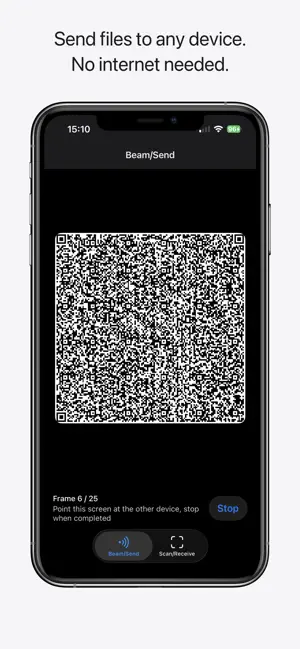

About AirQR: QR Code File Transfer
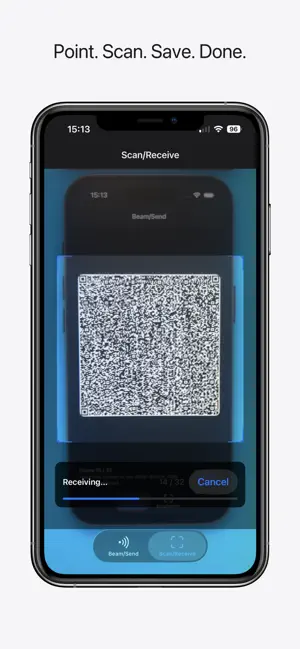
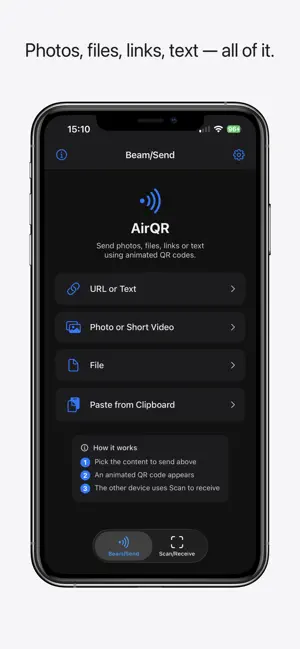
AirQR is an offline file transfer app that sends photos, videos, documents, links and text between devices with an animated QR code: one screen shows the code, the other scans it. No Wi-Fi. No Bluetooth pairing. No hotspot. No account. No cloud, ever. HOW IT WORKS Pick a photo, video, file, URL, or text on the sender. An animated sequence of QR codes appears on screen. Open Scan on the receiving device and point it at the screen — a progress bar fills as frames arrive. When the last frame lands, the file is reassembled exactly as sent. WHAT YOU CAN SEND • Photos and videos from your library • Any file: PDFs, documents, ZIPs, spreadsheets • URLs and links • Typed text or clipboard content • Content from other apps via the Share Extension BUILT FOR ZERO INFRASTRUCTURE AirQR works exactly the same in airplane mode, underground, on a flight, or on an air-gapped network with no internet access at all — not even a shared Wi-Fi network or hotspot. Most "offline" transfer apps still need both devices on the same Wi-Fi Direct connection; AirQR needs nothing but a camera and a screen. PRIVACY BY DESIGN Your files travel as light between two screens. They're never uploaded, cached, or transmitted over any network. No account, no sign-in, no data ever leaves your devices. SMART COMPRESSION AirQR automatically compresses content so transfers are as efficient as possible: • Photos are resized and re-encoded as JPEG • Videos are re-encoded with H.265 for a light, shareable file • Documents and text are compressed with LZMA — lossless, byte-identical on arrival Built for what it's great at: links, passwords, notes, small photos, and documents moving across a gap no network can bridge. For your original-quality camera roll or a big video library, your everyday same-network tools are still the better fit — AirQR earns its place for the moments those tools can't reach at all. SHARE EXTENSION Tap Share in Photos, Safari, Files, or any app and choose AirQR to beam content instantly — without switching apps first. BUILT FOR RELIABILITY Every QR frame carries a CRC integrity check. Corrupted or missed frames are silently discarded and re-scanned, so the transfer shrugs off brief obstructions or screen glare. AirQR is ideal for: — Sharing files without a corporate network or the same Wi-Fi — Swapping a link, Wi-Fi password, or note between two devices — Sending sensitive documents without cloud storage ever touching them — Transferring files in classrooms, conferences, or dead zones with no signal — Air-gapped and security-conscious workflows More at https://apps.qaqee.com
What’s new
Version 1.1.2 · Updated October 22, 2026
- New languages added - Bug fixes - Minor general improvements
App privacy
The developer, qaqee Tecnologia da informacao, reported these privacy practices to Apple.
Data Not Linked to You
The following data, which may be collected but is not linked to your identity, may be used for the following purposes:
- Identifiers: Device ID
- Usage Data: Product Interaction
- Diagnostics: Crash Data, Performance Data
Used for: Analytics
Alternatives to AirQR: QR Code File Transfer
Looking for apps like AirQR: QR Code File Transfer? Here are 6 similar apps on the App Store. The highest rated is Add Text to PDF - Fill Forms (4.8/5), and all 6 are free to download.
-
 PairDrop Pro
-
 Nekodoro
-
 All Cloud Hub: Storage Manager
-
 Alphaville R1
-
 Photo Cleaner - Clean Master
-
 Add Text to PDF - Fill Forms
4.8
| App | Rating | Price | Last updated | Compare |
|---|---|---|---|---|
| AirQR: QR Code File Transfer | – | Free | October 22, 2026 | |
| PairDrop Pro | – | Free | Aug 10, 2026 | Compare |
| Nekodoro | – | Free | Jan 7, 2026 | Compare |
| All Cloud Hub: Storage Manager | – | Free | Sep 23, 2026 | Compare |
| Alphaville R1 | – | Free | Jan 31, 2026 | Compare |
| Photo Cleaner - Clean Master | – | Free | Mar 3, 2025 | Compare |
| Add Text to PDF - Fill Forms | 4.8 / 5 (5) | Free | Nov 16, 2026 | Compare |