

Squirrel: Screen Time Savings
BRIAN RICHARD HALL Productivity iPhoneiPadiPod touch
Squirrel: Screen Time Savings is a free Productivity app for iPhone and iPad by BRIAN RICHARD HALL. Rated 5.0/5 from 2 ratings. Requires iOS 26.0.
- Rating
- 5.0
- 2 ratings
- Price
- Free
- on the App Store
- Size
- 14 MB
- Age 4+
- Updated
- Sep 16
- 2026 · v1.0.1
Screenshots

About Squirrel: Screen Time Savings
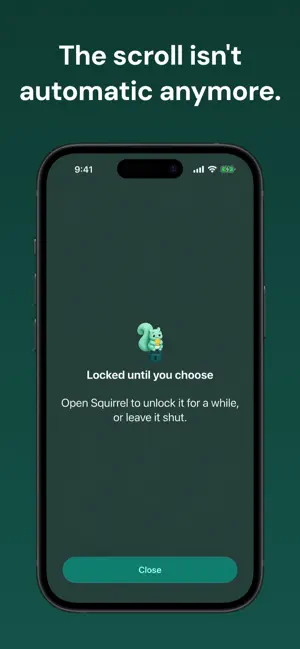
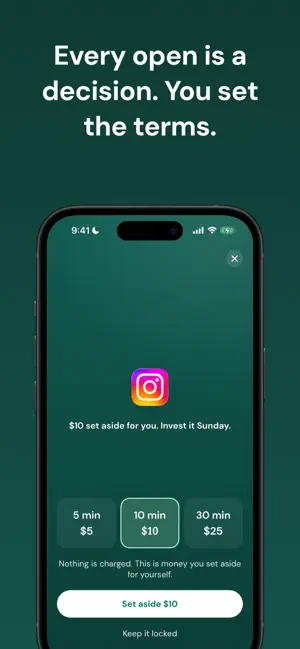
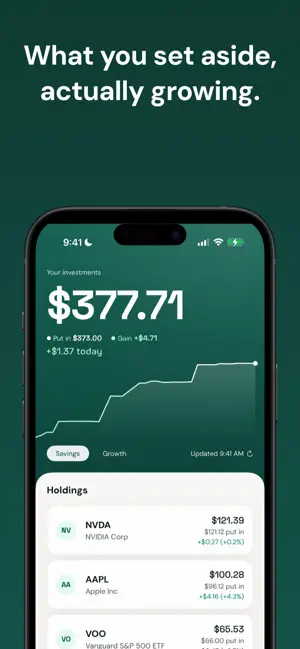
Some apps you open on purpose. Some you open out of habit. Squirrel turns the habit into savings, money you keep and invest. I almost never chose to open Instagram, it was always a knee-jerk reaction to being on my phone with nothing better to do. Growing up, staying focused and managing my time has always been a real struggle for me, and as social media got bigger, I felt more and more susceptible to doom scrolling and being careless with how I used these apps. But I never wanted to delete them. I truly believe there's a time and place for all of them. A lot of my relationships are better because of social media, whether that be from sending memes to friends, looking back on old memories, meeting my college roommate (true story), and even meeting my now girlfriend (another true story). It would be hypocritical to say social media hasn't improved my life, it certainly has. But the problem is the other side of it, the hours I lost without consciously deciding to. I've tried the built-in screen time limits. I had Instagram capped at 40 minutes a day... that same week I spent 12 hours and 48 minutes on it, more than double my next most used app, because "ignore limit for today" is one tap away. The week after I started using Squirrel it was 1 hour and 45 minutes. The week after that, 56 minutes. That's just my usage, but the drop was hard to argue with. Squirrel is different because it doesn't treat these apps as the enemy. Other apps do the blocking part, but none of them connect it to the other thing people my age are behind on, which is investing. Two problems most college students and young adults have: too much time on their phones, and no idea where to start with money. Squirrel puts them together so each one fixes the other. HOW IT WORKS Pick the apps you want to put behind a decision. Opening one is your cue to set a few dollars aside for yourself. Nothing is charged. No money moves through Squirrel. It only records what you set aside. You invest it yourself, wherever you already invest, and tell Squirrel what you bought. The optional Portfolio upgrade tracks it so you can watch it grow. NOTHING IS CHARGED Opening a blocked app is always free. The amount you set aside is a note to yourself, like a swear jar. Squirrel never processes a payment for it, never connects to your bank or brokerage, and never moves money. You decide what to do with it, outside the app. There are no goals, no targets, no limits, and no streaks. There is nothing to fail. FREE AND PAID Blocking, setting money aside, and your savings history are free forever. The Portfolio view (holdings, growth charts, market prices, and projections) is an optional paid upgrade: $19.99 once, or $8.99/year auto-renewing. Prices may vary by region. Portfolio features shown in the screenshots are part of this upgrade, and have nothing to do with blocking or opening apps. No account, no login, no ads, no tracking. Everything stays on your phone and in your own iCloud. Squirrel is not a bank, broker, or financial advisor and does not give investment advice. You make every investment yourself. Any growth figures shown are illustrations, not guarantees. Terms of Use: https://www.apple.com/legal/internet-services/itunes/dev/stdeula/ Privacy Policy: https://brian-hall-dev.github.io/squirrel-site/#privacy
App privacy
The developer, BRIAN RICHARD HALL, reported these privacy practices to Apple.
Data Not Collected
The developer does not collect any data from this app.
Alternatives to Squirrel: Screen Time Savings
Looking for apps like Squirrel: Screen Time Savings? Here are 6 similar apps on the App Store. The highest rated is BlockLab (5.0/5), and all 6 are free to download.
-
 Zenith: Reduce Screen Time
-
 IdeaTamer
-
 Awaitr - Waitlist Tracker
-
 BlockLab
5.0
BlockLab
5.0
-
 Nametag AI: Remember Names
-
 nenspace
5.0
nenspace
5.0
| App | Rating | Price | Last updated | Compare |
|---|---|---|---|---|
| Squirrel: Screen Time Savings | 5.0 / 5 (2 ratings) | Free | September 16, 2026 | |
| Zenith: Reduce Screen Time | – | Free | Sep 21, 2026 | Compare |
| IdeaTamer | – | Free | Apr 21, 2026 | Compare |
| Awaitr - Waitlist Tracker | – | Free | Mar 29, 2026 | Compare |
| BlockLab | 5.0 / 5 (1) | Free | Apr 30, 2026 | Compare |
| Nametag AI: Remember Names | – | Free | Oct 13, 2026 | Compare |
| nenspace | 5.0 / 5 (1) | Free | Sep 22, 2026 | Compare |