

Find Lost Device: Bluvik
Hrishikesh Javkar Utilities iPhoneiPadiPod touch
Find Lost Device: Bluvik is a free Utilities app for iPhone and iPad by Hrishikesh Javkar. Rated 5.0/5 from 1 ratings. Requires iOS 15.0.
- Rating
- 5.0
- 1 ratings
- Price
- Free
- on the App Store
- Size
- 24 MB
- Age 4+
- Updated
- Sep 29
- 2026 · v1.0.0
Screenshots


About Find Lost Device: Bluvik
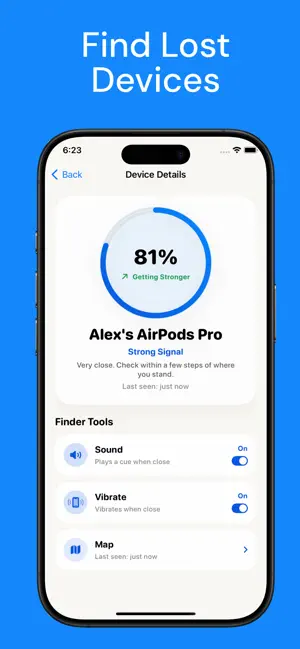
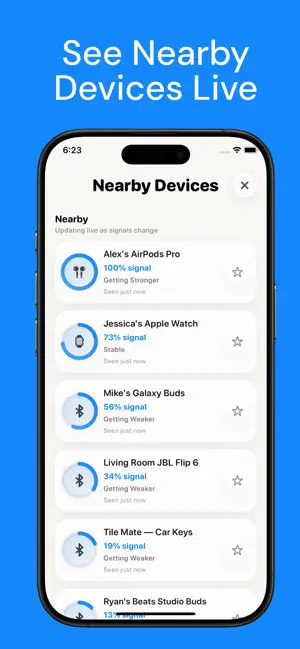
Misplaced your earbuds again? Bluvik turns your iPhone into a Bluetooth scanner that listens for the gear around you and tells you when you are getting warmer. HOW IT WORKS: 1. Tap Start Scan. Bluvik lists the Bluetooth devices around you, strongest signal first. 2. Pick the one you are hunting for and walk slowly. The signal meter climbs as you close in. 3. Turn on Sound and Vibration, and search with your hands instead of your eyes. WHAT BLUVIK DOES: - Tells you where to look. The percentage rises as you close in, and Bluvik says what that reading means — same room, a few steps, or arm's reach. - Sound and vibration as you get closer, so you can keep your head up and both hands in the couch cushions. - Last seen on a map. Every device Bluvik hears is pinned where your iPhone last heard it, with an accuracy radius and a shortcut into Maps. - Saved devices. Pin the gear you care about. Saved devices sit at the top of the list and update live the moment they are back in range. WORKS WITH: Wireless earbuds and headphones, smart watches, fitness bands, Bluetooth speakers, key tags, phones and tablets. Anything that broadcasts a standard Bluetooth LE signal. WORTH KNOWING: Bluvik finds devices that are powered on and broadcasting, so something switched off or sealed inside a closed charging case may not appear. Signal strength is a guide to distance rather than GPS, and the map shows where your iPhone last heard a device, not where it is now. Upgrade to Unlock Full Features & Unlimited Access - Weekly Plan - Starts at $4.99 - Annual Plan - Best value for year-round access - Starts at $39.99 Prices may vary by country. Enjoy full access with a subscription. Subscriptions auto-renew unless canceled at least 24 hours before the end of the current period. You can manage or cancel your subscription anytime from your iPhone Settings. Privacy Policy: https://hrishikeshjavkar.github.io/Bluvik/privacy.html Terms of Use: https://hrishikeshjavkar.github.io/Bluvik/terms.html Support: https://hrishikeshjavkar.github.io/Bluvik/support.html Bluvik is an independent app and is not affiliated with, authorized, sponsored, or otherwise approved by Apple Inc. or any other device manufacturer. iPhone is a trademark of Apple Inc., registered in the U.S. and other countries and regions. All other product names and trademarks are the property of their respective owners.
App privacy
The developer, Hrishikesh Javkar, reported these privacy practices to Apple.
Data Not Linked to You
The following data, which may be collected but is not linked to your identity, may be used for the following purposes:
- Purchases: Purchase History
- Identifiers: Device ID
- Usage Data: Product Interaction
- Location: Precise Location
- Diagnostics: Crash Data, Performance Data
Used for: Analytics, App Functionality
Alternatives to Find Lost Device: Bluvik
Looking for apps like Find Lost Device: Bluvik? Here are 6 similar apps on the App Store. The highest rated is Live text - Text flasher (5.0/5), and all 6 are free to download.
-
 Bluetooth Device Finder: FindB
1.0
Bluetooth Device Finder: FindB
1.0
-
 Netsbee: Wi-Fi Security
4.3
Netsbee: Wi-Fi Security
4.3
-
 Find Lost Device Track Locator
4.6
Find Lost Device Track Locator
4.6
-
 BMC Development Plan
-
 Water My Yard
3.2
Water My Yard
3.2
-
 Live text - Text flasher
5.0
Live text - Text flasher
5.0
| App | Rating | Price | Last updated | Compare |
|---|---|---|---|---|
| Find Lost Device: Bluvik | 5.0 / 5 (1 rating) | Free | September 29, 2026 | |
| Bluetooth Device Finder: FindB | 1.0 / 5 (1) | Free | Apr 20, 2026 | Compare |
| Netsbee: Wi-Fi Security | 4.3 / 5 (27) | Free | Oct 25, 2026 | Compare |
| Find Lost Device Track Locator | 4.6 / 5 (50) | Free | Sep 29, 2026 | Compare |
| BMC Development Plan | – | Free | Aug 11, 2026 | Compare |
| Water My Yard | 3.3 / 5 (16) | Free | Apr 3, 2026 | Compare |
| Live text - Text flasher | 5.0 / 5 (6) | Free | Feb 28, 2026 | Compare |