

HearingFriend Live Caption Amp
Menrong Jiang Utilities iPhoneiPadiPod touch
HearingFriend Live Caption Amp is a free Utilities app for iPhone and iPad by Menrong Jiang. Requires iOS 17.0. Updated September 25, 2026.
- Price
- Free
- on the App Store
- Size
- 22 MB
- Age 4+
- Updated
- Sep 25
- 2026 · v1.5
Screenshots


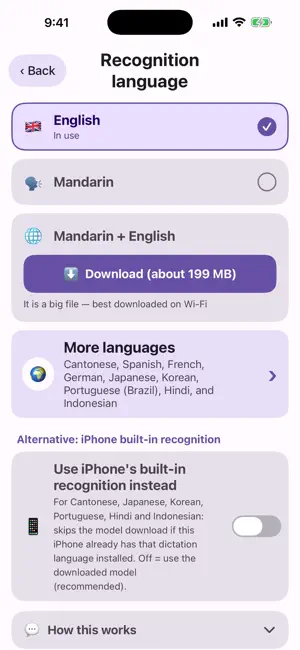
About HearingFriend Live Caption Amp
When it's hard to catch what family members are saying, put the phone on the table and press one big green button — their speech becomes large captions on screen. HearingFriend is an assistive tool for seniors and anyone who finds conversations hard to follow: LIVE CAPTIONS • Words appear as people speak — no waiting • Text can be made very large and easy to read • On supported iPhones with iOS 26, captions use iPhone speech recognition — more accurate, with automatic punctuation • Supports Mandarin (also mixed with English), Cantonese, English, Spanish, French, German, Japanese, Korean, Portuguese, Hindi and Indonesian • The first time, download the speech model (free); after that it works completely offline HEARING AMPLIFIER • Plug in headphones (wired or Bluetooth) and amplify nearby voices • Quiet speech is boosted automatically; sudden loud noises are limited so they don't startle you • Three volume levels, plus a treble boost that makes consonants clearer DESIGNED FOR SENIORS • Big buttons, big text, clear colors — nothing to learn • Switch headphones and it keeps listening; if it ever stops, it tells you why, and one tap starts it again • Conversations are saved for 30 days, so you can always check what was just said • Long-press any line to fix a mistake — the app remembers and corrects it automatically next time • Add frequent names and places to “My words” for better accuracy • Caption differentiation: your own words fade so other people's stand out PRIVACY • Everything stays on your phone — no uploads, no ads, no tracking • Cloud backup is disabled; nothing is sent to any server Note: this is not a medical device and cannot replace a hearing aid. If you have concerns about your hearing, please see an ENT doctor or an audiologist.
What’s new
Version 1.5 · Updated September 25, 2026
MORE ACCURATE CAPTIONS: Starting with iOS 26, supported iPhones use iPhone speech recognition. It's more accurate and adds punctuation for you. The first time, just tap “Install” on the main screen. It's free and usually takes 10–20 seconds. Everything is still recognized right on your phone, and nothing is uploaded. MORE RELIABLE: Switch headphones or reconnect Bluetooth, and listening picks right back up on its own. If it ever stops (say, for a phone call), the screen tells you why. Just tap “Keep listening” to carry on. EASIER SETTINGS: The “Recognition language” page is reorganized, so you can see at a glance which kind of recognition each language uses. Plus stability fixes and clearer wording.
App privacy
The developer, Menrong Jiang, reported these privacy practices to Apple.
Data Not Collected
The developer does not collect any data from this app.
Alternatives to HearingFriend Live Caption Amp
Looking for apps like HearingFriend Live Caption Amp? Here are 6 similar apps on the App Store.
-
 こえの窓
こえの窓
-
 Live Transcribe, Voice to Text
-
 SoundLinker
-
 編集電卓 ボタンをカスタムしてよく使う数字を入力できる計算機
-
 Shogi Diagram Maker
-
 FuncNote
| App | Rating | Price | Last updated | Compare |
|---|---|---|---|---|
| HearingFriend Live Caption Amp | – | Free | September 25, 2026 | |
| こえの窓 | – | Free | Jul 24, 2026 | Compare |
| Live Transcribe, Voice to Text | – | Free | Oct 22, 2026 | Compare |
| SoundLinker | – | Free | Mar 26, 2026 | Compare |
| 編集電卓 ボタンをカスタムしてよく使う数字を入力できる計算機 | – | Free | Jun 14, 2024 | Compare |
| Shogi Diagram Maker | – | Free | Sep 18, 2026 | Compare |
| FuncNote | – | Free | Sep 22, 2026 | Compare |