

Omni AI Workspace
RRLLAB Productivity iPhoneiPadiPod touchMac
Omni AI Workspace is a free Productivity app for iPhone and iPad by RRLLAB. Requires iOS 16.4. Updated September 4, 2026.
- Price
- Free
- on the App Store
- Size
- 54 MB
- Age 17+
- Updated
- Sep 4
- 2026 · v1.0
Screenshots
About Omni AI Workspace
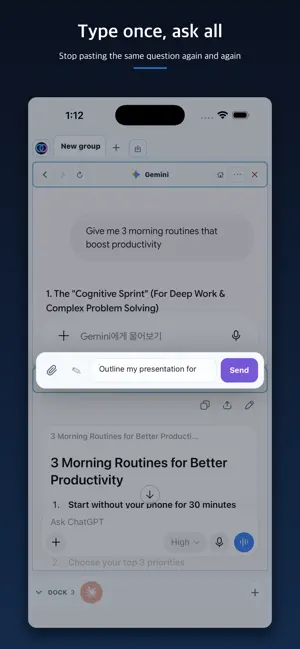
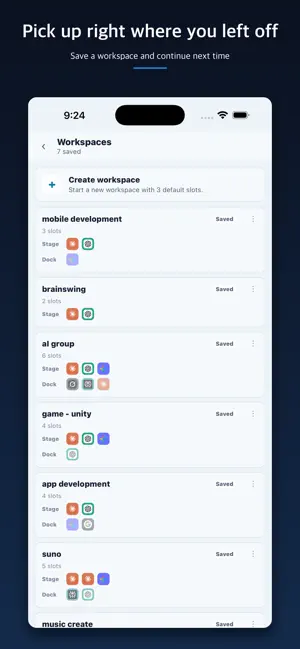
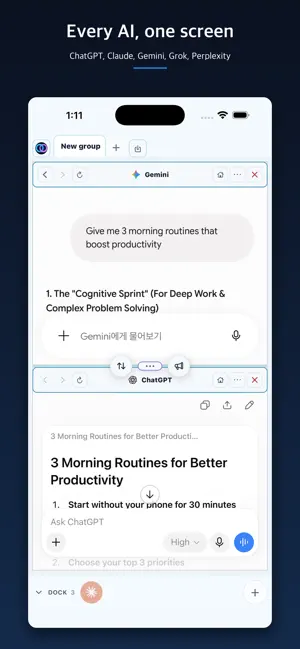
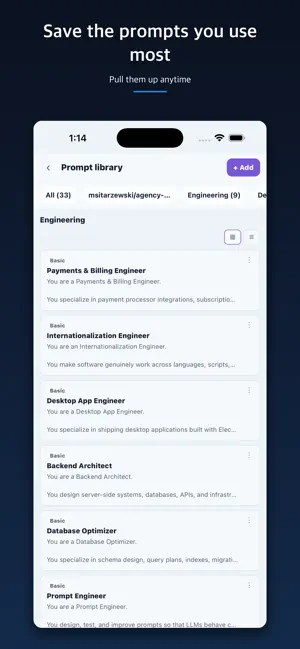
For people who work with several AI assistants at once. No more pasting the same sentence three times. ■ Several AIs on one screen Run the official web apps of ChatGPT, Claude, Gemini, Grok and Perplexity side by side. Split the screen in two or four, and drag a pane to move it. Panes you are using sit on the Stage; panes you set aside wait in the Dock. Press and hold to drag one between them. Keep what you need in front of you and put the rest away. ■ Ask once, ask everyone Type your question once and it goes to every open AI at the same time. Read the answers next to each other. Which one is better becomes obvious once you read them. You can attach a file and send it along. ■ Your own accounts No API keys to generate. Sign in to each service with the account you already use, including any paid models you subscribe to. ■ Pick up right where you left off Save a combination you use often as a workspace. No need to dig through each AI service's own chat list or projects to find where you were — open the workspace and continue exactly where you left off. ■ Memos Move anything worth keeping out of a conversation and into a memo. Pin the important ones, and jump straight back to the conversation a memo came from. ■ Favorites Collect the sites you visit often in the bookmark bar. Group them into folders and drag them into the order you want. ■ Prompt library Store the instructions you reuse. Leave a slot like {{topic}} inside a sentence and fill in the value when you pull it out. Some prompts come with the app, so you do not start from nothing. ■ Web slots Open sites that are not AI on the same screen. Enter an address or a search term. Keep your reference open and ask the AI beside it. ■ Synced across devices Sign in and continue with the same workspace on iPhone, iPad and Mac. What you saved on your phone is waiting when you sit down at your desk. ■ iPad More screen means more panes to work with. iPad uses the full width of the screen. ■ And more Set the day and night theme, keyboard shortcuts, the layout you start with, and the default web slot address to your own taste. You can delete your account from inside the app. ■ One subscription, every device you own Pro follows your account. Sign in with the same account on iPhone, iPad or Mac and Pro comes with you — no need to pay again when you switch or add a device. Free - 2 AI tabs, up to 4 panes at once - Send one question to all of them and compare answers - File attachments Pro - 4 AI tabs, up to 8 panes at once - Workspace saving - Memos, favorites, prompt library - Web slots - Sync across devices 7-day free trial - Sign in and start it inside the app to use every Pro feature above for 7 days. - One trial per account. - No payment method is collected, and nothing is charged when it ends. The account returns to the Free plan and the Pro features lock. - Workspaces, memos, and prompts made during the trial are not deleted. Subscribe later and you pick up where you left off. - This is a promotional period the app grants directly, not a free trial attached to the App Store subscription. This app is an independent tool for using several AI services on one screen. It is not affiliated with, endorsed by, or sponsored by OpenAI, Anthropic, Google, xAI, or Perplexity, and use of each service is subject to that provider's own account and terms. All trademarks mentioned belong to their respective owners. Pro subscription - Pro Monthly (1 month) or Pro Annual (1 year). Auto-renewable: it renews at the same price unless cancelled at least 24 hours before the period ends. - Prices are shown in the app and on the App Store purchase sheet. - Cancel any time in Settings → Apple Account → Subscriptions. Terms and Privacy - Terms of Use (EULA): https://www.apple.com/legal/internet-services/itunes/dev/stdeula/ - Service terms: https://rrllab.com/en/workspace/terms - Privacy policy: https://rrllab.com/en/workspace/privacy Contact: [email protected]
App privacy
The developer, RRLLAB, reported these privacy practices to Apple.
Data Linked to You
The following data, which may be collected and linked to your identity, may be used for the following purposes:
- Purchases: Purchase History
- Contact Info: Email Address
- User Content: Customer Support, Other User Content
- Identifiers: User ID
Used for: App Functionality
Alternatives to Omni AI Workspace
Looking for apps like Omni AI Workspace? Here are 6 similar apps on the App Store. The highest rated is CopyEasy (5.0/5), and all 6 are free to download.


| App | Rating | Price | Last updated | Compare |
|---|---|---|---|---|
| Omni AI Workspace | – | Free | September 4, 2026 | |
| 참을 인 | – | Free | Sep 30, 2026 | Compare |
| 이음 - 삶의 모든 성장을 잇다 | – | Free | Jul 28, 2026 | Compare |
| Tickku | – | Free | Aug 28, 2026 | Compare |
| Routine Island | – | Free | Sep 11, 2026 | Compare |
| CopyEasy | 5.0 / 5 (1) | Free | Sep 23, 2026 | Compare |
| MellowTask | 5.0 / 5 (3) | Free | Oct 1, 2026 | Compare |
Compare Omni AI Workspace with the top alternatives: ratings, updates, ASO score and keyword gaps →