

WakeUp Alarm Clock & Snore Log
UTKU ZIP Lifestyle iPhoneiPadiPod touch
WakeUp Alarm Clock & Snore Log is a free Lifestyle app for iPhone and iPad by UTKU ZIP. Requires iOS 15.0. Updated September 15, 2026.
- Price
- Free
- on the App Store
- Size
- 60 MB
- Age 4+
- Updated
- Sep 15
- 2026 · v1.0.2
Screenshots


About WakeUp Alarm Clock & Snore Log
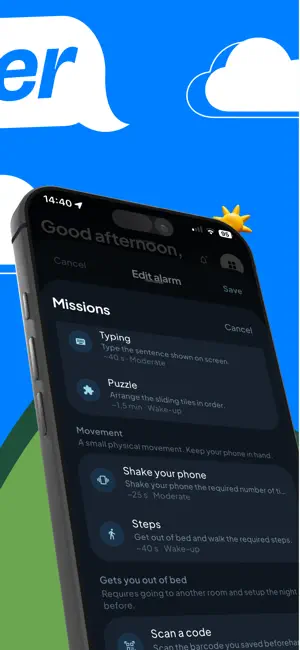
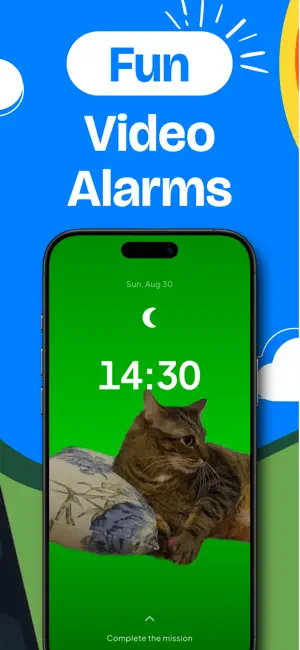
You set five alarms last night. You turned off all five. You do not remember doing any of it. WakeUp does not let that happen. Before the sound stops, you have to do something that needs a working brain: solve a problem, repeat a pattern, or walk to the kitchen and scan the barcode you stuck on the coffee jar. By the time the alarm is off, you are standing up and awake. WAKE-UP MISSIONS THAT ACTUALLY WORK Sixteen of them, each with difficulty levels you can raise as you get used to them. - Math: the number of digits grows with the difficulty - Missing sign: work out which operator makes the equation true - Memory: repeat the pattern shown on the grid - Typing: type the sentence out, letter by letter - Shake, Steps, Stretch: get your body out of bed, not just your thumb - Scan a code: keep the barcode in another room and you have to walk there - Photo: take a picture of a place you chose the night before - Sliding puzzle, color test, reaction test: real cognitive load - Breathing, dream note, card of the day: gentler mornings when you want one Chain several missions on one alarm. Cap the snooze, or switch it off entirely. IT RINGS. THAT IS THE WHOLE POINT. The alarm is scheduled on the phone itself, not on a server. It fires in airplane mode, with no signal, on a plane, in a basement. It shows on the lock screen and rings even when the app is closed. You can also stop the app being deleted while an alarm is due. KNOW HOW YOU SLEPT Put the phone on the nightstand. No watch, no band, nothing extra to charge. - Sleep stages drawn as a hypnogram, night by night - A sleep quality score from 0 to 100, and what moved it - Snoring and night noise captured with real decibel levels, so you can hear what happened - Smart alarm: rings in your lightest sleep inside the window you choose, so you wake mid-stage instead of mid-dream - A sleep goal with a bedtime reminder that follows the alarm you set YOUR MORNING, NOT JUST YOUR ALARM The first screen after you get up shows the weather hour by hour, asks how you feel in one tap, and tracks the habits you are trying to hold. Habits can be confirmed with a photo. Streaks build. Weekly and monthly reports show what is actually changing: how long you slept, how often you snoozed, how loud the room was, which habits survived. MAKE IT YOURS Alarm sounds and video alarms that play with their own audio. Color themes you can download. Labels, repeat days and a separate bedtime reminder for every alarm. WHAT STAYS ON YOUR PHONE This app listens to your bedroom, so it is worth being exact about this. - Raw microphone and motion data never leave the device. They become sleep stages each morning and are then deleted. - Snore clips are stored locally only, never uploaded, and removed after 14 days. - Photo missions keep a 64-bit signature for comparison, never the photo. - No account, no sign-up, no email address. FREE AND PREMIUM The alarm, the missions, sleep tracking and your reports are free. Premium unlocks the full sound and video library, every color theme, the premium missions and unlimited report history. PRIVACY Microphone and motion data are processed on your device and deleted each morning; snore clips never leave your phone. We ask for tracking permission to measure advertising, and every feature stays available if you decline. Subscription Information WakeUp Premium is an auto-renewable subscription. Subscriptions renew automatically unless cancelled at least 24 hours before the period ends. Payment is charged to your Apple ID at confirmation of purchase. Manage or cancel in your App Store account settings. Privacy Policy: https://wakeup.workorm.com/privacy Terms of Use (EULA): https://www.apple.com/legal/internet-services/itunes/dev/stdeula/ WakeUp is not a medical device and does not diagnose any condition.
What’s new
Version 1.0.2 · Updated September 15, 2026
Bug fixes and performance improvements. Localization enhancements and translation updates.
App privacy
The developer, UTKU ZIP, reported these privacy practices to Apple.
Data Used to Track You
The following data may be used to track you across apps and websites owned by other companies:
- Identifiers: Device ID
Data Linked to You
The following data, which may be collected and linked to your identity, may be used for the following purposes:
- Identifiers: Device ID, User ID
- Purchases: Purchase History
- Usage Data: Product Interaction
- Health & Fitness: Health
- Location: Precise Location
- User Content: Photos or Videos, Other User Content
Used for: Developer’s Advertising or Marketing, Analytics, App Functionality
Alternatives to WakeUp Alarm Clock & Snore Log
Looking for apps like WakeUp Alarm Clock & Snore Log? Here are 6 similar apps on the App Store.
-
 RizzAlarm - Wake Up in Luxury
-
 Safa: Ezan Vakti
-
 All the Alarms
-
 أوان: أذكار وقتك
-
 Rak'ah
-
 أذكار المؤمن - قرآن وأذكار
| App | Rating | Price | Last updated | Compare |
|---|---|---|---|---|
| WakeUp Alarm Clock & Snore Log | – | Free | September 15, 2026 | |
| RizzAlarm - Wake Up in Luxury | – | Free | Mar 30, 2026 | Compare |
| Safa: Ezan Vakti | – | Free | Jul 23, 2026 | Compare |
| All the Alarms | – | Free | Oct 10, 2024 | Compare |
| أوان: أذكار وقتك | – | Free | Oct 21, 2026 | Compare |
| Rak'ah | – | Free | Oct 13, 2026 | Compare |
| أذكار المؤمن - قرآن وأذكار | – | Free | Sep 30, 2026 | Compare |