

Mokuroku: Shopping & Packing
Yoichi Yamane Productivity iPhoneiPadiPod touchApple Watch
Mokuroku: Shopping & Packing is a free Productivity app for iPhone and iPad by Yoichi Yamane. Requires iOS 18.0. Updated September 16, 2026.
- Price
- Free
- on the App Store
- Size
- 9 MB
- Age 4+
- Updated
- Sep 16
- 2026 · v1.4
Screenshots

About Mokuroku: Shopping & Packing
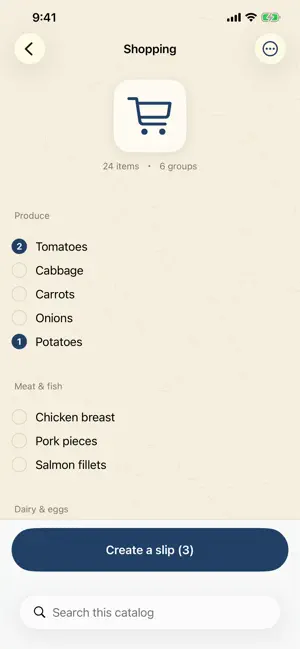
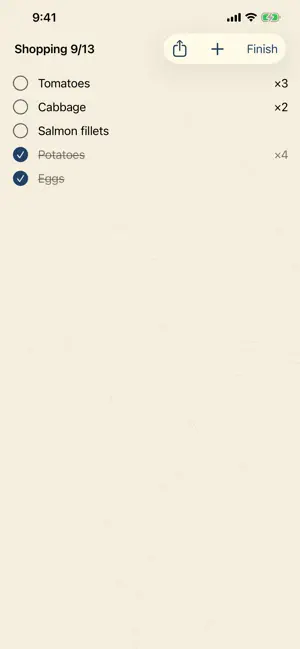
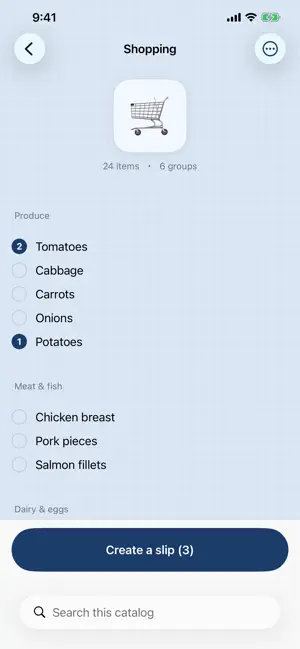
A list that starts from “I might not get everything.” Keep the things you buy and pack in one catalog. Before you head out, tap the ones you need. They’re numbered 1, 2, 3… in the order you tapped them — and that order is today’s priority. Mokuroku deliberately never sorts by store aisle. On a day when you’re short on time, when the shelf is empty, or when your hands are full, you want to start with what matters most. HOW IT WORKS 1. Build a catalog of things you buy or pack (paste a list from another app in one go) 2. Tap what you need, in the order you want it 3. Take the slip with you and check things off WHAT YOU MISSED JUST STAYS A slip you didn’t finish is still there, ready to pick up where you left off. You decide when it’s over. Mokuroku never ends it for you. Sold out isn’t the only reason something goes unbought. Sometimes you just changed your mind. BUILD IT NOW, USE IT LATER Build next week’s packing list today and add to it whenever something comes to mind. On the day you head out, just use it. Each slip shows whether it’s Not started, In use, or All done — so you can see at a glance. NOT ONLY FOR SHOPPING Packing for a trip. Checking your emergency supplies. Chores. Work. Anywhere you pick today’s share out of a fixed set, it works the same way. Pick a starter catalog the first time you open it. ASK SOMEONE ELSE TO GO Send a finished slip straight into a message. Whoever gets it can read it as a plain shopping list — no app required. If they do use Mokuroku, they can pull it straight in. APPLE WATCH Open the slip you’re working on and check items off from your wrist. Finish the trip without taking your iPhone out (requires Pro’s iCloud sync). WHAT YOU CAN DO • Home Screen widget — keep a slip in progress on your Home Screen and check items off right there • Tap order is priority order, carried straight into your slip • Group items so you can find them • Pin the ones you use often to the top • Paste a list from another app (bullets and numbering are stripped automatically) • Checked items sink, so what’s next is always at the top • Build a slip now and leave it until the day you need it • Pin the catalogs you use most to the top • History of finished slips, and one tap to build the same one again • Clear out history in bulk • Send a slip as text (the person receiving it doesn’t need the app) • Export as text — paste it back to restore • Dark mode and Dynamic Type FREE AND PRO Everything above works in the free version, including export and sending slips. The free version shows a banner at the bottom of the screen. Your catalogs and slips stay on your device. Pro is a one-time purchase that adds three things: • No ads • Styles — set the screen's background color (Washi, Indigo, Ink, Fresh green, Cherry) or use your own photo • iCloud sync — the same catalogs and slips on your iPhone and Apple Watch WHAT IT DOESN’T DO • Sort by store aisle (on purpose) • Ask you to sign up • Use what’s in your catalogs or slips for advertising In the free version your catalogs and slips stay on your device. With Pro’s iCloud sync it travels between your devices through your own iCloud account.
What’s new
Version 1.4 · Updated September 16, 2026
Check things off right from your Home Screen. • Home Screen widget Put a shopping list or packing list that's in progress on your Home Screen. Tap the box to check an item off on the spot. Long-press the widget and choose "Edit Widget" to pick which list it shows. Three sizes: small, medium, and large. ※ Like Apple's Reminders, items you finish disappear. • Long-press a catalog for a menu Press and hold a catalog on the Home screen to get Rename, Change mark, Pin, and Delete all in one place. Swiping left to rename or delete, and swiping right to pin, still work just as before. • Verified to work on the latest iOS 27, too.
App privacy
The developer, Yoichi Yamane, reported these privacy practices to Apple.
Data Linked to You
The following data, which may be collected and linked to your identity, may be used for the following purposes:
- Location: Coarse Location
- Identifiers: Device ID
- Usage Data: Product Interaction, Advertising Data
Used for: Third-Party Advertising, Analytics
Data Not Linked to You
The following data, which may be collected but is not linked to your identity, may be used for the following purposes:
- Diagnostics: Crash Data, Performance Data, Other Diagnostic Data
Used for: Analytics
Alternatives to Mokuroku: Shopping & Packing
Looking for apps like Mokuroku: Shopping & Packing? Here are 6 similar apps on the App Store.


| App | Rating | Price | Last updated | Compare |
|---|---|---|---|---|
| Mokuroku: Shopping & Packing | – | Free | September 16, 2026 | |
| 과이일 | – | Free | Aug 26, 2026 | Compare |
| MOUP - 모이면 업이 된다 | – | Free | Dec 17, 2025 | Compare |
| MemoJet | – | Free | Dec 24, 2025 | Compare |
| 5Goals | – | Free | Sep 28, 2026 | Compare |
| 짐싸J | – | Free | Jul 3, 2025 | Compare |
| 일단: 일정 관리, 투두리스트를 단순하게 | – | Free | Oct 10, 2026 | Compare |