

Pomodoro: Work & Study Timer
ozan batuhan kurucu Productivity iPhoneiPadiPod touchMac
Pomodoro: Work & Study Timer is a free Productivity app for iPhone and iPad by ozan batuhan kurucu. Requires iOS 17.0. Updated September 28, 2026.
- Price
- Free
- on the App Store
- Size
- 4 MB
- Age 4+
- Updated
- Sep 28
- 2026 · v1.5
Screenshots
About Pomodoro: Work & Study Timer
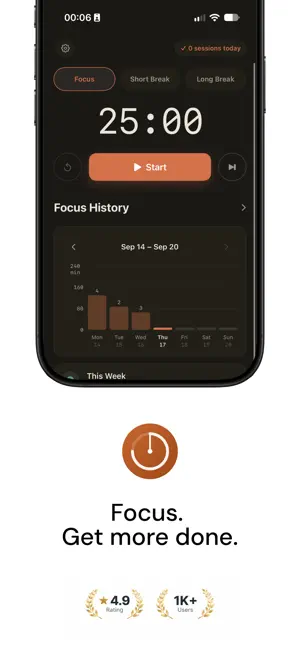
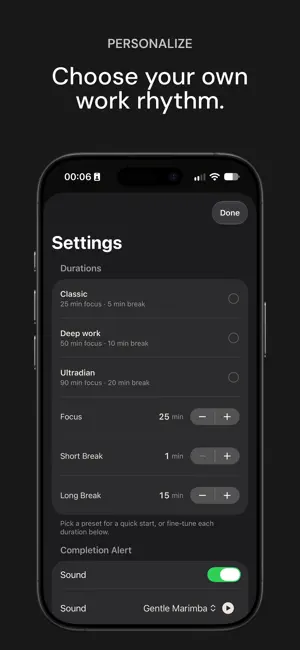
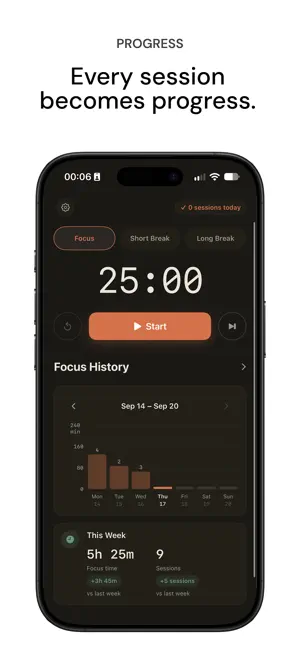
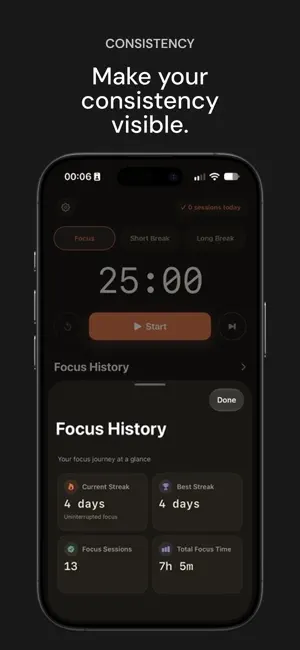
Pomodoro: Work & Study Timer is a native iPhone Pomodoro timer built for deep focus, study sessions, and calm break cycles — with a Lock Screen countdown, daily focus goals, and gentle celebrations. Start a focus session, take a short or long break, and keep going at your own pace. Customize your timer, set a daily goal, and see your progress with weekly charts, goal rings, and Full History. WHY PEOPLE USE IT • Students preparing for exams and homework • Anyone looking for a simple Pomodoro timer without an account • People who want to see their focus countdown on the Lock Screen • Writers, remote workers, and freelancers protecting deep work time FOCUS FEATURES • Focus, Short Break, and Long Break sessions • Classic, Deep, and Ultradian duration presets, or custom lengths • Pause, resume, reset, and skip — you stay in control • Optional Lock Screen Live Activity and local notifications • Sessions never auto-start; the next session waits for you TRACK YOUR PROGRESS • Set a daily focus goal from 1 to 16 sessions • See today’s completed sessions and progress toward your goal • Explore weekly charts and Daily Goal rings on Home • View your current streak and best streak • Open Full History for total focus time, sessions, and streaks MAKE IT YOURS • Guided first launch to set up your timer, daily goal, sounds, and celebrations • Six gentle completion sounds and six optional animal celebrations • English and Turkish — follow your system language or choose manually • Timer settings and active sessions saved between launches • Check for App Store updates from Settings HOW IT WORKS 1. Open Pomodoro: Work & Study Timer on your iPhone 2. Choose Focus, Short Break, or Long Break 3. Set your duration and press Start 4. When time is up, enjoy your sound and celebration, then start the next session when you’re ready PRIVATE BY DESIGN No account required. Privacy-preserving analytics help us understand how the app is used and improve the experience. We do not collect names, email addresses, or personal content through analytics. Your timer settings and focus history stay on your iPhone. Settings may contact Apple to check for updates. REQUIREMENTS iPhone with iOS 17.0 or later
What’s new
Version 1.5 · Updated September 28, 2026
You can now customize the app's appearance! • Choose between System, Light, and Dark modes in Settings. • Switch themes instantly without restarting the app. • Your appearance preference is saved for your next visit. Enjoy a more comfortable focus experience, day or night.
App privacy
The developer, ozan batuhan kurucu, reported these privacy practices to Apple.
Data Not Linked to You
The following data, which may be collected but is not linked to your identity, may be used for the following purposes:
- Identifiers: Device ID
- Usage Data: Product Interaction
Used for: Analytics
Alternatives to Pomodoro: Work & Study Timer
Looking for apps like Pomodoro: Work & Study Timer? Here are 6 similar apps on the App Store.
-
 Pomopolis: Pomodoro Timer
-
 Habpix: Habit Tracker & Goals
-
 PeraPlan
-
 Kalera AI
-
 MeKa – Homework & Exam Tracker
-
 Okuma Takibi
| App | Rating | Price | Last updated | Compare |
|---|---|---|---|---|
| Pomodoro: Work & Study Timer | – | Free | September 28, 2026 | |
| Pomopolis: Pomodoro Timer | – | Free | Sep 7, 2026 | Compare |
| Habpix: Habit Tracker & Goals | – | Free | Sep 24, 2026 | Compare |
| PeraPlan | – | Free | Sep 15, 2026 | Compare |
| Kalera AI | – | Free | Jun 27, 2026 | Compare |
| MeKa – Homework & Exam Tracker | – | Free | Nov 25, 2025 | Compare |
| Okuma Takibi | – | Free | Jun 4, 2026 | Compare |