

SingFun: Reverse Audio Singing
PLURIFORM S.R.L. Music iPhoneiPadiPod touch
SingFun: Reverse Audio Singing is a free Music app for iPhone and iPad by PLURIFORM S.R.L. Requires iOS 17.0. Updated September 11, 2026.
- Price
- Free
- on the App Store
- Size
- 8 MB
- Age 4+
- Updated
- Sep 11
- 2026 · v1.1
Screenshots


About SingFun: Reverse Audio Singing
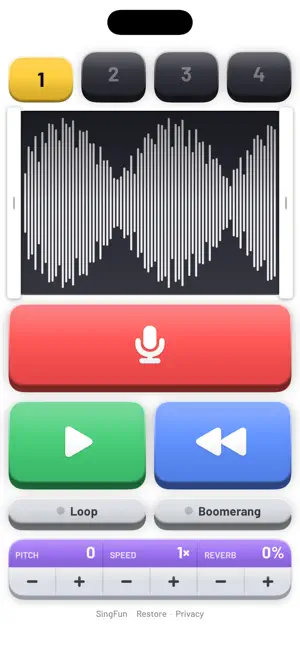
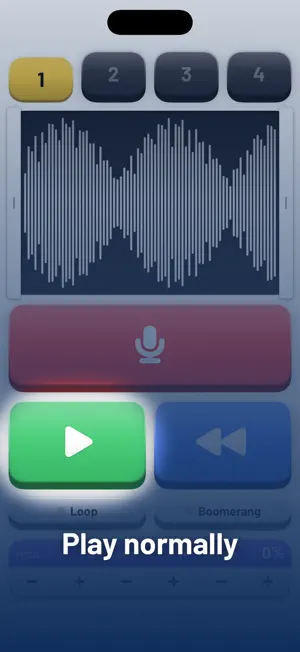
SingFun is the app for the viral online reverse-talking challenge. Record your voice, hear it backwards, then try to imitate that backwards sound. Record your attempt, reverse it — and find out whether it turned back into the original phrase. Spoken or sung, alone or with friends: it is much harder than it sounds, and the results are hilarious. HOW IT WORKS 1. Tap the big red key and say or sing a short phrase. 2. Tap REVERSE and listen to it backwards. Listen a few times. 3. Pick a new slot, record yourself imitating that backwards sound. 4. Tap REVERSE on your attempt. Does it sound like the original? 5. Switch between the slots to compare, and keep trying until you nail it. MADE FOR THE CHALLENGE • 4 recording slots on iPhone, 6 on iPad — the original, your attempts, and your friends' attempts, one tap apart • True reverse playback: the sound really runs backwards • Trim with two handles, or tap the waveform to move the nearest handle, so you compare exactly the part that matters • Big colorful 3D keys, instant response, zero menus — kids get it in seconds • Download any take as a WAV file, forward or reversed — post your best attempt or send it to someone to decode BONUS EFFECTS When you want to mess around some more: shift the pitch from chipmunk to monster, slow it down or speed it up to 4×, add reverb, loop a snippet or boomerang it back and forth — all live while it plays. PRIVATE BY DESIGN Your recordings never leave your device. No account, no cloud, no upload — a sound only leaves your phone when you export it yourself. FREE, WITH ADS SingFun is free and supported by ads. Watch a short video for an hour without ads, or remove all ads forever with a single one-time purchase. Works on iPhone and iPad.
What’s new
Version 1.1 · Updated September 11, 2026
• A short guided tour on first launch • Loop and Boomerang now switch instantly while a sound plays • Fresh look for the slot menu, more compact effects panel • Now in 7 more languages
App privacy
The developer, PLURIFORM S.R.L., reported these privacy practices to Apple.
Data Used to Track You
The following data may be used to track you across apps and websites owned by other companies:
- Location: Coarse Location
- Identifiers: Device ID
- Usage Data: Product Interaction, Advertising Data
Data Linked to You
The following data, which may be collected and linked to your identity, may be used for the following purposes:
- Location: Coarse Location
- Identifiers: Device ID
- Usage Data: Product Interaction, Advertising Data
- Other Data: Other Data Types
Used for: Third-Party Advertising, Analytics, App Functionality
Data Not Linked to You
The following data, which may be collected but is not linked to your identity, may be used for the following purposes:
- Diagnostics: Crash Data, Performance Data, Other Diagnostic Data
Used for: Analytics, App Functionality
Alternatives to SingFun: Reverse Audio Singing
Looking for apps like SingFun: Reverse Audio Singing? Here are 6 similar apps on the App Store. The highest rated is Reverse Singing: Challenge App (4.9/5), and all 6 are free to download.
-
 Reverse Audio: Sing Fun
4.0
Reverse Audio: Sing Fun
4.0
-
 Reverse Singing: Audio Play
-
 Reverse Singing: Challenge App
4.9
Reverse Singing: Challenge App
4.9
-
 Reverse Sing: Audio Challenge
4.0
Reverse Sing: Audio Challenge
4.0
-
 Reverse Audio Pro
4.0
Reverse Audio Pro
4.0
-
 Reverse Audio & Reverse Voice
| App | Rating | Price | Last updated | Compare |
|---|---|---|---|---|
| SingFun: Reverse Audio Singing | – | Free | September 11, 2026 | |
| Reverse Audio: Sing Fun | 4.0 / 5 (4) | Free | Oct 2, 2026 | Compare |
| Reverse Singing: Audio Play | – | Free | Oct 20, 2026 | Compare |
| Reverse Singing: Challenge App | 4.9 / 5 (36) | Free | Sep 26, 2026 | Compare |
| Reverse Sing: Audio Challenge | 4.1 / 5 (20) | Free | Sep 5, 2026 | Compare |
| Reverse Audio Pro | 4.0 / 5 (4) | Free | Sep 21, 2026 | Compare |
| Reverse Audio & Reverse Voice | – | Free | Oct 17, 2026 | Compare |