

NoteOCR - Handwriting to Text
CHUKWUDALU DANIEL ATU Productivity iPhoneiPadiPod touch
NoteOCR - Handwriting to Text is a free Productivity app for iPhone and iPad by CHUKWUDALU DANIEL ATU. Requires iOS 15.1. Updated September 8, 2026.
- Price
- Free
- on the App Store
- Size
- 47 MB
- Age 4+
- Updated
- Sep 8
- 2026 · v1.0
Screenshots

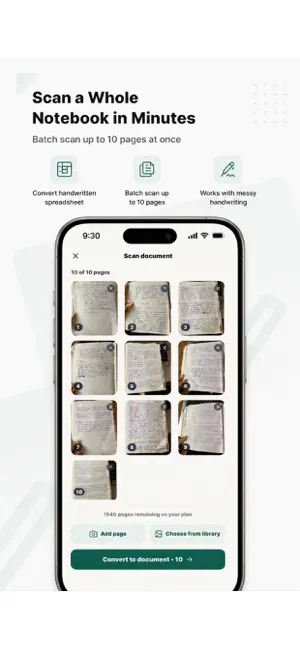
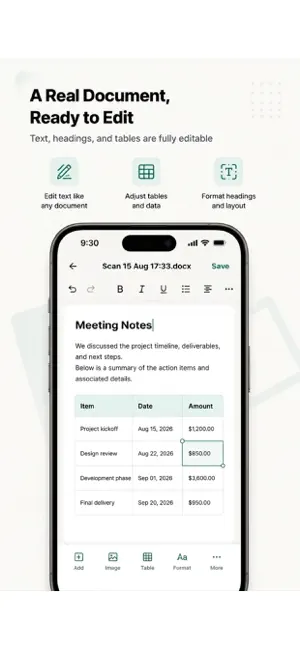

About NoteOCR - Handwriting to Text
NoteOCR – Handwriting to Text Converter Turn handwritten notes into clean, formatted digital documents in seconds. NoteOCR uses AI-powered ICR (Intelligent Character Recognition) to scan your handwriting and convert it into editable Word and Excel files, not just raw text, but a properly formatted document that looks like the page you wrote. WHY NOTEOCR Most OCR scanner apps just dump your handwriting into a messy text box. NoteOCR is different: our Engine reads your handwriting, including cursive, and reconstructs the layout, headings, bullet points, tables, and paragraphs so you get a document ready to edit, not a wall of text to clean up. KEY FEATURES * Handwriting to text conversion — snap a photo of any handwritten page and transcribe it instantly, even messy handwriting or cursive * Photo scan & image to text — turn any picture, screenshot, or scanned image into editable digital text * Export to Word & Excel — download your notes as a formatted .docx or .xlsx file, ready to share or edit * Smart document digitize — journal entries, class notes, meeting memos, receipts, letters, and old documents all convert cleanly * Cloud storage — securely save and access your digitized notes and documents from any device * Table & data recognition — convert handwritten tables, lists, and structured data into properly formatted spreadsheets * Fast transcribe engine — get results in seconds, not minutes WHO USES NOTEOCR Students digitizing lecture notes and study guides. Professionals converting handwritten meeting memos into shareable Word documents. Anyone with a stack of paper notes, old journal entries, or handwritten receipts they want searchable and backed up. Writers transcribing handwritten drafts. Researchers and genealogists digitizing old letters and documents. HOW IT WORKS 1. Take a photo or upload an image of your handwritten page 2. NoteOCR’s AI scans and transcribes the handwriting 3. Review your formatted document 4. Export as Word, Excel, or PDF, or save it to your NoteOCR cloud account From a single handwritten note to a full notebook, NoteOCR turns your handwriting into a document you can actually use — search it, edit it, and share it in the format you need. Download NoteOCR today and stop retyping your handwritten notes by hand.
App privacy
The developer, CHUKWUDALU DANIEL ATU, reported these privacy practices to Apple.
Data Linked to You
The following data, which may be collected and linked to your identity, may be used for the following purposes:
- Contact Info: Email Address, Name
- User Content: Photos or Videos
Used for: App Functionality
Alternatives to NoteOCR - Handwriting to Text
Looking for apps like NoteOCR - Handwriting to Text? Here are 6 similar apps on the App Store. The highest rated is Shadowbox Studios (4.9/5), and all 6 are free to download.
-
 TableScan Studio
-
 Handwriting to Text - Glyph
-
 Textify: Handwriting to Text
-
 Unscribble Handwriting to Text
-
 HandNote: Handwriting OCR
-
 Shadowbox Studios
4.9
Shadowbox Studios
4.9
| App | Rating | Price | Last updated | Compare |
|---|---|---|---|---|
| NoteOCR - Handwriting to Text | – | Free | September 8, 2026 | |
| TableScan Studio | – | Free | Feb 25, 2026 | Compare |
| Handwriting to Text - Glyph | – | Free | Jun 18, 2026 | Compare |
| Textify: Handwriting to Text | – | Free | May 5, 2026 | Compare |
| Unscribble Handwriting to Text | – | Free | Aug 6, 2026 | Compare |
| HandNote: Handwriting OCR | – | Free | Sep 25, 2026 | Compare |
| Shadowbox Studios | 4.9 / 5 (11) | Free | Aug 7, 2025 | Compare |