

Signer.
Bilal Naeem Education iPhoneiPadiPod touch
Signer. is a free Education app for iPhone and iPad by Bilal Naeem. Requires iOS 18.6. Updated September 4, 2026.
- Price
- Free
- on the App Store
- Size
- 80 MB
- Age 4+
- Updated
- Sep 4
- 2026 · v1.3.0
Screenshots
About Signer.
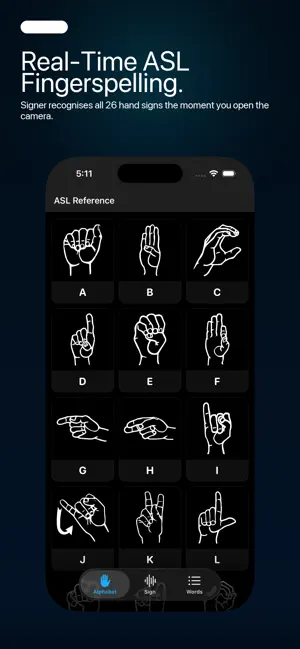
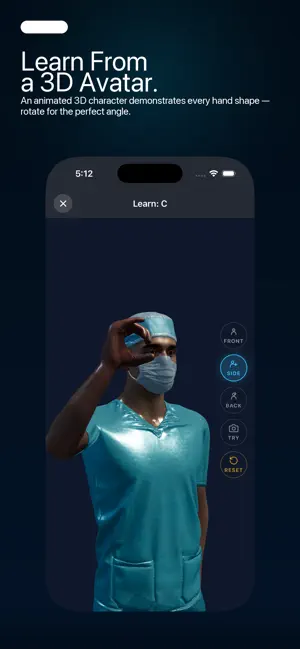
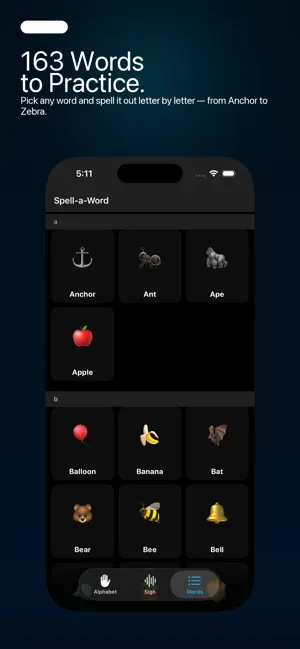
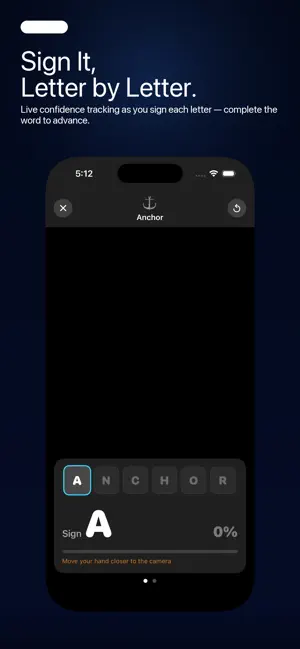
Signer brings American Sign Language fingerspelling to life using your iPhone or iPad camera. Whether you're a beginner or brushing up your skills, Signer gives you instant, real-time feedback — no Wi-Fi required. REAL-TIME SIGN DETECTION Point your front or back camera at your hand and Signer recognises all 26 ASL letters on the spot. Detection works with both left and right hands automatically. LEARN WITH A 3D AVATAR Watch a fully animated 3D character demonstrate the correct hand shape for every letter. Fluid bone animations show each pose clearly, with dynamic motions for letters like J and Z. WORD PRACTICE MODE Choose from 163 common words and spell them out letter by letter. A live progress bar tracks your confidence as you sign, and the app speaks each letter and word aloud when you get it right. ALPHABET REFERENCE Browse an illustrated A–Z grid of ASL hand shapes. Tap any letter to enter single-letter practice mode with live camera feedback alongside the reference image. SMART FEEDBACK • Auto-speech reads out detected letters and completed words • Confidence meter shows detection strength in real time • Hand skeleton overlay visualizes keypoint tracking • Background segmentation isolates your hand for cleaner detection CUSTOMIZABLE EXPERIENCE • Adjust detection sensitivity (confidence threshold) • Control how long you need to hold a sign before it registers • Toggle hand skeleton, background mask, and auto-speech on or off • Choose your mask background color (black, green, or light blue) • iPad: side-by-side multi-angle avatar view for a fuller look at each sign PRIVACY FIRST All processing happens entirely on-device using Apple Vision and Core ML. Your camera feed is never stored or transmitted.
What’s new
Version 1.3.0 · Updated September 4, 2026
- Improved 3D Avatar: All A–Z hand poses have been refined for greater accuracy and clarity, making it easier to learn the correct handshape for each letter. - Upgraded Detection Model: Now using an improved ASL model (v1.5) for more accurate and reliable sign recognition. - Better Practice Feedback : The confidence bar in letter practice now responds to any detected sign, not just the target letter, so you always know the camera is working.
App privacy
The developer, Bilal Naeem, reported these privacy practices to Apple.
Data Not Collected
The developer does not collect any data from this app.
Alternatives to Signer.
Looking for apps like Signer.? Here are 6 similar apps on the App Store. The highest rated is HandsIn Learning (5.0/5), and all 6 are free to download.
-
 ASL Alphabet - USA
-
 GestuAR
-
 HandsIn Learning
5.0
HandsIn Learning
5.0
-
 Fingersign!
5.0
Fingersign!
5.0
-
 SignWise: Learn Sign Language
2.0
SignWise: Learn Sign Language
2.0
-
 GradeSync: Schoology Grades
4.2
GradeSync: Schoology Grades
4.2
| App | Rating | Price | Last updated | Compare |
|---|---|---|---|---|
| Signer. | – | Free | September 4, 2026 | |
| ASL Alphabet - USA | – | Free | Jul 8, 2025 | Compare |
| GestuAR | – | Free | Mar 20, 2026 | Compare |
| HandsIn Learning | 5.0 / 5 (5) | Free | Oct 9, 2026 | Compare |
| Fingersign! | 5.0 / 5 (1) | Free | Oct 8, 2024 | Compare |
| SignWise: Learn Sign Language | 2.0 / 5 (1) | Free | Oct 26, 2026 | Compare |
| GradeSync: Schoology Grades | 4.2 / 5 (17) | Free | Oct 1, 2026 | Compare |
Compare Signer. with the top alternatives: ratings, updates, ASO score and keyword gaps →