

NoiseGone: Audio Cleaner
辉 郭 Utilities iPhoneiPadiPod touch
NoiseGone: Audio Cleaner is a free Utilities app for iPhone and iPad by 辉 郭. Rated 1.0/5 from 1 ratings. Requires iOS 17.0. Updated October 4, 2026.
- Rating
- 1.0
- 1 ratings
- Price
- Free
- on the App Store
- Size
- 126 MB
- Age 4+
- Updated
- Oct 4
- 2026 · v1.0.2
Screenshots

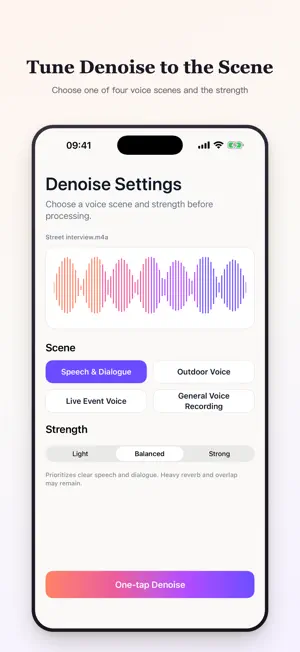
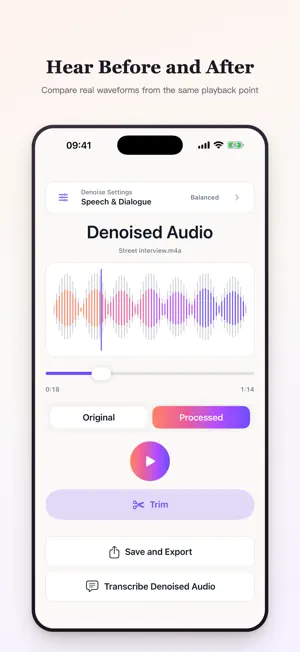

About NoiseGone: Audio Cleaner
Remove background noise, separate vocals from instrumental tracks, and turn speech into editable text on your iPhone or iPad. DENOISE Reduce background noise in speech recordings with Light, Balanced, and Strong controls. Compare Original and Processed from the same playback position. Trim one continuous section of a denoised result into a new clip, or send the result straight to Transcribe. SEPARATE Split a song into two stems: Vocals and Instrumental. Listen to each part and adjust their levels before export. Results vary with the recording; some sound may remain in both parts. TRANSCRIBE Import audio, use the sound from a video, or record in the app. Transcription runs after import or after recording stops. Edit the text, tap timestamps to listen, and export TXT or SRT. Text edits do not change the audio. VIDEO INPUT Video is used as an audio source. NoiseGone extracts its sound for processing and exports audio or text. It does not export edited videos or add subtitles to video images. ON YOUR DEVICE Media processing, waveforms, transcripts, projects, and exports stay on your device. No account or media upload is required. NoiseGone preserves your original media. StoreKit may contact Apple for purchases and restores. TRY BEFORE EXPORTING Denoise and Separate processing and in-app previews are free. Saving, sharing, and exporting their results require Premium. Free transcription covers the first 30 seconds; full transcription and text export require Premium. Your full original recording is preserved. SUBSCRIPTION NoiseGone Premium is an auto-renewable subscription that unlocks full exports and full transcription. Your subscription automatically renews unless cancelled before the end of the current period. You can manage or cancel your subscription at any time in your Apple Account subscription settings. Payment will be charged to your Apple Account at the price shown for your storefront. Eligible new subscribers may receive a 3-day free trial on the annual plan. Privacy Policy: https://sonicraft-app.pages.dev/privacy/ Terms of Use: https://sonicraft-app.pages.dev/terms/
What’s new
Version 1.0.2 · Updated October 4, 2026
Sonicraft is now NoiseGone: Audio Cleaner. Continue reducing background noise, separating vocals, and transcribing recordings on your device. Improved Settings layouts at accessibility text sizes.
App privacy
The developer, 辉 郭, reported these privacy practices to Apple.
Data Linked to You
The following data, which may be collected and linked to your identity, may be used for the following purposes:
- Purchases: Purchase History
- Identifiers: User ID, Device ID
- Usage Data: Product Interaction
- Other Data: Other Data Types
Used for: Analytics
Alternatives to NoiseGone: Audio Cleaner
Looking for apps like NoiseGone: Audio Cleaner? Here are 6 similar apps on the App Store. The highest rated is KeepWaves (5.0/5), and 5 of the 6 are free to download.
-
 SoundSpice: Audio Enhancer
-
 Noise Reducer - OffgridVox
-
 DeadClaw - AI Anxiety Relief
4.0
DeadClaw - AI Anxiety Relief
4.0
-
 Tuno Audio Video Noise Reducer
-
 KeepWaves
5.0
KeepWaves
5.0
-
 Noise Reducer - Audio Cleaner
| App | Rating | Price | Last updated | Compare |
|---|---|---|---|---|
| NoiseGone: Audio Cleaner | 1.0 / 5 (1 rating) | Free | October 4, 2026 | |
| SoundSpice: Audio Enhancer | – | 9.99 USD | Jul 29, 2026 | Compare |
| Noise Reducer - OffgridVox | – | Free | Oct 7, 2026 | Compare |
| DeadClaw - AI Anxiety Relief | 4.0 / 5 (1) | Free | Apr 6, 2026 | Compare |
| Tuno Audio Video Noise Reducer | – | Free | Oct 14, 2026 | Compare |
| KeepWaves | 5.0 / 5 (1) | Free | Sep 11, 2026 | Compare |
| Noise Reducer - Audio Cleaner | – | Free | Aug 1, 2026 | Compare |