

Kaiju Mechanic
RB ZILLA LLC Utilities iPhoneiPadiPod touch
Kaiju Mechanic is a free Utilities app for iPhone and iPad by RB ZILLA LLC. Rated 5.0/5 from 1 ratings. Requires iOS 15.1. Updated October 20, 2026.
- Rating
- 5.0
- 1 ratings
- Price
- Free
- on the App Store
- Size
- 62 MB
- Age 4+
- Updated
- Oct 20
- 2026 · v1.33.1
Screenshots



About Kaiju Mechanic
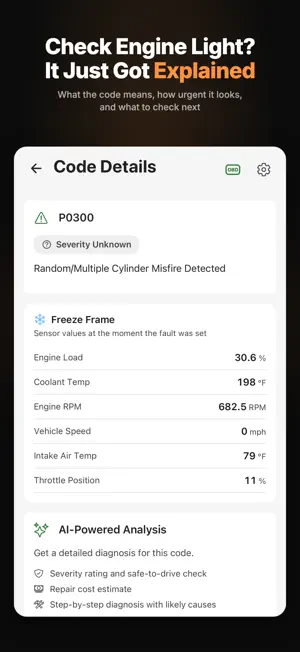
Your AI car mechanic: diagnose issues, track maintenance, and know your car. Get plain-language answers about your specific vehicle, read your car's diagnostic codes, watch live engine data, track every service, and turn receipts into organized records with a scan. And when that check engine light does come on? Get a plain-language first read for your vehicle - what the code means, how urgent it looks, and what to check next. Confirm with a mechanic before you clear it. WHAT KAIJU MECHANIC DOES Connect a Bluetooth Low Energy (BLE) ELM327 OBD-II adapter and Kaiju Mechanic reads your car's diagnostic codes directly. No adapter? No problem - you can still use AI chat, log maintenance, scan documents, and manage your garage without any hardware. - AI mechanic chat. Ask anything about your car and get a real, vehicle-specific answer. Not generic advice. Kaiju Mechanic knows your make, model, year, and service history. Rough idle, strange noise, hard starts? Describe the symptom and the AI helps you narrow down likely causes. - Maintenance tracking. Log every oil change, brake job, and fluid flush, and see what is due next. Personalized AI schedules are a Premium feature and use AI credits. - Document scanning. Photograph your repair invoices and service receipts. AI reads them and automatically extracts the service date, mileage, and what was done. - Vehicle garage. Each vehicle keeps its own complete history; add more than one with Premium. - Modification log. Track upgrades, aftermarket parts, and tuning changes alongside your factory service history. - Check engine light decoder. Connect an adapter and read the actual trouble codes. Already have a code like P0420 or P0301? Type it in - no adapter needed. The AI explains what each code means for your specific vehicle, how urgent it is, and what the typical repair involves. - Live sensor data. Real-time engine readings over OBD-II: RPM, coolant temperature, throttle position, oxygen sensors, battery voltage and more. - Tune and flash history. Your ECU's firmware signature is recorded on the first scan and any later change is flagged (adapter required). Premium adds the full calibration detail and mileage forensics. FREE - NO CATCH Every account starts free. No credit card. No trial period. - One vehicle in your garage - A monthly allotment of AI credits for chat, diagnostics, document scanning, and more - Full maintenance history logging with unlimited service records - OBD-II connectivity over Bluetooth LE for diagnostic code reading - Cloud storage, synced across devices - Registered users can buy extra AI credit packs anytime PREMIUM Optional subscription for DIY owners, enthusiasts, collectors, and multi-car households who want the full AI experience. Price and billing period are shown in the app before you buy. - A larger monthly allotment of AI credits - Unlimited vehicles - More cloud storage with backup and sync - Member pricing on extra AI credit packs - Premium forensic detail: calibration data and mileage forensics CONNECT YOUR OBD-II ADAPTER On iPhone, Kaiju Mechanic works with Bluetooth Low Energy (BLE) ELM327 adapters, widely available online and at auto parts stores. Plug into the OBD-II port under your dashboard, standard on virtually all vehicles built after 1996, and connect from inside the app. Bluetooth Classic (SPP) and Wi-Fi adapters are not supported on iPhone, and the connect screen explains why. Requires iOS 15.1 or later. Bluetooth is only requested when you go to connect an adapter. Premium is an auto-renewing subscription, charged to your Apple Account at purchase and renewing unless cancelled at least 24 hours before the period ends. Manage or cancel in your Apple Account settings. Terms of Use: https://www.kaijumechanic.com/terms-of-service Privacy Policy: https://www.kaijumechanic.com/privacy Download free. Start with your car's story, not just its warning light.
What’s new
Version 1.33.1 · Updated October 20, 2026
What's new in this version: - Create a modification from a receipt and pick the part - That modification links to the receipt and its service visit - Review Changes stays until you apply the schedule updates - Scans explain the five-page limit, and you can leave while one runs - Credit Usage shows the pack price from the store Thanks for using Kaiju Mechanic. Send feedback to [email protected].
App privacy
The developer, RB ZILLA LLC, reported these privacy practices to Apple.
Data Linked to You
The following data, which may be collected and linked to your identity, may be used for the following purposes:
- Purchases: Purchase History
- Contact Info: Email Address, Name
- Identifiers: User ID, Device ID
- Usage Data: Product Interaction, Advertising Data
- User Content: Photos or Videos, Other User Content, Customer Support
- Diagnostics: Crash Data, Performance Data, Other Diagnostic Data
Used for: Developer’s Advertising or Marketing, Analytics, App Functionality
Data Not Linked to You
The following data, which may be collected but is not linked to your identity, may be used for the following purposes:
- Location: Coarse Location
Used for: App Functionality
Alternatives to Kaiju Mechanic
Looking for apps like Kaiju Mechanic? Here are 6 similar apps on the App Store. The highest rated is HighwayRadar (4.6/5), and all 6 are free to download.
-
 Wayleadr Home
2.5
Wayleadr Home
2.5
-
 Our Burbank
3.0
Our Burbank
3.0
-
 Siemens Event
3.0
Siemens Event
3.0
-
 HighwayRadar
4.6
HighwayRadar
4.6
-
 Raivo - 2FA Authenticator app
4.3
Raivo - 2FA Authenticator app
4.3
-
 Slay the Spire: TBG Companion
4.0
Slay the Spire: TBG Companion
4.0
| App | Rating | Price | Last updated | Compare |
|---|---|---|---|---|
| Kaiju Mechanic | 5.0 / 5 (1 rating) | Free | October 20, 2026 | |
| Wayleadr Home | 2.5 / 5 (6) | Free | Jul 20, 2026 | Compare |
| Our Burbank | 3.0 / 5 (11) | Free | Oct 13, 2026 | Compare |
| Siemens Event | 3.0 / 5 (2) | Free | Oct 17, 2026 | Compare |
| HighwayRadar | 4.6 / 5 (147) | Free | Oct 20, 2026 | Compare |
| Raivo - 2FA Authenticator app | 4.3 / 5 (196) | Free | Jun 16, 2026 | Compare |
| Slay the Spire: TBG Companion | 4.0 / 5 (23) | Free | Jan 29, 2026 | Compare |
Compare Kaiju Mechanic with the top alternatives: ratings, updates, ASO score and keyword gaps →