

PulseList
DAVID SEDACCA Productivity iPhoneiPadiPod touch
PulseList is a free Productivity app for iPhone and iPad by DAVID SEDACCA. Rated 5.0/5 from 1 ratings. Requires iOS 17.0. Updated September 12, 2026.
- Rating
- 5.0
- 1 ratings
- Price
- Free
- on the App Store
- Size
- 7 MB
- Age 4+
- Updated
- Sep 12
- 2026 · v1.7
Screenshots

About PulseList
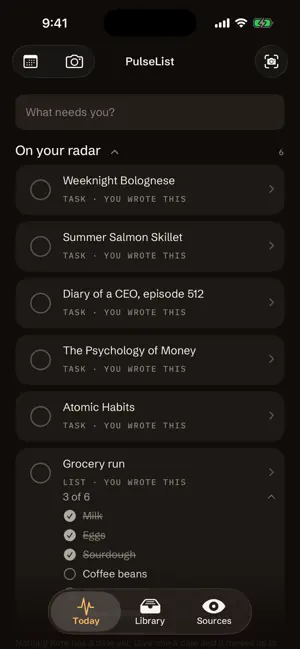
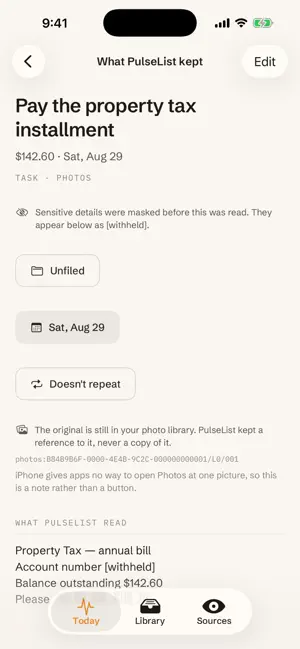
PulseList turns the bills, letters and screenshots on your iPhone into one short list of what actually needs you. Photograph a letter and it works out what it is asking of you and when. Connect your reminders and your calendar and they sit on the same list. Everything else it reads, it leaves alone. WHAT IT DOES Photograph a bill, a school letter, an appointment card. Hand over a screenshot. Type it, say it, or share it in from another app. PulseList works out what it is and when it matters, and writes that one line on your list. Clear a row when it's done. That's the whole interaction. A bill becomes the biller and the date. An envelope becomes whoever sent it. A recipe or a reading list keeps its own heading. An audiobook says Listen; a shared video says Watch. A meme becomes nothing at all, and that is the feature. YOUR REMINDERS AND YOUR CALENDAR, ON THE SAME LIST Tick the Reminders lists and calendars you want and they appear alongside everything else, so there is one list to read instead of three. PulseList marks the few events that are asking something before they happen: an invitation you haven't replied to, a maybe that is nearly here, two things booked at once. IT READS ON YOUR IPHONE PulseList uses AI to read your picture, and the AI is Apple's. The text recognition built into iOS is a neural model that ships with your iPhone and runs on it. PulseList 1.7 downloads no model, holds no account with an AI provider, and sends your content to no model anywhere. PulseList 1.7 contains no code that can reach the internet. No network client, no analytics, no crash reporter, no model download, no account with us. Nothing you photograph, type, say or connect is ever sent anywhere. Buying or restoring PulseList Plus is the one thing that needs a connection, and the App Store handles it rather than PulseList. The payment, the receipt and the account are Apple's, and PulseList is told one thing at the end of it: whether this Apple Account has PulseList Plus. Turn on Airplane Mode and everything PulseList does with your things still works; only that one purchase has to wait. SENSITIVE THINGS STAY PUT Card numbers, account numbers and the like are covered on the device before anything is analyzed. Detection is thorough but not infallible, so PulseList masks more than it needs to. The original photograph stays in Photos, referred to and never copied out. IT NEVER WRITES BACK PulseList reads the Reminders lists and calendars you tick. It never creates, edits, completes or deletes anything in them. Clear a mirrored row here and it clears from your PulseList list; what is in Apple's own apps is left exactly as it was. You pick which ones, one at a time, and can untick them whenever you like. YOUR DATA, YOUR CALL Export everything PulseList holds as a file, or erase all of it, from inside the app. Because it never leaves your iPhone, that export and that deletion are complete. There is no copy of ours to find. PULSELIST PLUS PulseList is free to use. Photographing something, typing it, saying it, sharing it in, reading your list and clearing a row are free and stay free. PulseList Plus is what lets it watch on your behalf: reading your photo library for new screenshots and letters, mirroring Reminders, reading your calendar, tasks that come back, the Home Screen widget and the month view. $1.99 a month with the first three days free, or $29.99 once. WHAT IT IS NOT No account. No sign-in. No server of ours. No streak, no score, nothing that notices you were away. Nothing to configure. Payment is handled by the App Store. Subscriptions renew until cancelled; cancel any time in your Apple Account settings. TERMS OF USE https://pulselist.io/terms
What’s new
Version 1.7 · Updated September 12, 2026
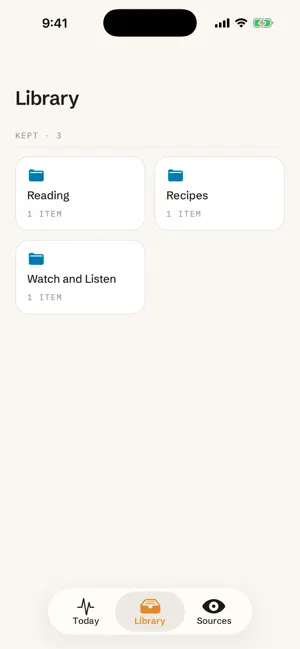
Screenshots come back with better names. A book or audiobook page is now filed under its title rather than its author, and a price or a date from an advert on the page is no longer mistaken for something you owe or a deadline of yours. Dates written out in words are read properly, so "Due 31 July 2026" lands on your list with its date. Filing is easier too: the folder list offers Reading, Watch and Listen, Recipes and Bills straight away. The Sources screen now says in one line what PulseList reads.
App privacy
The developer, DAVID SEDACCA, reported these privacy practices to Apple.
Data Not Collected
The developer does not collect any data from this app.
Alternatives to PulseList
Looking for apps like PulseList? Here are 6 similar apps on the App Store. The highest rated is Snipd | AI Podcast Player (4.7/5), and all 6 are free to download.
-
 My Day: Daily Planner & To-Do
-
 Aqua Voice: AI Dictation
4.4
Aqua Voice: AI Dictation
4.4
-
 SwiftConnect Mobile
3.2
SwiftConnect Mobile
3.2
-
 Snipd | AI Podcast Player
4.7
Snipd | AI Podcast Player
4.7
-
 AUTHADA
-
 SubWallet - Polkadot Wallet
3.9
SubWallet - Polkadot Wallet
3.9
| App | Rating | Price | Last updated | Compare |
|---|---|---|---|---|
| PulseList | 5.0 / 5 (1 rating) | Free | September 12, 2026 | |
| My Day: Daily Planner & To-Do | – | Free | Sep 12, 2026 | Compare |
| Aqua Voice: AI Dictation | 4.4 / 5 (95) | Free | Oct 1, 2026 | Compare |
| SwiftConnect Mobile | 3.2 / 5 (11) | Free | Sep 21, 2026 | Compare |
| Snipd | AI Podcast Player | 4.7 / 5 (1,151) | Free | Sep 29, 2026 | Compare |
| AUTHADA | – | Free | Aug 24, 2026 | Compare |
| SubWallet - Polkadot Wallet | 3.9 / 5 (825) | Free | Jul 28, 2026 | Compare |
Compare PulseList with the top alternatives: ratings, updates, ASO score and keyword gaps →