

Rotshield: Screen Time Control
Ruslan Dzhafarov Productivity iPhoneiPadiPod touch
Rotshield: Screen Time Control is a free Productivity app for iPhone and iPad by Ruslan Dzhafarov. Requires iOS 18.0. Updated September 15, 2026.
- Price
- Free
- on the App Store
- Size
- 42 MB
- Age 4+
- Updated
- Sep 15
- 2026 · v1.0
Screenshots



About Rotshield: Screen Time Control
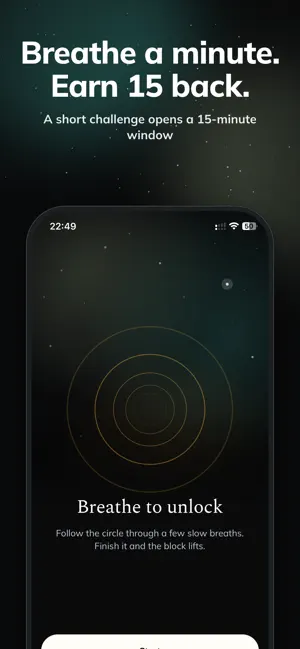
Your screen time isn't a time problem. It's a mood problem. You don't miss the hour. You miss the version of you that existed before it — the one who wasn't foggy, flat, and vaguely annoyed at nothing in particular. That isn't a willpower failure. Those apps are built by people who are very good at their job, and you are not going to out-argue them at 11pm. So don't. Decide now, while you're calm, and let the decision hold later. HOW IT WORKS You pick the apps. Rotshield closes them with the system shield iOS uses for Screen Time — not a reminder you can swipe away. While a rule is on, the app does not open. • Schedule — closed on the days and hours you set • All day — closed until you turn the rule off • Daily limit — closed after a set number of minutes, until midnight THE 15 MINUTES ARE NOT FREE Hit the shield and you get a choice, not a lecture. Breathe. Four seconds in, two held, four out, until the rings settle. Nothing to read, nothing to prove. Or answer one question: why are you opening this? Bored. Anxious. Avoiding. Habit. Need info. Add a note, mark how you feel, done. Nothing is graded and no answer is wrong — naming it is the whole exercise. Then Rotshield asks once more, and this is the part that matters. Turning back is the big button. Taking the fifteen minutes is the small one. No guilt trip either way. Change your mind and ten minutes come off today's count, up to three times a day. Other apps punish you for wanting in. This one pays you for walking away. You can quit either challenge at any second and it costs you nothing. The friction is the pause, not the punishment. FOCUS TIMER One session, one set of apps, closed until the clock runs out. Hard mode does not let you stop early. WHAT IT WON'T DO It won't make you productive. There are no coins, no streaks, no leaderboards, nobody to beat. It closes the apps and gets out of the way. NOTHING LEAVES YOUR PHONE No account. No server. No analytics. Rotshield cannot even tell which apps you picked — iOS hands it opaque tokens and draws the names and icons itself. Requires iOS 18 and Screen Time permission. Privacy policy: https://www.rotshield.app/privacy/
App privacy
The developer, Ruslan Dzhafarov, reported these privacy practices to Apple.
Data Not Collected
The developer does not collect any data from this app.
Alternatives to Rotshield: Screen Time Control
Looking for apps like Rotshield: Screen Time Control? Here are 6 similar apps on the App Store. The highest rated is Jellwalk: Screen Time Control (5.0/5), and all 6 are free to download.
-
 Jellwalk: Screen Time Control
5.0
Jellwalk: Screen Time Control
5.0
-
 Sapiens: Screen Time Control
-
 Neural Pomodoro Timer
-
 Habituize: Habit Tracker
5.0
Habituize: Habit Tracker
5.0
-
 LifeLevels
5.0
LifeLevels
5.0
-
 DonDone
5.0
DonDone
5.0
| App | Rating | Price | Last updated | Compare |
|---|---|---|---|---|
| Rotshield: Screen Time Control | – | Free | September 15, 2026 | |
| Jellwalk: Screen Time Control | 5.0 / 5 (1) | Free | Oct 20, 2026 | Compare |
| Sapiens: Screen Time Control | – | Free | Jul 20, 2026 | Compare |
| Neural Pomodoro Timer | – | Free | Oct 13, 2026 | Compare |
| Habituize: Habit Tracker | 5.0 / 5 (5) | Free | Jul 23, 2026 | Compare |
| LifeLevels | 5.0 / 5 (1) | Free | Oct 20, 2026 | Compare |
| DonDone | 5.0 / 5 (2) | Free | Dec 8, 2025 | Compare |